





Running promotions on WooCommerce shouldn’t mean giving away margin.
Most store owners running active promotions run into the same three problems.
- Discounts apply to products they never meant to discount.
- Customers forget or mistype coupon codes at checkout and abandon.
- Running BOGO or loyalty campaigns requires adding a separate plugin, one that often conflicts with something already installed.
The native WooCommerce coupon system wasn’t built to solve any of these.
You get basic percentage and fixed discounts, a manual code entry field, and no controls over what does and doesn’t qualify.
A sitewide promo applies to everything. There’s no auto-apply, no BOGO, no loyalty program, and no way to show shoppers what they’re close to unlocking.
This matters because nearly 70% of shopping carts are abandoned before purchase, and a large portion of that happens at the exact moment your coupon experience fails.
Power Coupons fixes all of this. As a WordPress coupon plugin built specifically for WooCommerce, the free version handles auto-apply and smart cart rules.
Pro adds the promotion types that active stores actually need: six BOGO formats, loyalty store credits, a cart progress bar, and offer scheduling, all inside the same interface you use to manage standard coupons.
Built by Brainstorm Force, the team behind CartFlows, the Astra Theme, and Spectra, it has the same support record trusted by over 12 million websites worldwide.
Read the full Power Coupons launch announcement for the backstory on why it was built.
Quick facts about Power Coupons
- Investment: $49/year (Single Site), $99/year (Multi-Site, 10 sites), or $249 one-time (Lifetime, 30 sites)
- Free version: Available on WordPress.org
- Setup time: Under 5 minutes
- ROI timeline: 30-60 days for stores with 20+ orders/month
- Company: CartFlows / Brainstorm Force
- WooCommerce Blocks: Compatible
I tested Power Coupons on multiple WooCommerce stores, including a small store running under 50 orders a month, a mid-size store doing around 300 orders a month, and stores using WooCommerce Blocks, to evaluate real-world performance rather than just listed features.
Here’s my full assessment.
Power Coupons Performance
Ease of implementation: 9.5/10
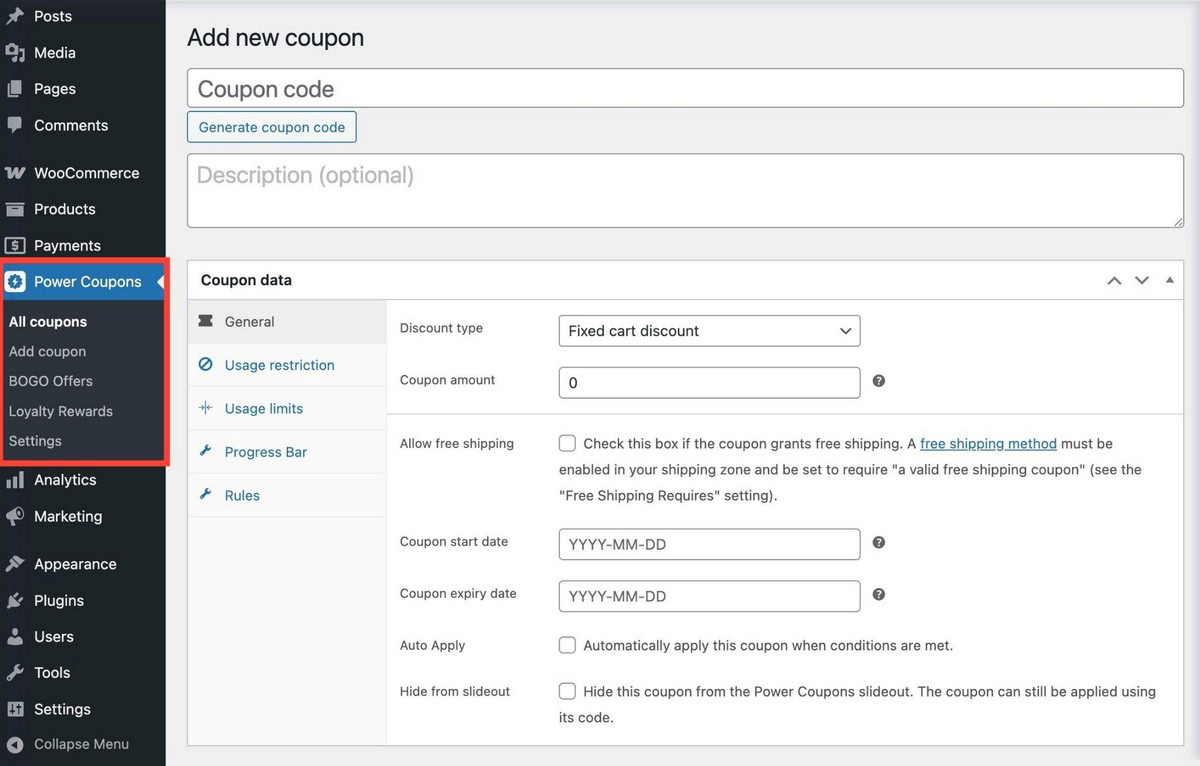
Install, activate, create your first rule in under two minutes. No configuration wizard, no complex setup and your existing WooCommerce settings remain untouched.
Any store owner could have a live auto-apply promotion within minutes of installation.
Revenue impact: 9/10
Auto-apply removes the most common conversion killer at checkout. BOGO offers and loyalty rewards directly increase average order value and repeat purchase rate.
For stores already doing real volume, this is where revenue compounds fastest.
A cart progress bar that lifts AOV by $10-15 on 20 monthly orders covers the annual cost in the first week.
Technical stability: 8.5/10
Power Coupons is a newer plugin with a clean, lightweight architecture. It’s built by a team with a long track record maintaining complex WooCommerce products.
No compatibility issues have turned up in testing. Priority support is available with Pro if you encounter anything.
Who Is Power Coupons Pro For?
Power Coupons Pro works best for:
- Stores running active promotions that need control over which products are eligible, not just a blanket discount for everything.
- WooCommerce stores making $1,000 or more per month where a modest AOV lift or improved repeat purchase rate has a meaningful revenue impact.
- Store owners who want BOGO campaigns without installing a dedicated BOGO plugin on top of everything else.
- Stores focused on customer retention, as loyalty rewards give repeat customers a reason to return and don’t depend on your next email campaign.
- Agencies managing multiple stores because the Lifetime plan covers 30 sites for a one-time $249 payment.
- Non-technical store owners as setup takes minutes, rules work automatically and there’s no code to write.
It’s probably not the right fit for stores that need enterprise-level coupon restriction logic across dozens of conditions, or for businesses that need advanced gift card management now rather than in a future update.
For most other types of store, it could make a real difference.
Power Coupons Features
Power Coupons was built as an integrated system from the ground up. The rule engine, BOGO system and loyalty module all work together rather than operating as separate additions.
1. Auto-Apply Discounts (Free)
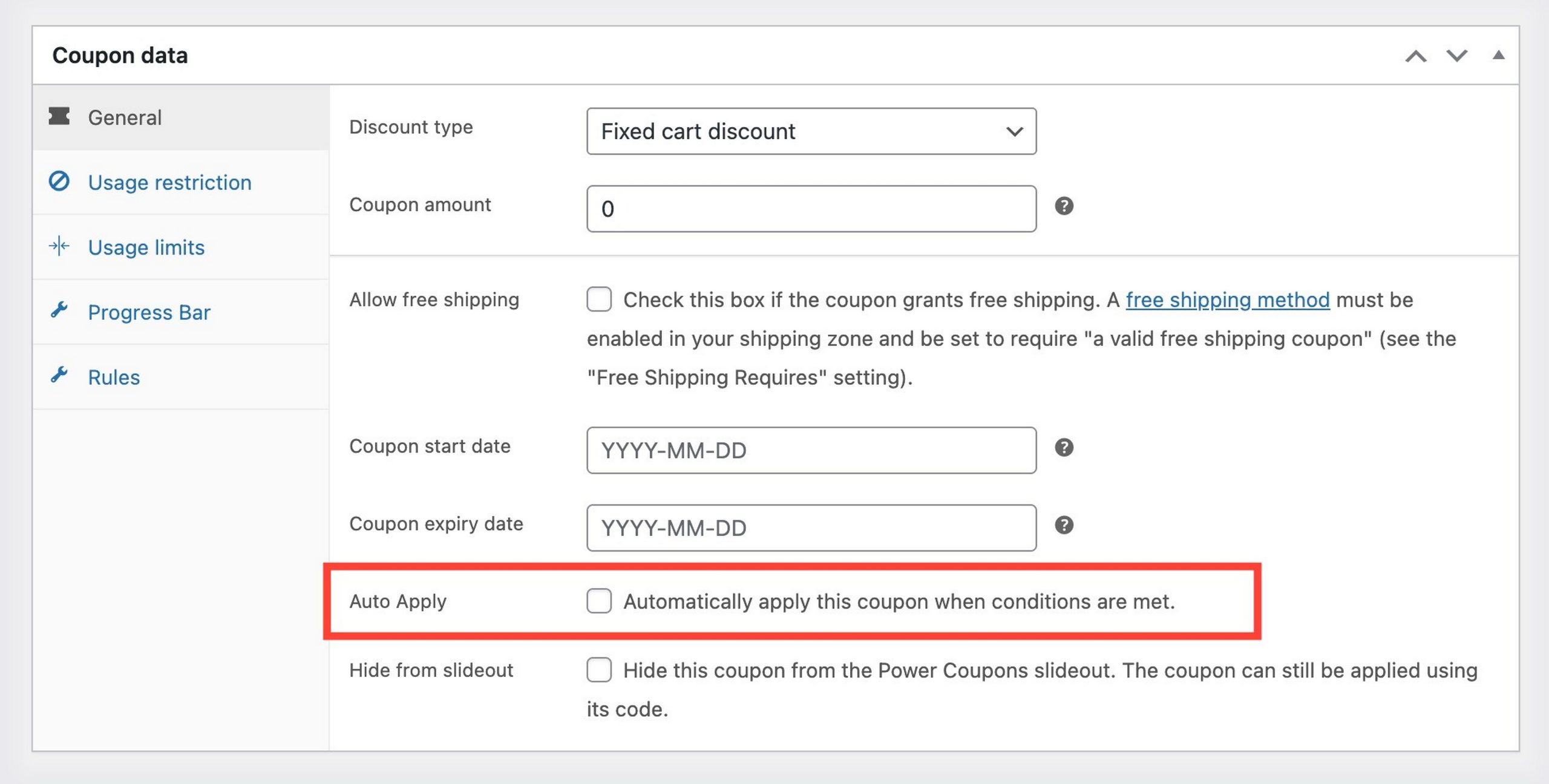
WooCommerce discount codes require shoppers to remember a code, find the right field and type it correctly. Any one of those steps can kill the conversion.
Auto-apply automates that entire process. Set a rule, and when a shopper’s cart meets the conditions, the discount appears automatically. No code entry, no missed promotions.
The discount updates in real time as items are added or removed from the cart. Qualify and it appears. Remove the qualifying item and it clears. Everything happens without a page reload.
2. Smart Cart Rule Engine (Free)
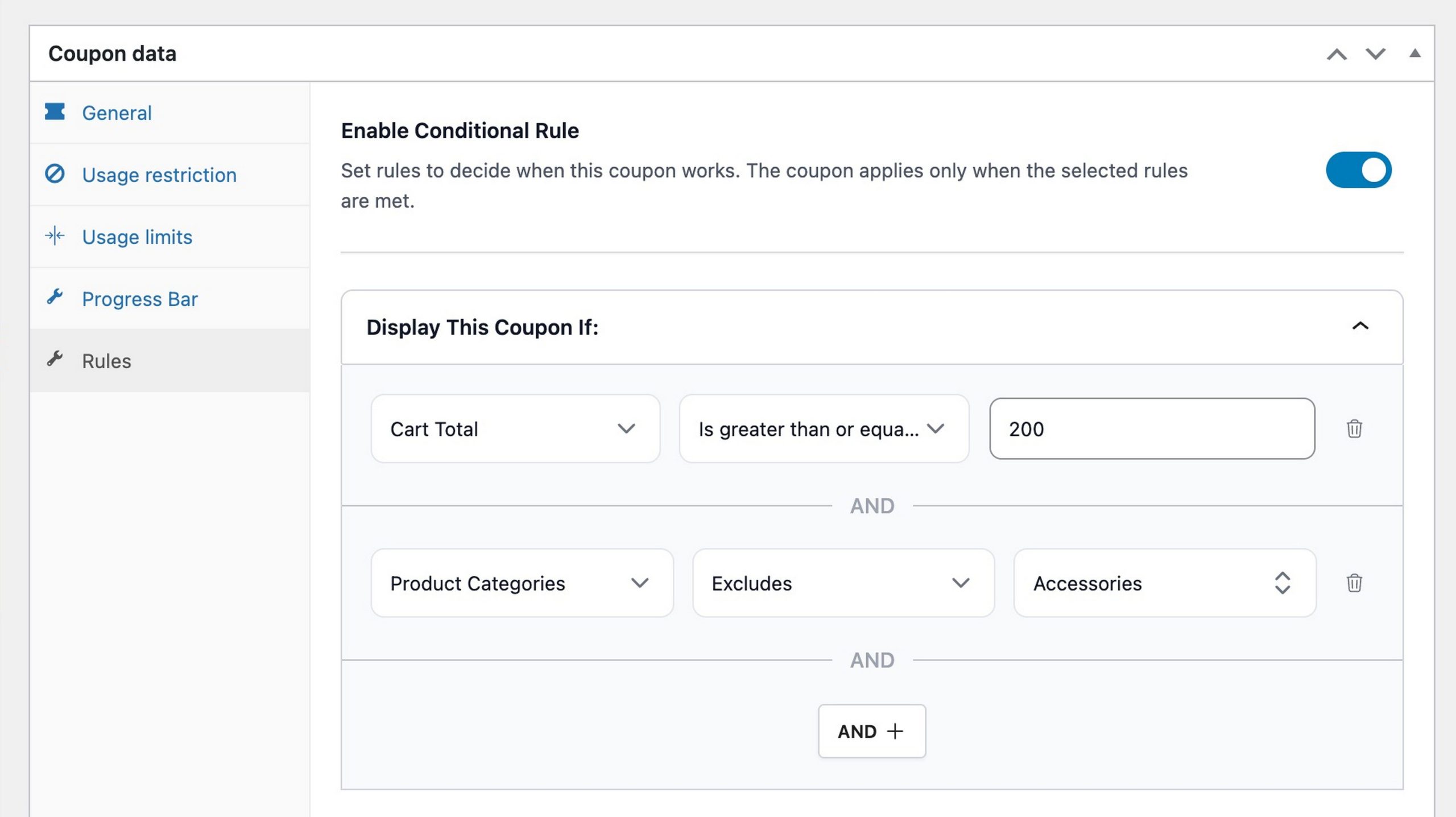
The rule engine is what makes auto-apply really useful. Instead of a single minimum spend condition, you can build rules using five condition types individually or in combination.
Condition types:
- Cart subtotal (greater than / less than / equal to)
- Specific products (include or exclude)
- Product categories (include or exclude)
- Item quantity thresholds
- Combinations using AND/OR logic
A rule can read: “Apply a 10% discount when the cart total is over $75 AND contains at least one item from the Apparel category.”
That level of precision isn’t possible with native WooCommerce coupons.
Sale item exclusions deserve special mention. It’s a dedicated toggle that excludes products currently on sale from the discount rule.
This is one of the most practically important controls in the plugin. It prevents your promotion from stacking on top of an already-reduced product, protecting margins across multiple simultaneous campaigns.
This is a free feature and I think it’s an excellent one.
3. In-cart Offer Visibility (Free)
Most WooCommerce promotions are invisible at the moment they matter most. The offer was in an email the customer deleted, or on a banner they scrolled past.
By the time they reach the cart, the discount might as well not exist.
Power Coupons adds a clean slideout panel to the cart page that shows customers exactly which offers they qualify for, and how close they are to qualifying.
Relevant, visible, at exactly the right moment.
Hiding individual coupons from the slideout is another standout feature in my opinion.
Not every coupon should be customer-facing. Staff discounts, backend automation coupons and applied partner offers can all be toggled off the slideout individually.
They still fire when conditions are met, but won’t appear in the panel. That’s smart!
4. BOGO Offers: 6 Types (Pro)
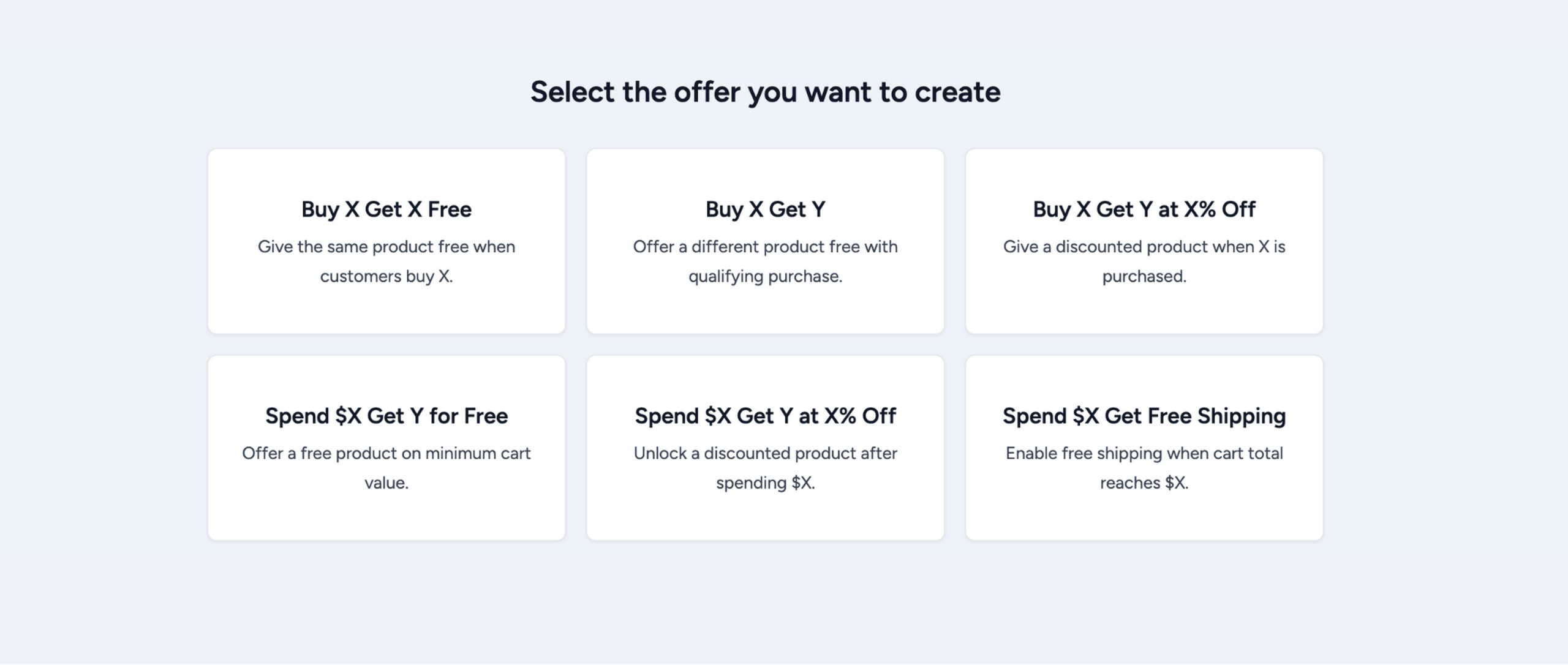
Native WooCommerce can’t run a Buy One Get One campaign without a third-party plugin.
Power Coupons Pro builds six WooCommerce BOGO formats directly into the same interface you already use:
- Buy X Get X Free: Classic BOGO, the same item free
- Buy X Get Y Free: Buy one product, get a different product free
- Buy X Get Y at X% Off: Reward with a discounted item rather than a free one
- Spend $X Get Y for Free: Free product unlocked when the cart hits a spend threshold
- Spend $X Get Y at X% Off: Spend trigger, discounted reward instead of free
- Spend $X Get Free Shipping: Convert a spend milestone into a shipping reward
Every BOGO offer can be set to auto-apply when conditions are met, or require a coupon code for redemption.
Smart product targeting for BOGO: A sitewide BOGO sounds generous until it applies to your highest-margin products.
Power Coupons lets you specify exactly which products trigger the deal and which are given as rewards.
Your bestsellers stay protected. Clearance campaigns run on the SKUs you choose. See Feature 9 for the full targeting detail.
Variable product support: When a BOGO reward is a variable product (for example, a t-shirt in multiple sizes and colors), the customer chooses their variant directly on the cart page when claiming it.
No redirect, no extra steps.
5. Cart Progress Bar (Pro)
When a shopper is $7 away from a free gift and has no idea, they check out at $43. When they can see the gap, they add another item.
Lots of stores use this tactic as it can be very effective.
The cart progress bar displays a visual spend indicator on the cart page for all spend-based BOGO offers.
It updates in real time as items are added or removed. The message text and icons are fully customizable to match your brand.
It works specifically with the “spend $X” offer types. Making the reward visible turns a missed upsell into a completed sale.
In my testing, stores that set their threshold about 20-30% above their current AOV saw the biggest lift. I guess this is because customers needed to feel the reward was within reach, not out of reach.
6. Loyalty Rewards / Store Credits (Pro)

Most WooCommerce stores invest in promotions to acquire customers. Far fewer have a system to bring those customers back.
Power Coupons Pro includes a complete loyalty rewards system inside the same plugin, with no dedicated loyalty plugin, no additional subscription and no integration work needed.
How customers earn credits — three campaign types:
- Order Earning: Credits based on purchase amount, using Fixed, Per Currency Unit (e.g. 1 credit per $1 spent), or percentage rates. The most commonly used type.
- Signup Bonus: A one-time credit reward when a new customer creates an account.
- Product Review: Credits awarded when an admin approves a review. Capped at one credit per product per customer.
Multiple campaigns run simultaneously, the system picks the best matching one automatically.
Individual coupons can override the default earn rate, which could be useful for double-credit promotions.
Credits are awarded on order completion, not on order placement. This prevents customers from earning credits on orders they subsequently refund.
Redemption: A widget on cart and checkout pages lets customers redeem their full balance at once or choose a partial amount. Credit expiry is configurable and automatic email notifications can fire as the expiry date approaches, giving customers a reason to return before their balance lapses.
What customers and admins see:
Customers get a My Credits tab in WooCommerce My Account showing their balance, transaction history, and credits expiring soon.
Admins get a full audit log across all customers and a “Combine with Coupons” toggle to control whether credits stack with standard WooCommerce coupons.
A customer with store credits has a reason to return that doesn’t depend on your next email campaign.
7. Offer templates (Pro)
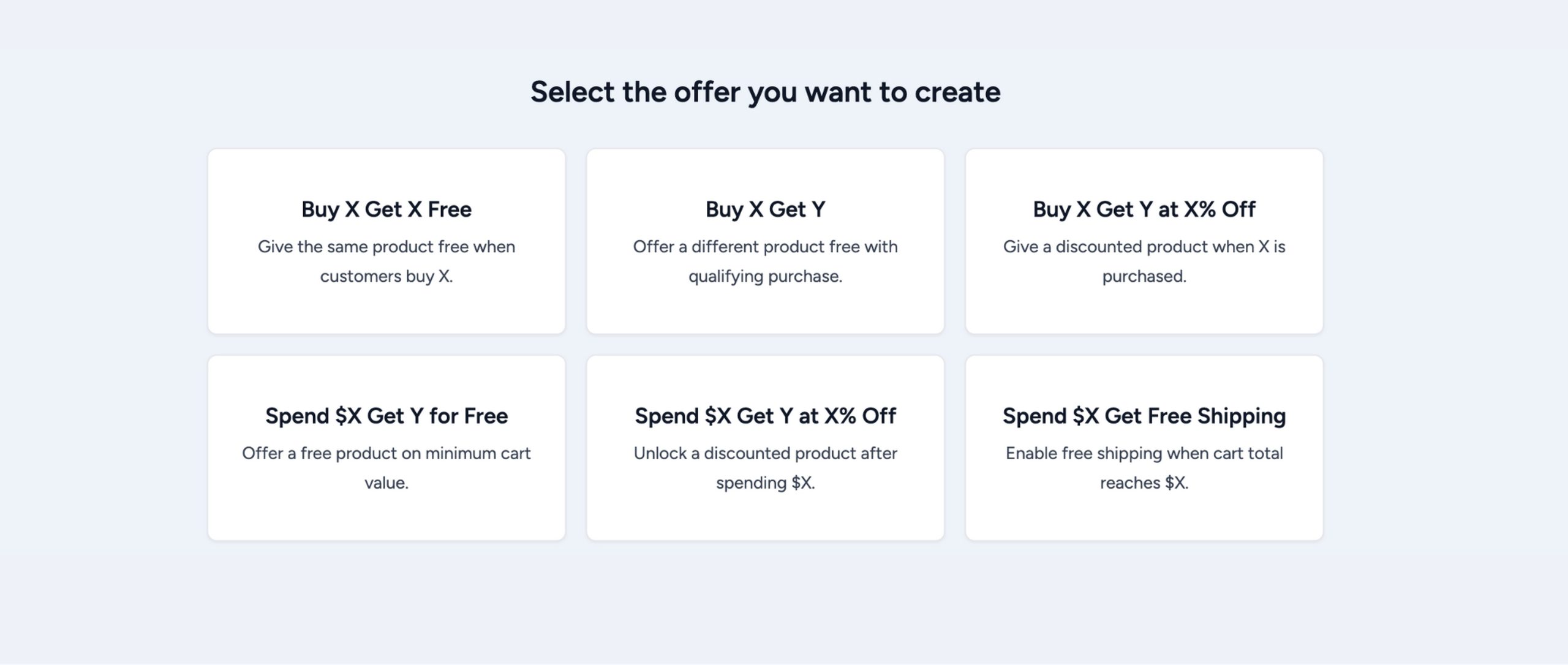
Building a BOGO campaign from scratch every time a seasonal event comes around is slow.
Pro ships with readymade offer templates so you can launch campaigns in minutes rather than hours. Select the template that matches your goal, swap in your products and amounts, and publish.
8. Offer Scheduling (Pro)
Power Coupons Pro supports offer scheduling, but it works a little differently than you might expect.
You won’t find date fields inside the BOGO offer itself. Instead, once your BOGO is set up, head to the Coupon edit page and set your start and end dates from there. One extra step, but the outcome is the same — your campaign goes live and closes automatically, no manual toggling, no risk of forgetting to switch something off.
Pair it with offer templates and a Black Friday BOGO that would take an afternoon to configure from scratch can be live in under fifteen minutes.
9. Smart Product Targeting (Pro)
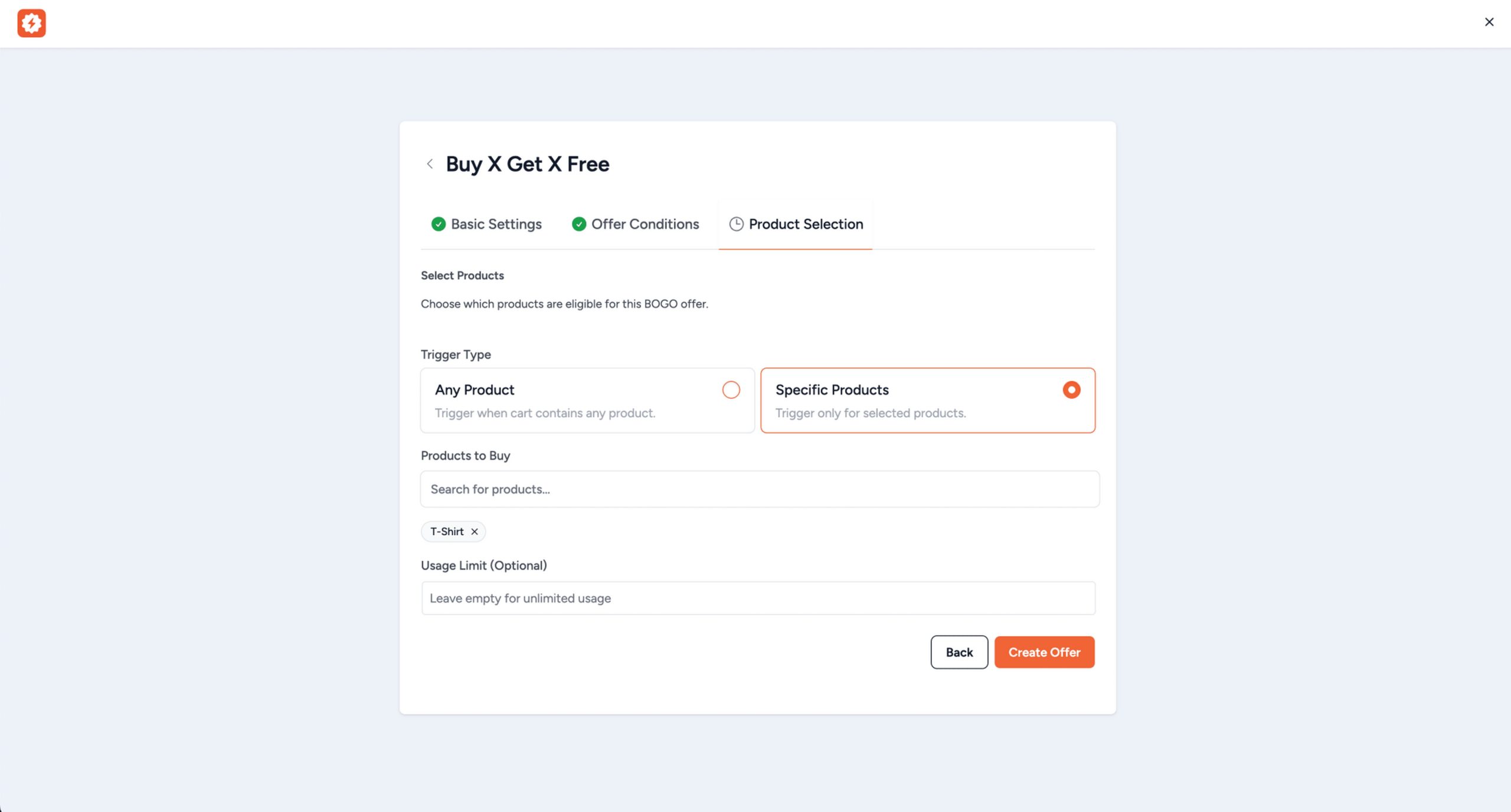
A sitewide BOGO is generous until it applies to the products where your margins are tightest. Smart targeting gives you precise control over which products trigger a deal and which are offered as rewards.
Run clearance campaigns on specific SKUs without any risk to your bestsellers. Set a BOGO on slow-moving inventory while your top-margin items stay completely untouched.
I think this is the feature that makes Power Coupons Pro viable for stores running real promotions, not just demo-friendly examples.
10. Offer Management Dashboard (Pro)
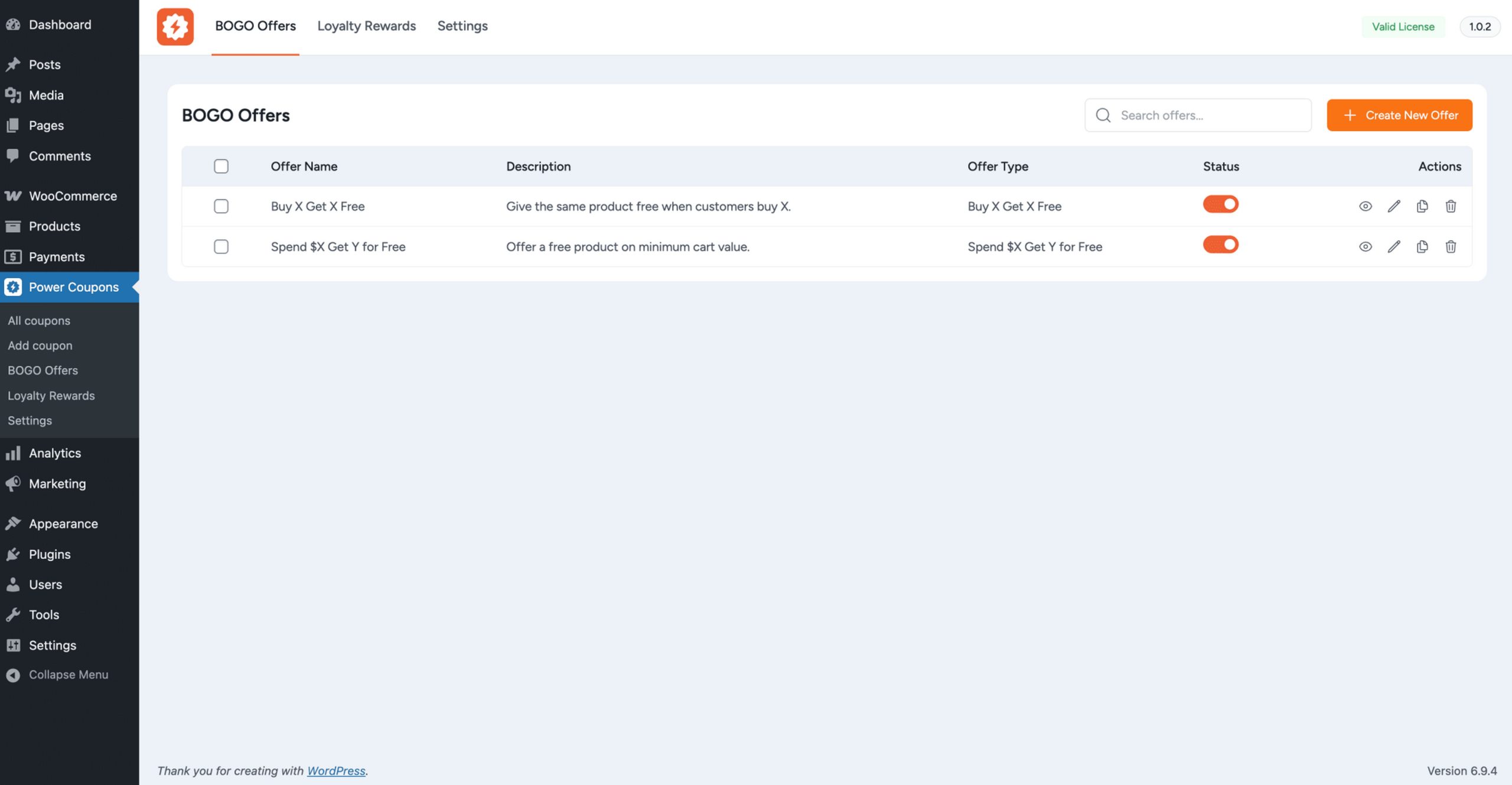
All Pro offers live in a dedicated dashboard separate from the standard WooCommerce coupons screen.
Create, edit, clone, preview, and delete offers from one place. Toggle offers active or inactive, search across campaigns and set usage limits, without navigating through multiple WooCommerce settings panels.
11. WooCommerce Blocks Compatibility (Free + Pro)
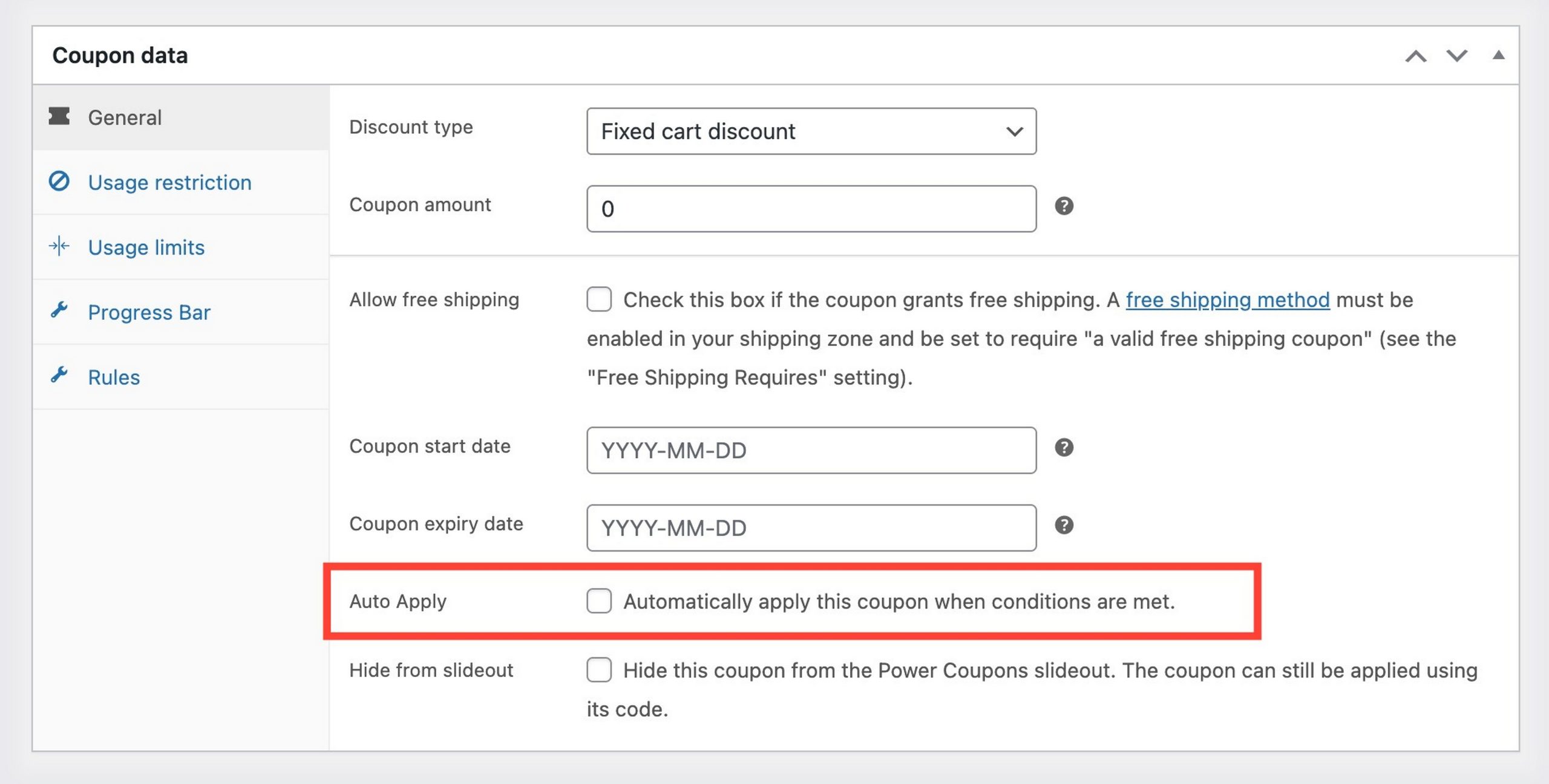
Power Coupons works with WooCommerce cart and checkout blocks and auto-apply logic and rule evaluation run natively within the block-based interface.
Keep both WooCommerce and Power Coupons updated to the latest versions for best compatibility.
12. Coming Soon: Advanced Analytics and Gift Cards
Two features are confirmed on the product roadmap and included in all current Pro and Lifetime plans at no extra cost when they launch.
Advanced Coupon Analytics: Track coupon performance directly inside the Power Coupons dashboard: impact on AOV, revenue attributed per coupon, redemption rates and conversion lift.
Gift Cards: Let customers purchase store credit for themselves or as a gift for others. Integrates with the existing store credits system and is well-suited for gifting campaigns and driving repeat purchases.
The 12 features already live give Power Coupons a strong foundation. These two additions will make the toolkit more complete when they arrive.
How To Set Up Your First Promotion (Step-by-Step)
Here’s how to create your first auto-apply discount using the free version in under five minutes.
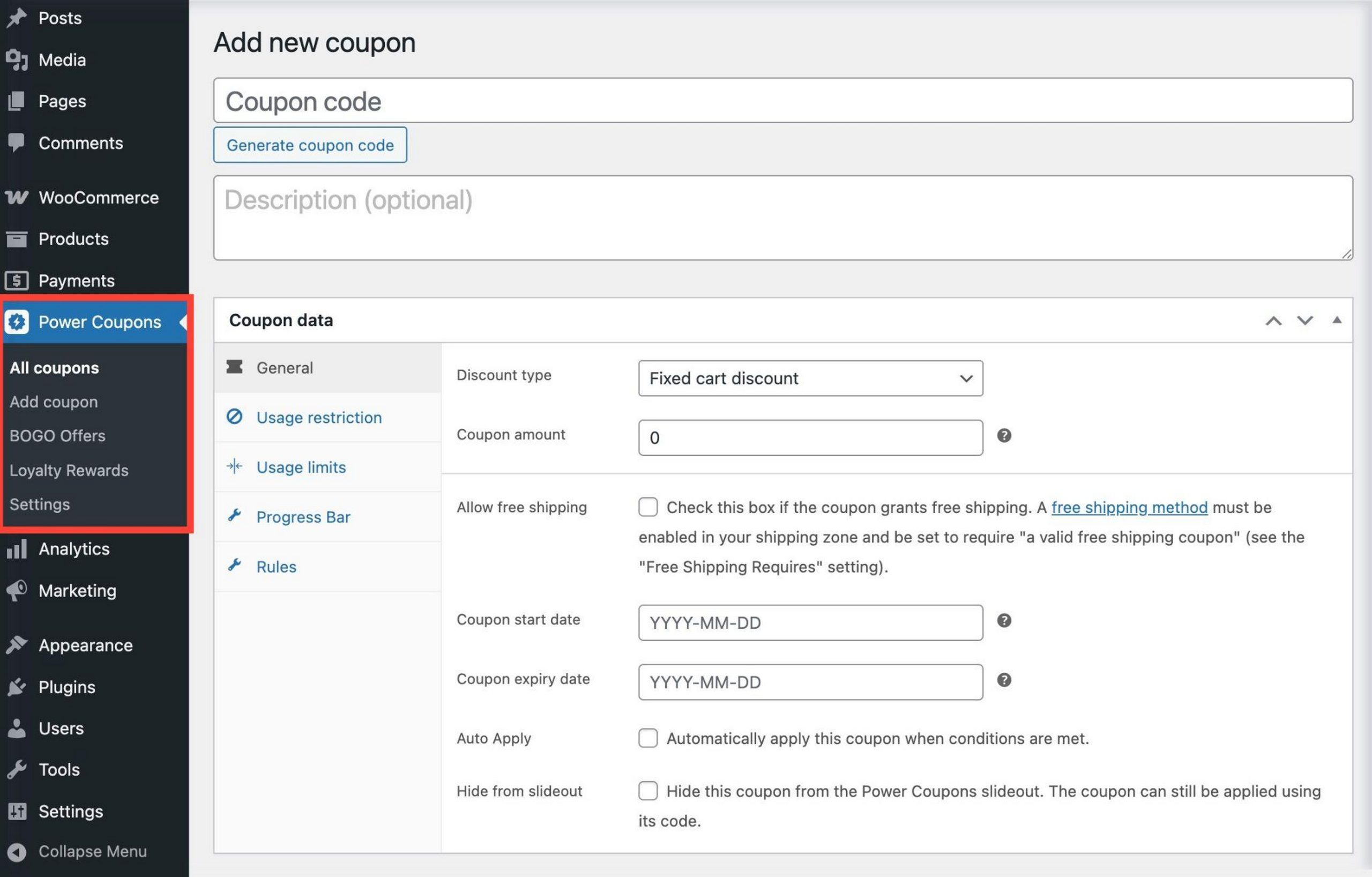
Step 1: Create your coupon
Go to Power Coupons > Add Coupon in the WordPress dashboard. Set a coupon name as an internal reference, choose your discount type (for example, percentage discount), and enter the amount.
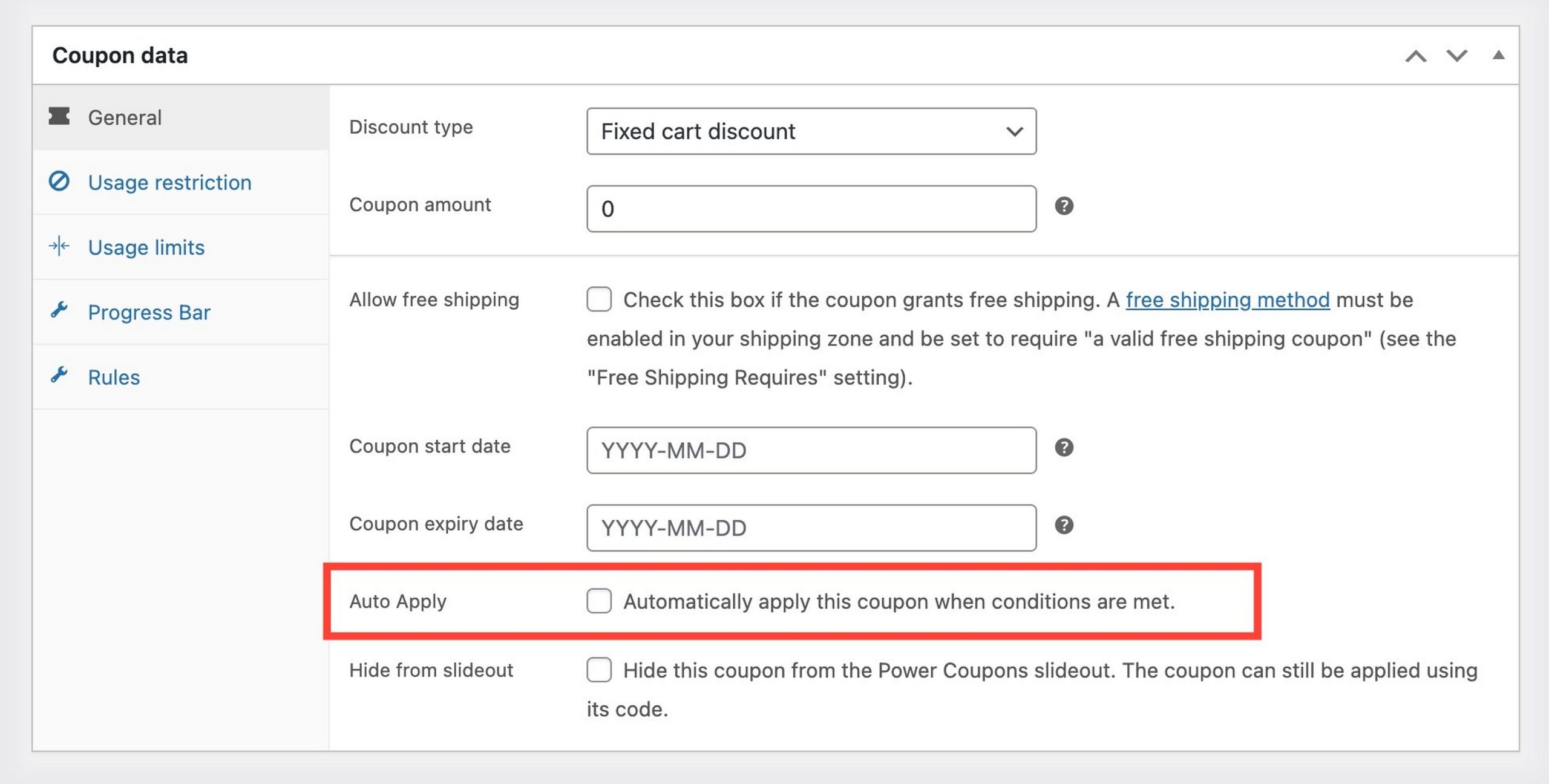
Step 2: Enable auto-apply
Scroll to the Settings section and toggle Auto-Apply This Coupon to on. The customer will never need to enter a code.
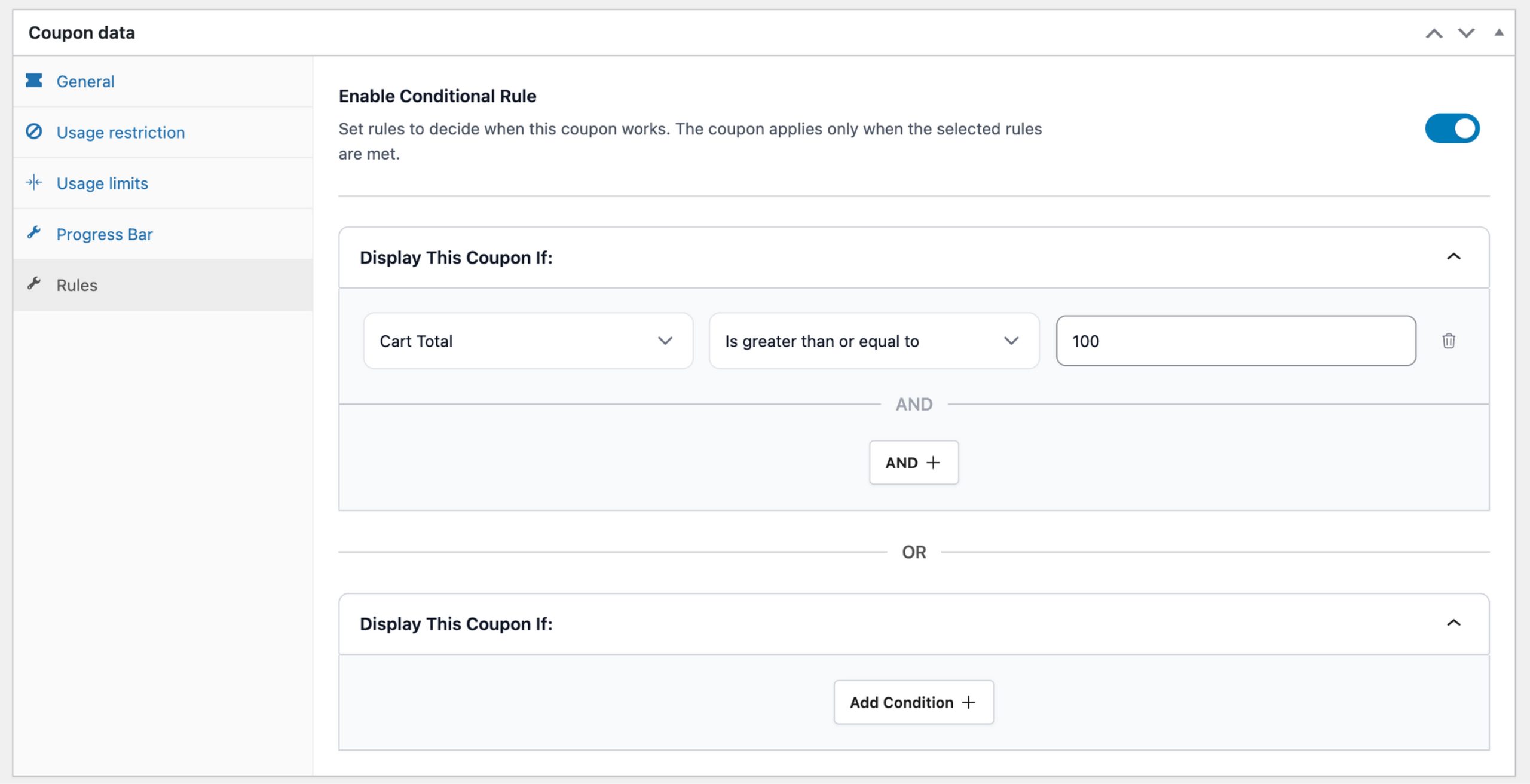
Step 3: Add a cart condition
Switch to the Rules tab, click Add Condition, select Cart Total, set the operator to “greater than or equal to,” and enter your threshold, for example $50.
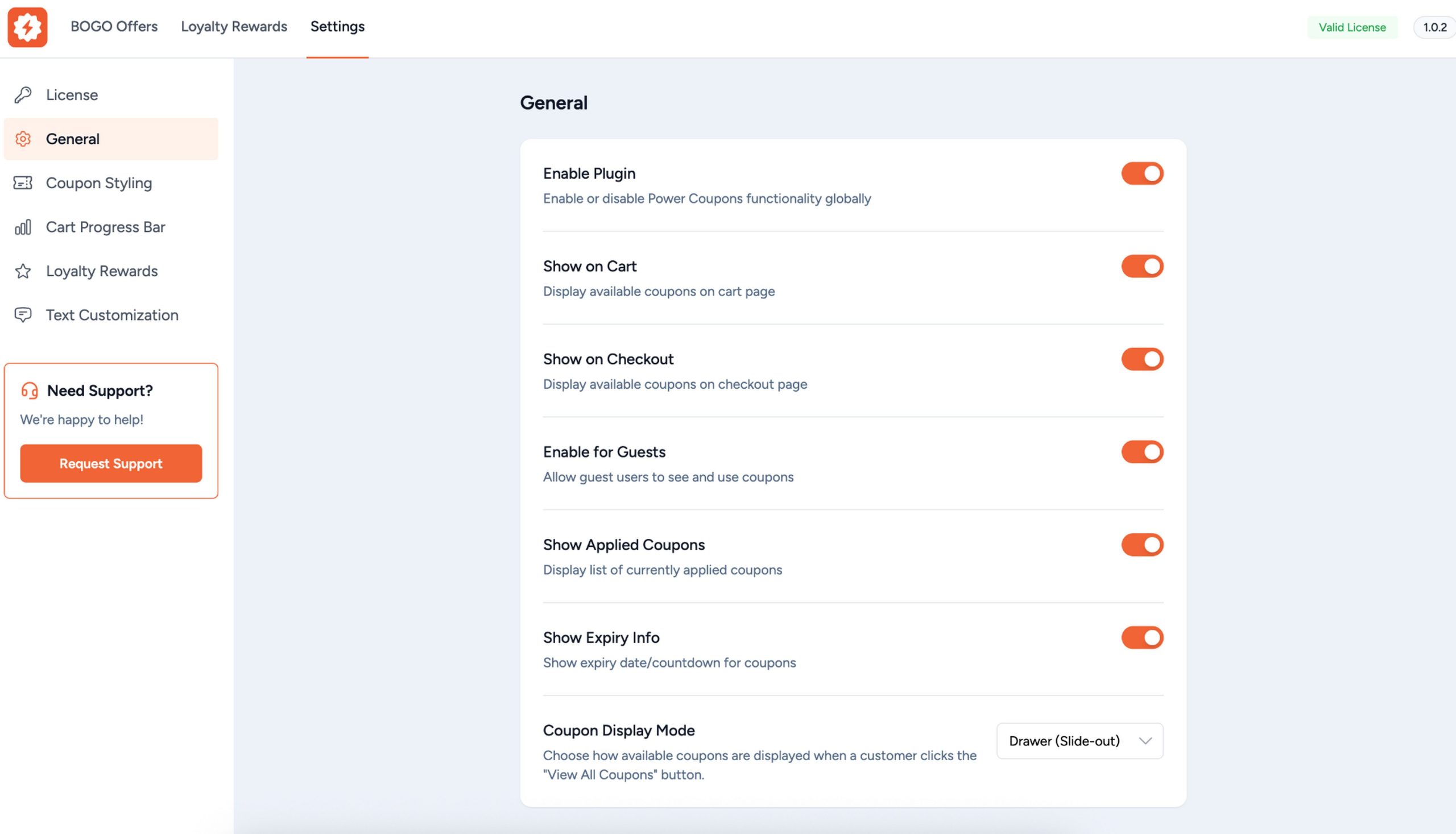
Step 4: Configure display settings
Go to Power Coupons > Settings to control where the offer appears. Select the cart page, checkout page, or both.
Your first automated promotion is now live. Not a coupon code in sight.
Caching note: If the discount doesn’t update immediately during testing, exclude your cart and checkout pages from caching and retest in an incognito window.
Power Coupons Pro: Use Cases by Goal
Even though I like them all, not every store is going to need every Pro feature.
I recommend matching the right capability to your specific goal and choose from there.
Increase average order value
Set up a cart progress bar with a spend-based BOGO reward. Shoppers who can see they’re $8 from a free product spend more to get there.
If your AOV moves from $60 to $72 on 20 orders a month, that’s $240 in extra monthly revenue from one rule. Power Coupons Pro costs $4.91 a month.
Run promotions without discounting your best-sellers
Combine sale item exclusion with smart product targeting to run a sitewide promotion that never touches your highest-margin SKUs.
Set the rules once and the plugin enforces them on every qualifying order automatically.
Clear slow-moving inventory
Run a targeted BOGO on specific SKUs. Smart product targeting controls exactly which products trigger the deal and which are offered as rewards.
Your bestsellers stay untouched while you move inventory that has been sitting.
Retain customers after the first purchase
Enable loyalty rewards so every order earns store credits. Customers with a credit balance have a reason to return that doesn’t depend on your next promotion.
Credit expiry creates additional urgency and customers whose points are approaching expiry have a deadline to come back.
Run seasonal and time-sensitive campaigns
Use offer scheduling to set start and end dates. Your Black Friday campaign goes live and closes automatically.
Combine with offer templates to launch in minutes instead of hours.
Power Coupons Free vs. Pro: What Do You Actually Need?
The free version was built to be a complete tool for most stores, not a limited trial and I like it for that.
Here’s exactly what you get at each level.
| Feature | Free | Pro |
|---|---|---|
| Auto-apply discounts | ✅ | ✅ |
| Cart subtotal rules | ✅ | ✅ |
| Product and category rules | ✅ | ✅ |
| Quantity-based rules | ✅ | ✅ |
| Sale item exclusions | ✅ | ✅ |
| In-cart offer visibility (slideout) | ✅ | ✅ |
| Hide individual coupons from slideout | ✅ | ✅ |
| WooCommerce Blocks compatibility | ✅ | ✅ |
| BOGO offers (6 types) | ❌ | ✅ |
| Variable product support for BOGO rewards | ❌ | ✅ |
| Cart progress bar | ❌ | ✅ |
| Loyalty rewards / store credits | ❌ | ✅ |
| Credit expiry controls | ❌ | ✅ |
| Offer templates | ❌ | ✅ |
| Offer scheduling | ❌ | ✅ |
| Smart product targeting | ❌ | ✅ |
| Offer management dashboard | ❌ | ✅ |
| Advanced coupon analytics | ❌ | Coming Soon |
| Gift cards | ❌ | Coming Soon |
| Sites | 1 | 10 Annual / 30 Lifetime |
| Support | Community | Priority |
| Regular updates | ✅ | ✅ |
Here is the full Power Coupons Free vs. Pro comparison.
Who should stick with the free version?
If you run standard percentage or fixed discounts, use minimum spend rules to lift order value, or want auto-apply coupons without the complexity of BOGO or loyalty, the free version covers everything you need.
There are no limits on the number of coupons you can create. Install it, see how auto-apply works in your store and upgrade when you’re ready.
Who should upgrade to Pro?
Pro is the right move when you want to run BOGO campaigns without adding a separate plugin, reward returning customers with store credits, motivate higher spend with a progress bar, or manage multiple time-sensitive promotions with templates and scheduling.
It’s also the better option for agencies managing more than one store.
Power Coupons Pro Pricing 2026
There are two paid plans, both backed by a 14-day money-back guarantee and regular product updates.
| Plan | Price | Sites | What’s Included |
|---|---|---|---|
| Single Site Annual | $49/year | 1 | All Pro features: BOGO offers, loyalty rewards, cart progress bar, offer templates, scheduling, smart targeting, priority support, regular updates, 14-day guarantee |
| Multi-Site Annual | $99/year | 10 | All Pro features: BOGO offers, loyalty rewards, cart progress bar, offer templates, scheduling, smart targeting, priority support, regular updates, 14-day guarantee |
| Lifetime | $249 one-time | 30 | Everything in Annual, lifetime updates, no renewal |
Annual ($49/year) – My take:
Start here if you run a single store and want to test BOGO and loyalty before committing to lifetime pricing.
If a cart progress bar rule lifts your AOV by $10-15 on 20 or more orders per month, the $49 annual cost pays for itself many times over within the first billing cycle.
Lifetime ($249 one-time) – My take:
At $249 for 30 sites, this is the clear choice for agencies, developers, or anyone managing multiple WooCommerce stores.
Pay once, use across all client sites and receive every future feature (including analytics and gift cards) at no extra cost.
You can upgrade from Annual to Lifetime at any time by paying the difference.
14-day money-back guarantee. No questions asked.
When To Pick Power Coupons Pro
Power Coupons Pro makes sense if you:
- Use WooCommerce and want BOGO offers without installing a separate plugin
- Run active promotions and need precise control over which products qualify
- Want discounts to apply automatically without depending on shoppers to enter codes
- Need a WooCommerce loyalty rewards system that doesn’t require a separate subscription
- Already use CartFlows and want to add coupon rules and BOGO at the cart level
- Run time-sensitive promotions that need scheduling
- Manage multiple WooCommerce stores (Annual covers 10 sites, Lifetime covers 30)
- Want one plugin replacing three or four discount tools
Power Coupons Pro doesn’t make sense if you:
- Don’t use WooCommerce
- Only need basic percentage or fixed discounts (the free version covers this fully)
- Need comprehensive funnel-building alongside coupons: CartFlows Pro handles that layer
- Need gift cards or advanced analytics today rather than in a future update
- Prefer a plugin with more third-party reviews before adopting
Power Coupons Alternatives
Advanced Coupons for WooCommerce (Rymera)

The most established alternative in this category. Covers BOGO, store credits, auto-apply, scheduling, URL coupons and advanced coupon restrictions.
Loyalty rewards and gift cards require purchasing separate addon plugins, which pushes the total cost significantly higher than it first appears.
Where Advanced Coupons wins:
- Longer track record with a larger user base
- More granular coupon restriction options including location, user roles and payment method
- More third-party reviews and community documentation
Where Power Coupons wins:
- Loyalty rewards included in one plan, no addon required
- Sale item exclusion and smart product targeting give better margin control out of the box
- Simpler setup for stores that want fast results over maximum configuration depth
- All-in pricing with no addon purchases required
Pricing: Core plugin starts at $59.50/year. The Loyalty Program add-on is $79.50/year. The All Access Bundle (core + loyalty + gift cards + store credits) is $149.50/year.
All figures are for a single site, multi-site licensing costs more. For a single store that needs loyalty included, that’s $149.50/year vs. $49/year for Power Coupons with loyalty already built in.
WebToffee Smart Coupons

A solid free version on WordPress.org that includes BOGO and auto-apply. The Pro version adds URL coupons, purchase history-based conditions, and gift cards.
The interface is busier than Power Coupons, especially for non-technical store owners.
Where WebToffee wins:
- Free version is more feature-rich out of the box
- Gift cards are available now in Pro, not waiting on a roadmap
- Longer track record
Where Power Coupons wins:
- Cleaner shopper-facing UI in the cart
- Loyalty rewards included without a separate purchase
- Better margin control tools via sale item exclusion and smart targeting
- Faster setup for stores that want results without deep configuration
Pricing: Free / $99+/year Pro.
StoreApps Smart Coupons
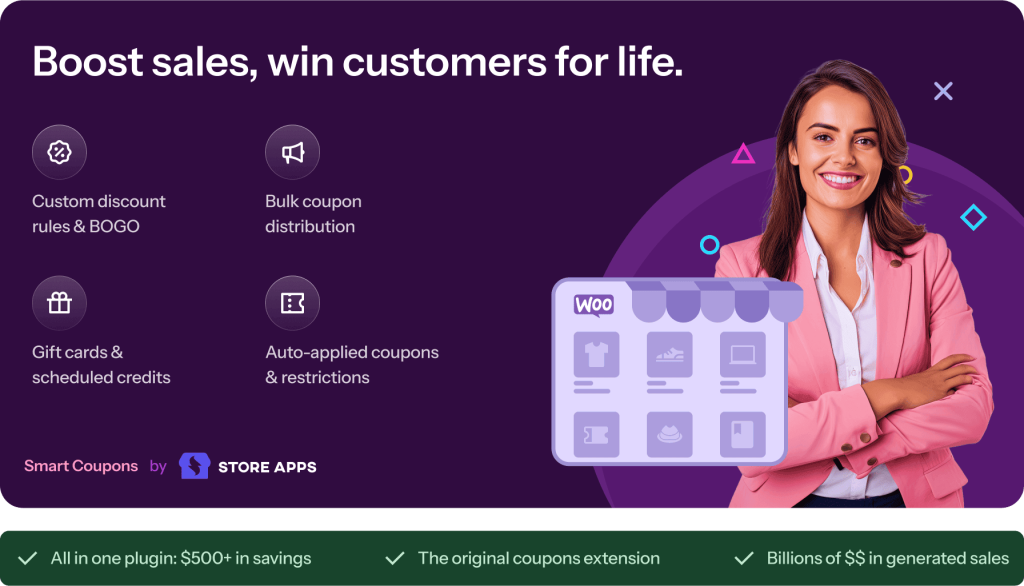
The longest-standing WooCommerce coupon plugin, active since 2012. Comprehensive features covering BOGO, gift cards, store credits, bulk coupon generation and advanced restriction logic.
Built for established stores with complex, high-volume promotion needs.
Where StoreApps wins:
- Deepest overall feature set in the category
- Best suited for complex enterprise-level promotions with extensive restriction logic
- Bulk coupon generation for large campaigns
- Largest community and most community documentation
Where Power Coupons wins:
- Significantly simpler for non-technical store owners
- Modern admin interface with a cleaner experience than older alternatives
- Better default shopper-facing cart UI
- More straightforward all-in pricing
Pricing: $99+/year.
Native WooCommerce Coupons (no plugin)
WooCommerce includes basic coupon functionality: percentage, fixed cart and fixed product discounts.
Customers must enter codes manually, there’s no auto-apply, no BOGO, no WooCommerce loyalty rewards, no scheduling and no margin protection rules.
Where it’s enough: Very simple promotions on low-traffic stores where coupon friction isn’t an issue.
Where it falls short: Any promotion requiring automatic application, BOGO logic, in-cart visibility, or loyalty covers most real store promotion work.
Pricing: Free (included with WooCommerce).
My overall take on the alternatives:
- Power Coupons is the right choice if you want auto-apply, BOGO, and loyalty rewards in one plugin without building a plugin stack.
- Advanced Coupons is worth considering if you need very granular restriction logic and don’t mind paying for addons separately.
- WebToffee is a reasonable free starting point if you want gift cards today and are comfortable with a busier interface.
- StoreApps is built for established stores with complex, high-volume promotion needs.
Overall, I think Power Coupons is worth a serious look if you’re serious about growing and developing your store.
Power Coupon Pro FAQs
Does Power Coupons work with WooCommerce Cart and Checkout Blocks?
Yes. Auto-apply logic and rule evaluation work natively within the block-based checkout interface. Keep both WooCommerce and Power Coupons updated for best compatibility.
What BOGO offer types are available in Pro?
Six types: Buy X Get X Free, Buy X Get Y Free, Buy X Get Y at X% Off, Spend $X Get Y for Free, Spend $X Get Y at X% Off, and Spend $X Get Free Shipping.
Can customers choose variations when claiming a BOGO reward?
Yes. If the reward is a variable product, customers choose their size, color, or variation directly on the cart page, with no redirect or extra steps required.
Can I set up a WooCommerce loyalty rewards program with Power Coupons?
Yes. Pro includes a complete store credits system. Customers earn credits for purchases, new account signup, and approved product reviews, then redeem them for discounts on future orders.
Can loyalty credits stack with regular WooCommerce coupons?
That’s configurable. A “Combine with Coupons” toggle controls whether credits can be used alongside standard WooCommerce coupons or must be used on their own.
Do loyalty credits expire?
Expiry is configurable. You set the period and the plugin sends automatic email notifications as credits approach their expiry date, creating urgency to return.
Will caching affect auto-apply discounts?
It can. Exclude your cart and checkout pages from caching to ensure discounts update correctly in real time. Test in an incognito window after setup to confirm.
Does Power Coupons load any external resources?
The plugin loads the Figtree font from Google Fonts in the admin area only, not on the frontend. No customer-facing data is transmitted externally. This can be disabled via a functions.php filter if needed for GDPR compliance.
How many sites can I use Power Coupons Pro on?
The Single Site Annual plan supports 1 site, the Multi-Site Annual plan supports 10 sites, and the Lifetime plan supports 30 sites.
Can I upgrade from Annual to Lifetime later?
Yes. Upgrade at any time by paying the difference. All settings and data remain intact.
Does Power Coupons conflict with CartFlows?
No. Both are built by the same team and designed to complement each other. CartFlows handles checkout funnels and post-purchase upsells. Power Coupons handles WooCommerce discount rules and BOGO offers at the cart level: different stages of the purchase journey.
How is Power Coupons different from Cart Abandonment Recovery Pro?
Different problems, different timing. Power Coupons works during the active shopping session to keep customers converting with auto-applied discounts and BOGO offers. Cart Abandonment Recovery sends follow-up emails after someone leaves without completing a purchase.
Is the free version a real tool or just a limited trial?
The free version is a complete tool for stores running standard discounts. Auto-apply, cart rules, sale item exclusions and in-cart offer visibility are all included at no cost. Pro adds BOGO, loyalty rewards and scheduling on top.