
Amazon's bundle box is the version of this format most shoppers recognize. Three products, three checkboxes, a running total, one button.
WooCommerce ships nothing like it, so you need a plugin, and the WordPress plugin directory alone offers dozens to pick from. If you're still building the store itself, come back to this once you have orders to learn from.
Here's the thing almost every roundup skips. All of them promise to show products that go together, but they don't agree on what “go together” means. Some ask you. Some read your tags. A handful look at what your customers actually bought together.
That difference decides whether the box earns money or gets quietly ignored. So instead of ranking nine plugins one through nine, we've grouped them by how each one decides what belongs with what.
- What Frequently Bought Together Actually Is
- How These Plugins Choose Products
- How We Evaluated These Plugins
- Group 1: Automatic Pairing From Your Order History
- Group 2: Pairing Manually
- Group 3: Automatic Pairing From Catalog Rules
- Comparison Table
- Best Free WooCommerce Frequently Bought Together Plugins
- Single Purpose or Part of a Suite
- How to Choose
- Frequently Asked Questions
What Frequently Bought Together Actually Is
Four things make up the format: it sits on the product page, each companion has its own checkbox, a combined total updates as boxes get ticked, and one button adds the set to the cart.
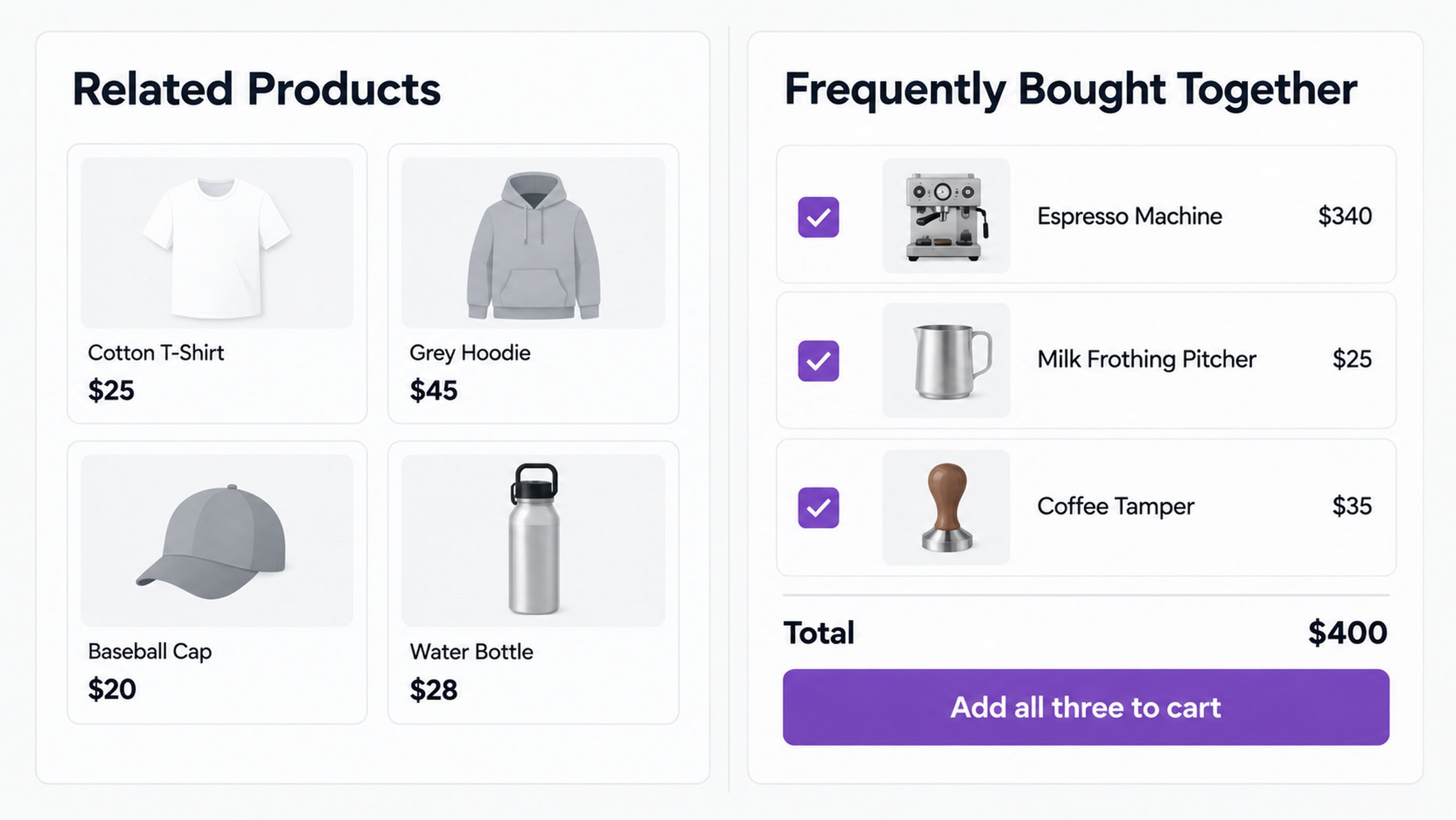
Three features already in WooCommerce get mistaken for it.
Related products are generated automatically from shared tags and categories. You don't choose what appears.
Upsells offer a better or pricier alternative to the product being viewed, instead of it rather than alongside it.
Cross-sells show complementary items on the cart page, after someone has already decided to buy.
Frequently bought together is a cross-sell in spirit. What separates it is timing and format, and the timing does most of the work.
Someone reading a product page is still assembling their idea of what they need. Someone on the cart page has finished deciding and is heading for checkout, which is a much harder moment to add to.
How These Plugins Choose Products
Before comparing features, it's worth asking a plainer question of any plugin on this list. When it tells a shopper “these go together,” what is that claim based on?
There are three common answers, and they aren't equivalent.
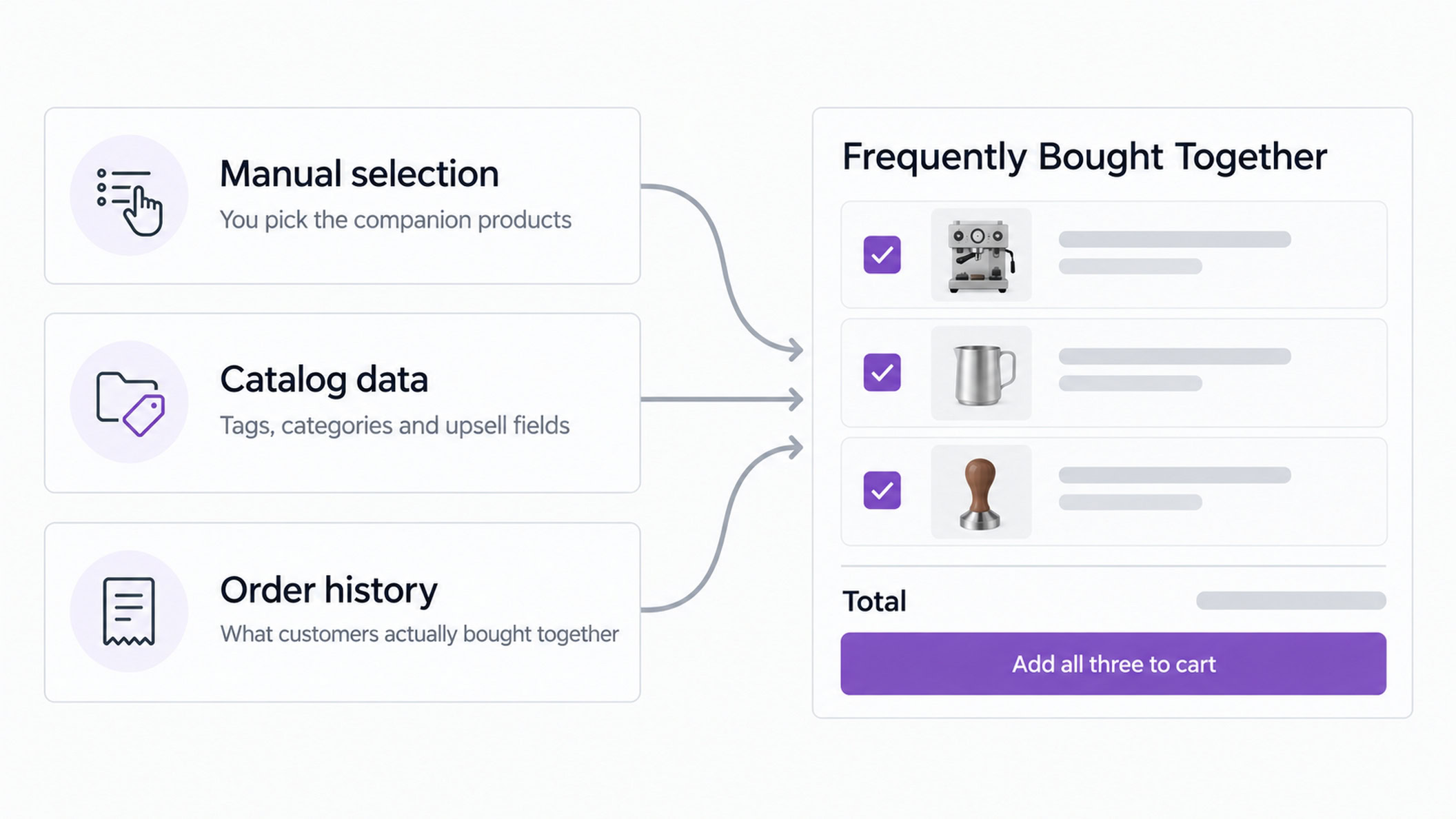
You Picked It
Manual pairing. You open a product, search for its companions, save.
This is accurate when you know your catalog well, and it stops being practical fast. A 50-product catalog creates 1,225 possible pairs, and working through all of them by hand isn't realistic. That constraint is the reason the other two approaches exist.
The Catalog Picked It
The plugin reads your tags, your categories, or the upsell and cross-sell fields you've already filled in.
This is quick to deploy, and it's worth being clear about what it is. The plugin is pattern-matching your filing system. Two products can appear together because they're tagged alike, even if customers have never bought them in the same order.
That can still be a good guess. It just isn't evidence.
It's also the right approach in one common situation. A store with no order history has nothing for the third method to read, and well-configured rules will beat an empty dataset every time.
Customers Bought Them Together
The plugin analyzes purchase history and pairs products that genuinely appear in the same orders. Of the three approaches, this is the closest to using actual co-purchase behavior as the signal.
Only a handful of WooCommerce plugins do it, which is why we've put that group first.
There's a second question worth asking alongside the first, and it matters just as much: finding a pairing and publishing a pairing are different things. A plugin can find candidates automatically and still wait for you to approve them before shoppers see anything. Both get described as “automatic.” They aren't the same, and the comparison table separates them.
One note on the categories. These are three common approaches, not a closed taxonomy. Several plugins below combine two, and we've filed each under its primary method and said so where it does more than one.
How We Evaluated These Plugins
Every classification here comes from the plugin's own documentation, not from other reviews. Where a plugin combines methods, we say so in its entry.
We grouped by how each plugin picks companion products rather than ranking one to nine, because no single plugin wins for every store. That's also why there are no star ratings.
Prices are shown where vendors publish them. Check the current figure before buying.
Disclosure: WPCrafter's founder, Adam Preiser, is a co-founder of CartFlows, one of the nine plugins covered here. It's why we group rather than rank, name CartFlows' limitations alongside its strengths, and point you elsewhere when another plugin fits better.
Group 1: Automatic Pairing From Your Order History
CartFlows
How it chooses: purchase history, with manual pairing available.
Worth knowing before you install it: CartFlows is a funnel builder, not a single-purpose frequently bought together plugin.
The bundle box sits alongside checkout optimization, order bumps, one-click upsells and downsells, funnel templates and A/B split testing. It supports the Block Editor, Elementor, Beaver Builder, Spectra, Bricks and Divi.
Whether that counts for or against it depends on whether you'd use the rest, which we come back to below.
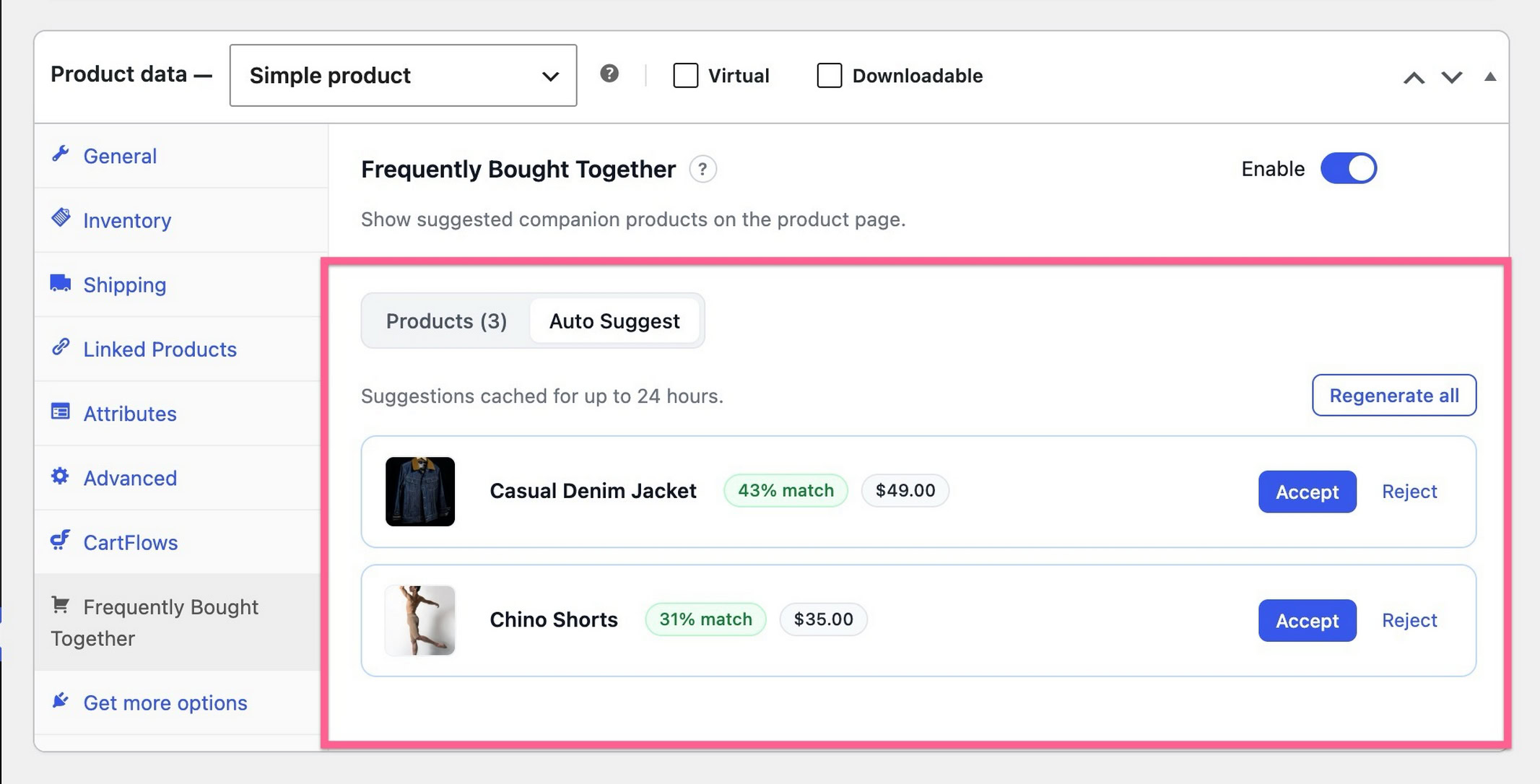
CartFlows splits the frequently bought together feature across its free plugin and its paid tiers. The manual widget is in the free plugin and needs no license or account, which means you can build the bundle box, pick companions and set placement without spending anything.
The purchase-history layer is a feature called Auto Suggest.
It requires the Pro plan, CartFlows' top tier at $299 a year for 30 sites, plus an activated license and a connected CartFlows account. Until all three are in place, the tab shows a prompt instead.
The manual widget below needs none of that. Paid plans start at $99 a year for Starter and $199 for Plus, but Auto Suggest specifically sits in Pro.
What it does is read your order history for products that genuinely appear in the same orders, then return a ranked list of candidates. Two details are worth knowing before you trust it.
The match percentage is a ranking score, not a prediction of how likely a shopper is to buy the suggested product.
The top suggestion always displays as 100%, with everything else ranked relative to it. It tells you how the suggestions are ranked, nothing more.
And nothing publishes itself. You accept or reject each suggestion, and accepted pairs land in the product list where you can edit them like anything you picked by hand. If you'd rather approve pairings before customers see them, that's the behavior you want.
A brand new store still gets output. With no co-purchase data to read, it falls back to what's selling and labels those rows differently, so you're never staring at an empty tab.
The output is the Amazon-style bundle format, checkboxes and a running total, rather than a row of thumbnails.
Where it falls short: no bundle discounts, which several plugins here offer. Configuration is per product with no catalog-wide switch, so a large catalog is a real time commitment even with suggestions helping. Grouped and external products aren't supported.
Best for: stores with enough order history to have something worth reading, that want to approve pairings rather than let them publish automatically.
StoreApps Frequently Bought Together
How it chooses: purchase history, with manual assignment available.
StoreApps' documentation describes the plugin assigning companions automatically based on previous orders for that product. Their own example is a mouse getting assigned to a laptop because most laptop buyers bought one.
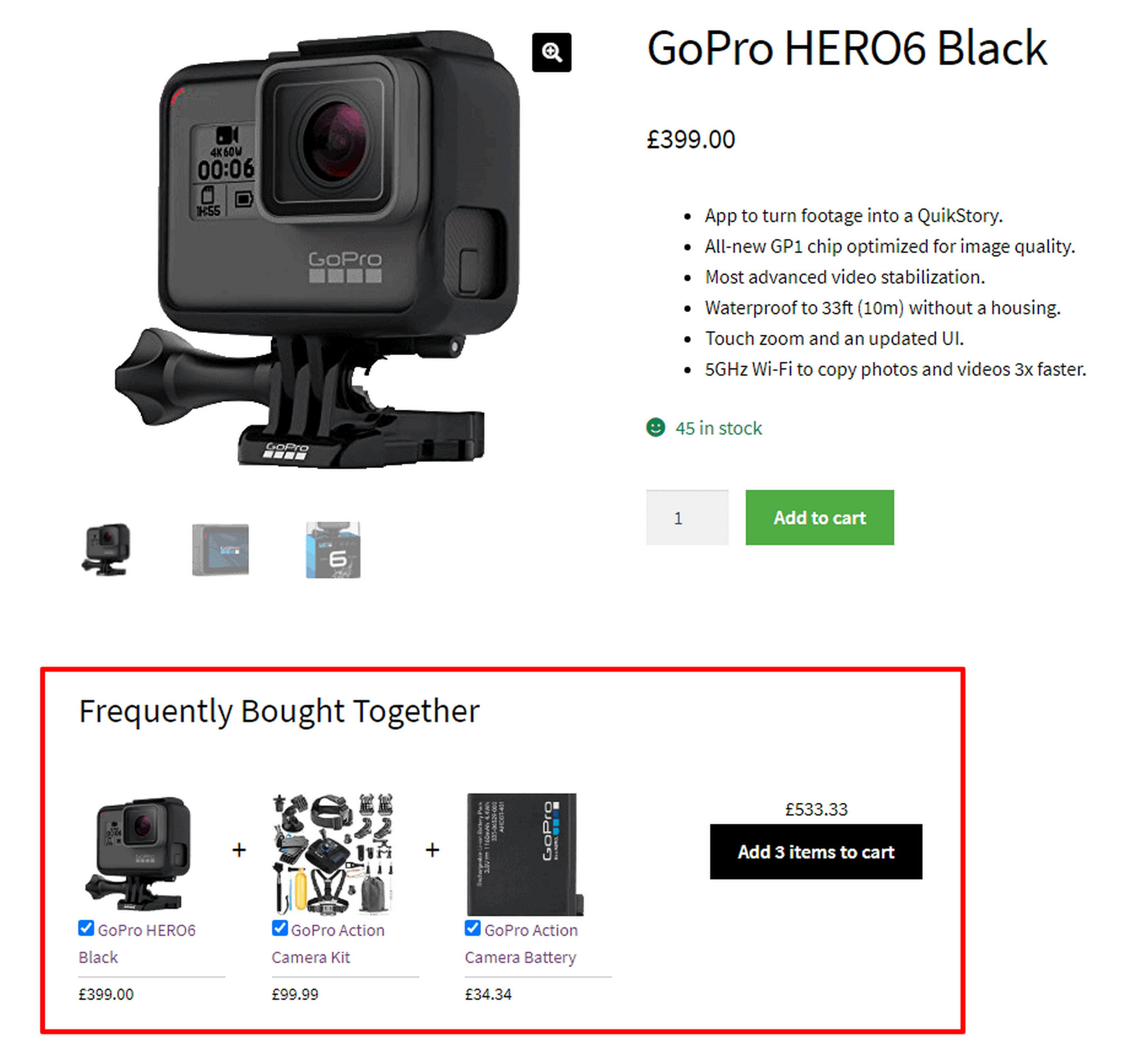
The plugin keeps configuration relatively simple, and the section displays below the product description by default.
One constraint to know upfront: their documentation sets the limit at a minimum of one and a maximum of three companions per product. If you want to offer more than three, this isn't the plugin.
Where it falls short: fewer customization options than most of this list, which is the trade you make for the simplicity.
Price: StoreApps doesn't publish a figure on its product page, so check their site for the current cost.
Best for: stores that want purchase-history pairing without configuration work.
WooCommerce Recommendation Engine
How it chooses: purchase history and view history.
This one is easy to confuse with WooCommerce Product Recommendations. They're different extensions taking different approaches, and the similar names do most of the damage.
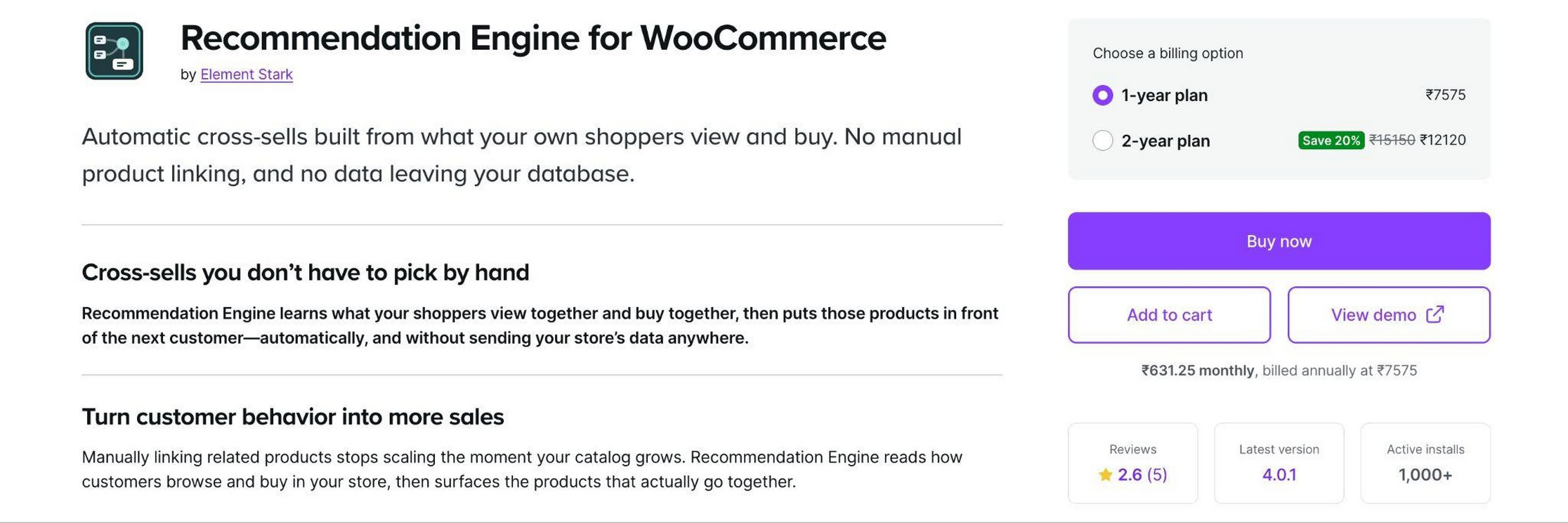
On activation it parses your existing order history to build its recommendation database. It offers three modules: related products by purchase history, related products by views, and products purchased together. The third is the one relevant here, and it specifically means items ordered at the same time.
The distinction between the first and third modules is a useful one. Purchase history links products bought by the same customer at any point, so a customer who buys a flashlight in March and batteries in June links those two. Purchased together means the same order.
The extension is actively maintained. Version 4.0.1 shipped at the end of August 2026.
Where it falls short: the output is recommendation rows rather than a bundle box with checkboxes and a combined total, so it isn't the Amazon pattern even though the underlying signal is right. It's also automatic with little review control.
Price: sold through the WooCommerce marketplace and priced in local currency.
Best for: stores that want purchase-driven recommendations across several page types and don't need the bundle interface specifically.
Group 2: Pairing Manually
WPC Frequently Bought Together
How it chooses: manual, with a catalog fallback.
Its standout feature is per-item bundle pricing, setting a percentage or fixed amount on each bundle item individually. That opens up pricing you can't build elsewhere on this list, like discounting the third item more heavily than the second.
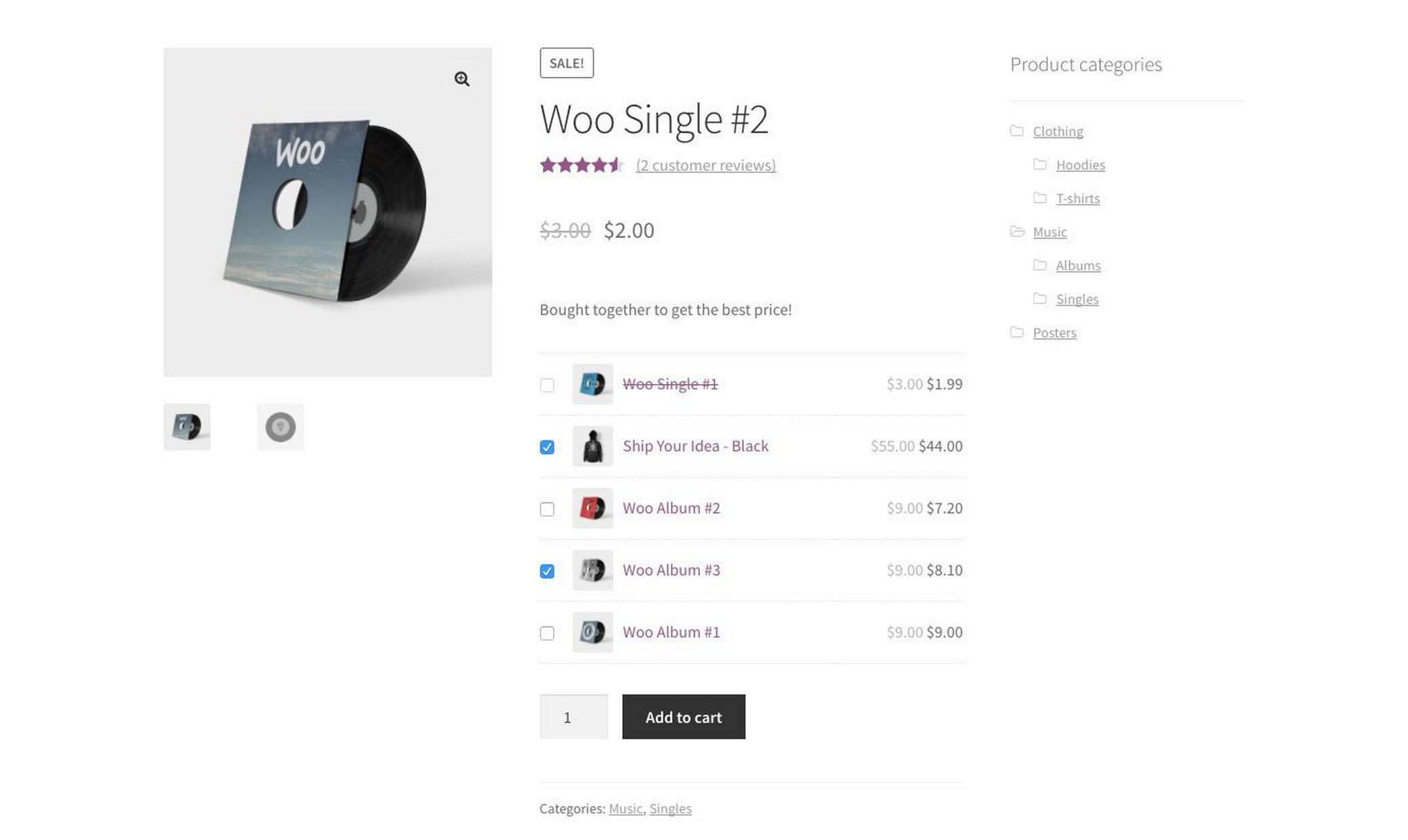
You also get multiple layouts, a default list plus grids at two, three or four columns, drag and drop ordering, and the option to exclude unpurchasable products. If you'd rather not pair every product by hand, it can fall back to showing your related products, cross-sells or upsells instead.
The plugin is free on WordPress.org with a premium version available.
Where it falls short: pairing is manual, so the plugin gives you no help deciding which products belong together. On a large catalog that's the whole job.
Best for: stores that want per-item bundle discounts without paying for them.
YITH Frequently Bought Together
How it chooses: manual, with a catalog-based automatic option.
The automatic option promotes your related products, upsells or cross-sells. It reads catalog data, not purchase history, which is worth stating plainly because the two get described in similar language.
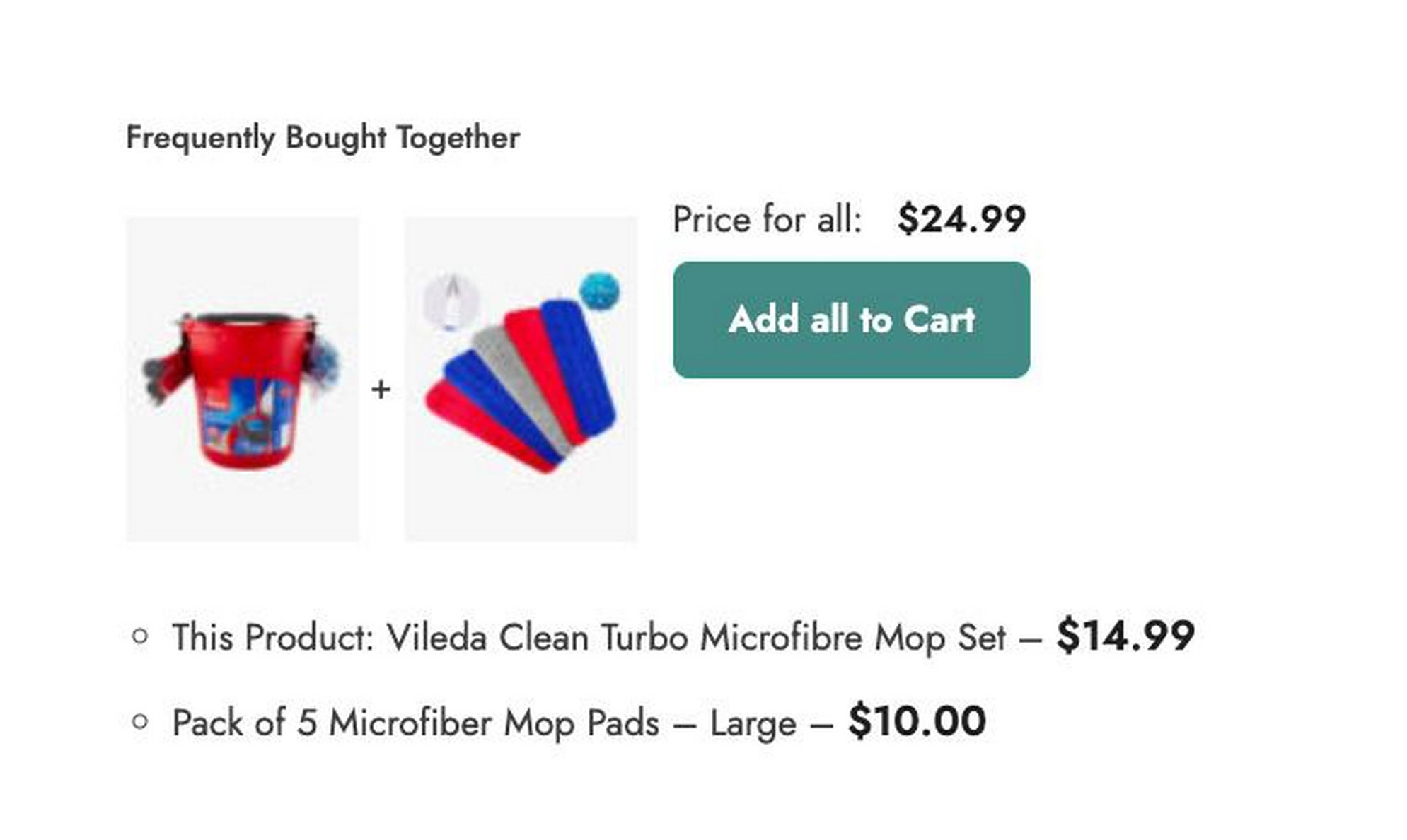
You can link unlimited products to a given item and then cap how many display at once, with the surplus rotating randomly on each page load. A linked products table lets you review and remove pairings without opening each product individually.
The free version is limited. Discounts, variation selection in the popup and the automatic option sit in premium, which carries a 30-day money back guarantee.
Two limits worth knowing. Companion quantities are fixed at one, so you can't offer two of something. And the main product can't be removed from the list.
Where it falls short: the free tier does less than the free options elsewhere on this list, so the comparison really starts at the premium price.
Best for: stores already running other YITH extensions, where this slots into a familiar interface.
UpsellWP
How it chooses: manual, plus targeting rules.
This is particularly useful for large catalogs. Rather than opening each product, you apply bundles by category, tag or SKU, which at a few hundred products is the difference between a weekend and an afternoon.
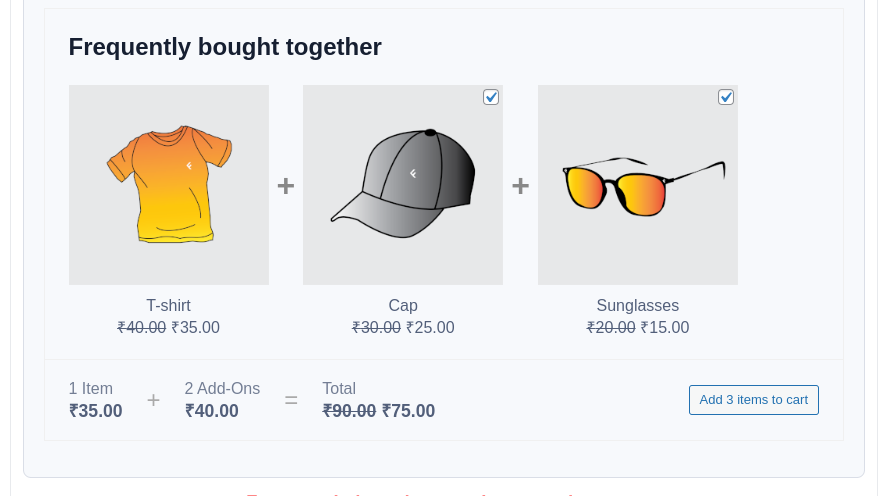
Frequently bought together is one campaign type among several here, alongside checkout upsells and order bumps, so you're getting a broader toolkit than a single-purpose plugin. Bundle discounts are supported.
The free Lite version includes the frequently bought together campaign.
Where it falls short: more surface area to learn than a plugin that does one thing. If a bundle box is all you need, this is more tool than the job requires.
Price: $75 a year for one site, $135 for five, $295 for 25. A 14-day refund window applies.
Their site runs near-permanent flash sales, so the checkout figure is usually lower. We've quoted the regular prices because this page will outlive the sale.
Best for: catalogs in the hundreds, or stores wanting several upsell mechanics from one plugin rather than a standalone bundle box.
Bought Together
How it chooses: manual.
Sold through the official WooCommerce marketplace, this covers the basics without extras. Manual pairing, bundle display, discounts.
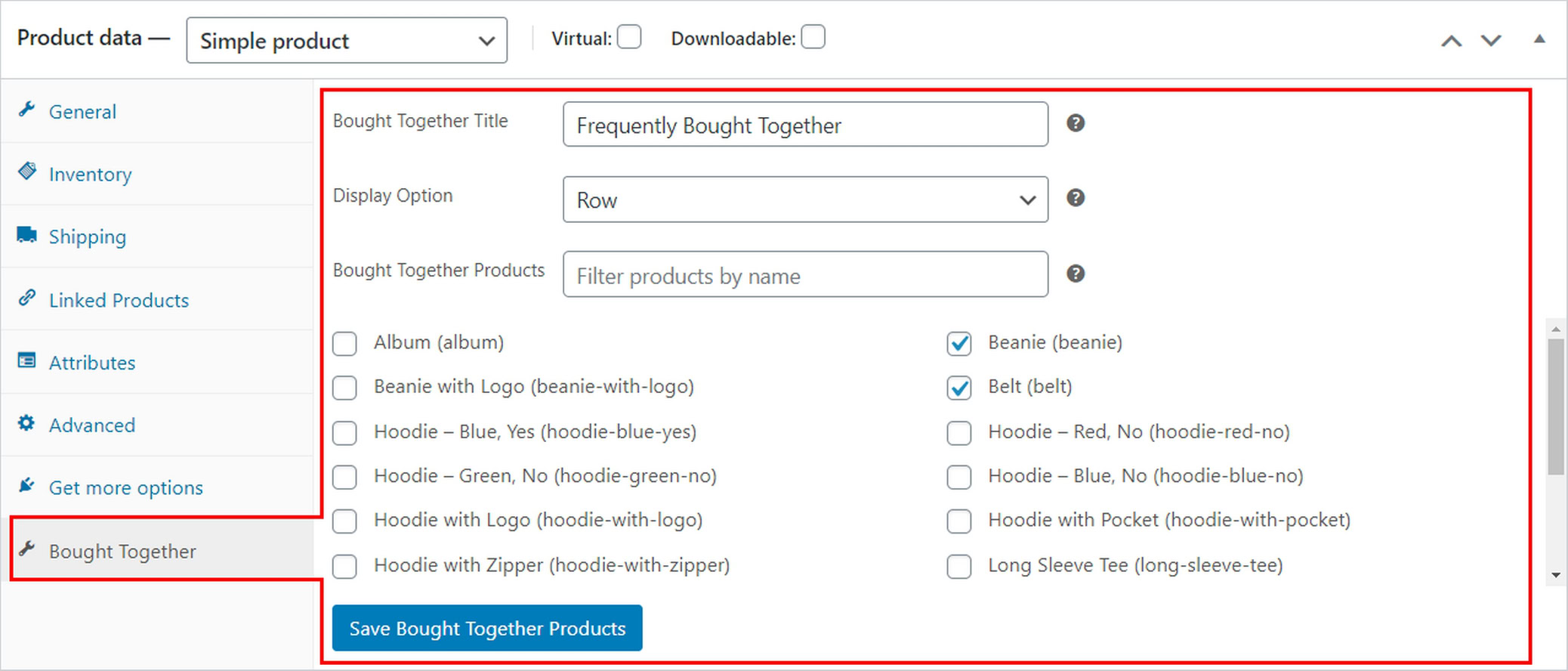
For a paid extension, it's worth checking the current install base and update history before buying.
Price: from $29 a year, with a 30-day money back guarantee. The marketplace prices in local currency, so your figure may differ.
The listing is live as of publication. Worth noting that Premmerce's frequently bought together extension has already been pulled from the marketplace, so this category sees churn.
Best for: stores that prefer everything inside the official marketplace with a single billing relationship.
Group 3: Automatic Pairing From Catalog Rules
WooCommerce Product Recommendations
How it chooses: catalog rules.
This is the official rules engine.
You build engines that filter and sort on category, tag, attribute and price, then weight priority by popularity, ratings or conversion rate. Recommendations can display across more than 20 locations covering product, cart, checkout and post-purchase pages.
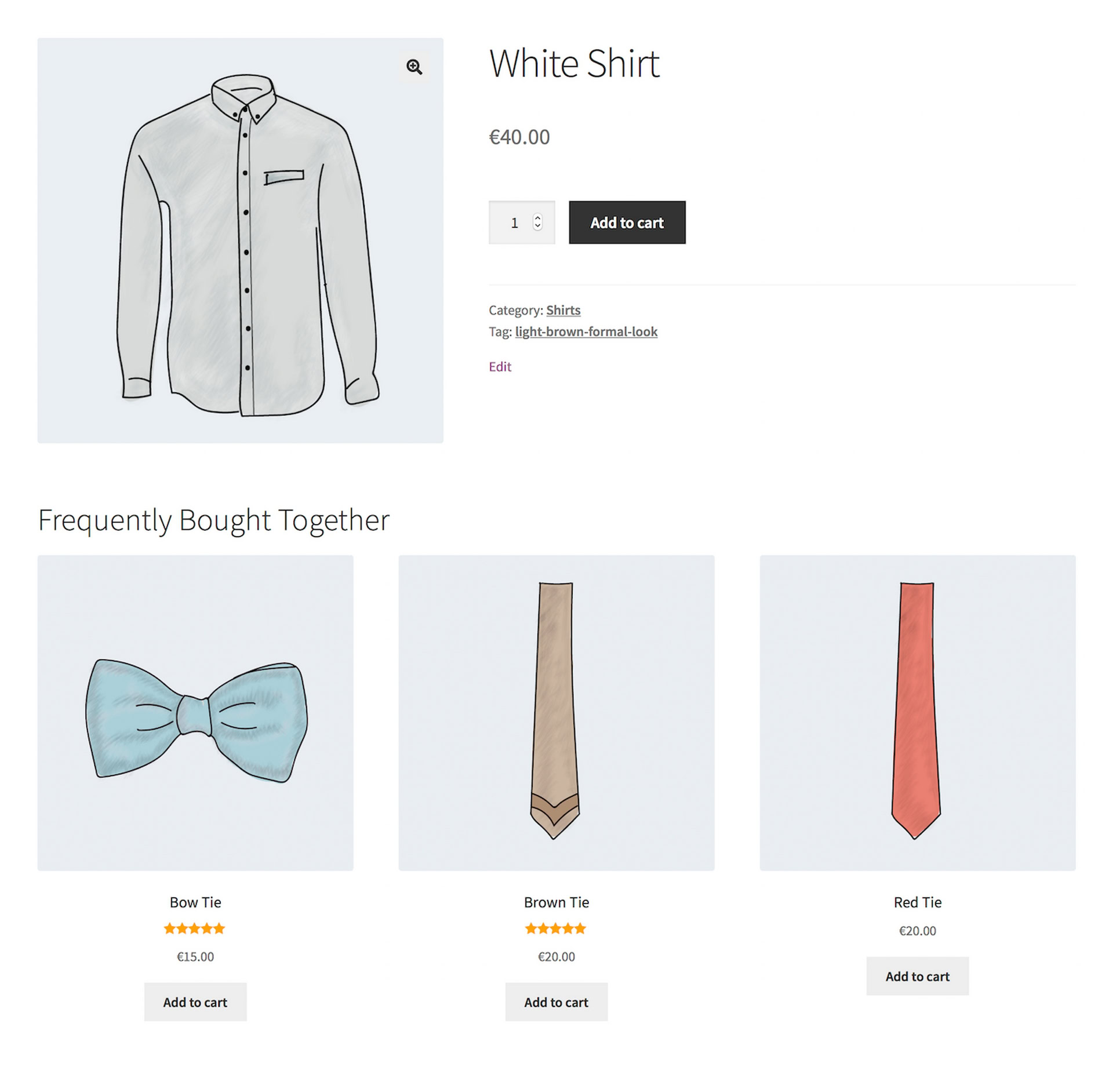
Woo publishes a frequently bought together strategy guide for it, so the use case is supported directly.
Worth being precise about the mechanism, because some articles describe this extension as purchase-history based. Woo's own documentation describes engines built on filtering and sorting rules that you write. Those rules can reference popularity and conversion data, but the pairing logic is yours rather than derived from co-purchases.
Where it falls short: the flexibility is the cost. There's real configuration work before anything appears, and the output is a recommendation block rather than a checkbox bundle.
Best for: stores that want one recommendation system across many locations and are comfortable writing rules.
FunnelKit Cart
How it chooses: catalog, reading your upsell and cross-sell fields.
FunnelKit is on this list because it competes for the same intent, not because it ships a product-page bundle box. Its frequently bought together offer appears in the cart, which by the definition we set at the top puts it outside the strict pattern.
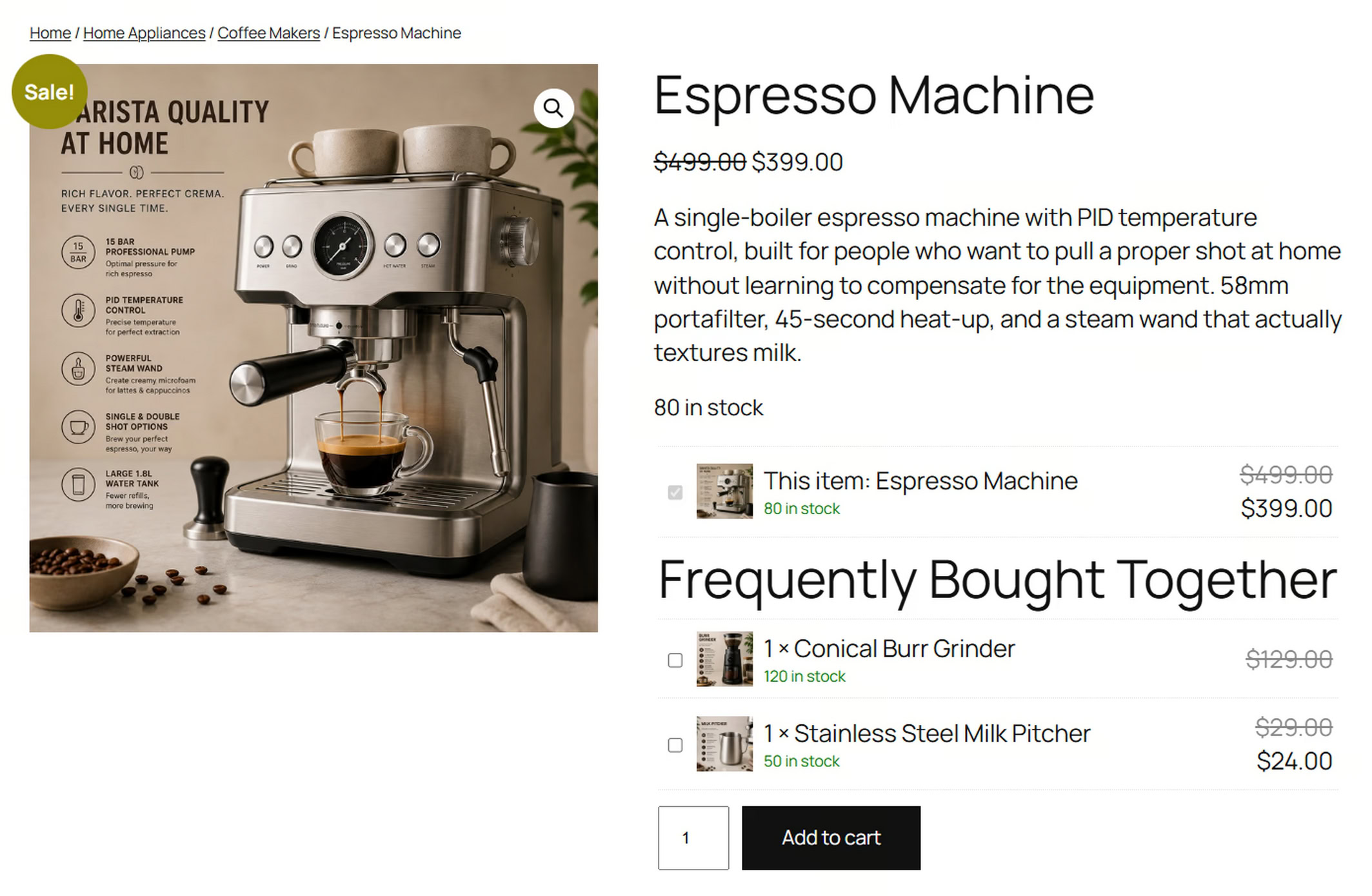
That's a placement difference rather than a flaw, and it's a deliberate one. The offer draws from upsell and cross-sell products relative to what's already in the cart, and falls back to default products so the section is never empty.
It's worth remembering what we said about timing earlier. The cart is a later, harder moment to add to than the product page. If cart-stage offers are what you're after, our Modern Cart review covers that approach in more depth. If you're specifically after the Amazon pattern, this isn't it.
Best for: stores already running FunnelKit that want cart-stage offers rather than product-page bundles.
Comparison Table
| Plugin | How Products Are Chosen | Automation | FBT Interface | Discounts | Free Option | Starting Price |
|---|---|---|---|---|---|---|
| CartFlows | Purchase history, or manual | Suggests, you approve | Checkbox bundle with total | No | Yes, manual widget | Free; $99 to $299/yr, Auto Suggest needs Pro |
| StoreApps | Purchase history | Fully automatic | Product page section | Yes | No | See storeapps.org |
| WooCommerce Recommendation Engine | Purchase history, views | Fully automatic | Recommendation rows | No | No | Marketplace pricing |
| WPC | Manual, catalog fallback | Manual | Checkbox bundle with total | Yes, per item | Yes | Free; premium available |
| YITH | Manual, catalog automation | Manual or automatic | Checkbox bundle with total | Premium only | Limited | Free; premium on yithemes.com |
| UpsellWP | Manual, targeting rules | Manual with rules | Checkbox bundle with total | Yes | Yes, Lite | Free; from $75/yr |
| Bought Together | Manual | Manual | Product page bundle | Yes | No | From $29/yr |
| WooCommerce Product Recommendations | Catalog rules | Rule-driven | Recommendation block | No | No | Marketplace pricing |
| FunnelKit Cart | Catalog, linked products | Rule-driven | Cart upsell | Yes | Yes | Free; paid tiers available |
Auto Suggest requires the CartFlows Pro plan. The free plugin covers manual pairing with the same bundle interface.
Best Free WooCommerce Frequently Bought Together Plugins
Three of the free options here stand out, for different reasons.
WPC is the pick when discounts matter. Per-item pricing in a free plugin is unusual, and it gives you more control over how you structure the offer.
CartFlows gives you the bundle interface itself, checkboxes and a running total, plus manual pairing, with no license or account needed.
UpsellWP Lite includes the frequently bought together campaign, which is worth knowing if you might want its other upsell types later.
YITH's free version exists but does less than these three.
One thing worth knowing: every purchase-history feature covered in this article requires a paid tier.
If you're not sure whether bundles will work on your store, the free route is the sensible test. Install one, set it up on five products, and look at whether bundle orders carry a higher average than single-product orders after a few weeks. WPC costs nothing and gives you discounts. CartFlows' manual widget costs nothing and gives you the checkbox and running total format, with the option to add purchase-history pairing later if the test works.
Single Purpose or Part of a Suite
There's one more dimension worth weighing, and it isn't a feature you'll find on a comparison table.
Four options here aren't only frequently bought together plugins. CartFlows is a funnel builder, covered in more depth in our CartFlows review. UpsellWP is an upsell suite with several campaign types. FunnelKit Cart is one piece of a larger funnel toolkit. WooCommerce Product Recommendations is a recommendation system that happens to cover this use case. WPC, YITH, StoreApps, Recommendation Engine and Bought Together are closer to doing one job.
That difference matters in both directions.
If checkout optimization, order bumps, cart abandonment recovery or post-purchase upsells are already on your list, a suite means one license, one vendor and one support channel instead of assembling three plugins that each want their own settings page. The bundle box effectively arrives as part of work you were going to do anyway.
If a bundle box is genuinely all you need, a suite is overhead. More settings to navigate, more surface area to learn, more plugin doing things you'll never switch on.
The test is simple enough. Look at the rest of what the plugin does and ask whether you'd use any of it in the next six months. If the answer is yes, the wider toolkit is doing real work for you. If it's no, pick something that does one job and does it without ceremony.
How to Choose
Catalog size alone doesn't decide this. The variables that matter are how many products you have, how many orders you've accumulated, how much of the work you want to hand over, and whether you want one tool or several.
Under 30 products. Manual pairing is usually practical at this size, and you may well have enough catalog knowledge to choose strong companions yourself. Choose on discounts and layout instead. WPC free covers it.
A few hundred products. Manual pairing becomes a real time cost. UpsellWP's ability to apply bundles by category, tag or SKU is the feature that solves this.
Small catalog, high order volume. This combination gets missed. Forty products and several thousand orders means manual pairing is easy, but you're also sitting on genuinely useful co-purchase data. The purchase-history group is worth it even though the catalog is small.
Large catalog with real order history. The strongest case for purchase-history pairing, because the manual work is impractical and the data is there. Pick CartFlows if you want to approve pairings first, or the fully automatic options if you'd rather not touch it.
Brand new store. There's no co-purchase data to read yet, so choose on manual usability and catalog rules, then revisit in a few months once orders have accumulated.
Whichever you pick, start with five products rather than fifty. Choose the five where the companion is obvious, then check after a few weeks whether orders containing a bundle carry a higher average than single-product orders. Expand from what worked.
Configuring 200 products before you know whether your shoppers respond to bundles is how this becomes a wasted weekend.
If you're building out the rest of your stack at the same time, our roundup of the best WooCommerce plugins covers the adjacent tools worth having.
Once you know which approach fits, start with the free option in that group and upgrade only if the data justifies it.
For the full setup walkthrough, see how to add frequently bought together to WooCommerce.
Frequently Asked Questions
Does WooCommerce Have Frequently Bought Together Built In?
No. WooCommerce includes related products, upsells and cross-sells, but none of them produce a bundle box with checkboxes, a combined total and a single add to cart button. That requires a plugin.
What's the Difference Between Frequently Bought Together and Cross-Selling?
Frequently bought together is one specific format of cross-sell. It appears on the product page as a bundle the shopper accepts in one action.
Cross-selling more broadly can happen anywhere, including the cart and checkout, and usually appears as individual products to click through one at a time.
Is There a Free Frequently Bought Together Plugin for WooCommerce?
Several, and three of them are worth your time. WPC is free on the WordPress plugin directory with per-item discount control. CartFlows includes the manual bundle widget in its free plugin. UpsellWP's Lite version includes its frequently bought together campaign. YITH has a free version too, though a more limited one.
What's the Difference Between WooCommerce Product Recommendations and WooCommerce Recommendation Engine?
They're separate extensions that get confused constantly because of the names.
Product Recommendations is a rules engine. You build recommendation engines that filter and sort products by category, tag, attribute and price, and display them across many locations.
Recommendation Engine parses your order history and generates recommendations from what customers viewed and bought, including a module specifically for products purchased in the same order.
One asks you to define the logic. The other derives it from your data.
Do These Work With Variable Products?
Variable product support varies by plugin, and in some cases sits behind a premium tier. CartFlows supports variable products in its free version. Support for grouped and external products is more limited across the category, partly because they can't be added to the cart in a single step. Check the documentation before buying if your catalog relies heavily on either.
Should I Discount the Bundle?
Not automatically. A discount reduces friction at the decision point, and it also reduces margin on items some shoppers would have bought anyway.
Discounts tend to earn their place when the companion is a genuine add-on the shopper hasn't considered. They're less necessary when the companion is something the main product plainly requires, like a memory card for a camera.
If you want to test it, WPC's per-item pricing gives you unusually granular control over the offer.
How Much Will This Increase Average Order Value?
There isn't a reliable universal percentage, because the result depends heavily on the products, the audience and the offer. If you want benchmark figures with sources attached, CartFlows keeps a cross-selling statistics library worth reading alongside your own numbers.
Run it against your own figures instead. At 400 orders a month with a $20 companion, every 1% of orders that add that companion is roughly $80 in additional revenue, before discounts, refunds or other costs. How far above that you land depends on how genuinely the companion belongs with the product.
