





Most WooCommerce stores have no recovery system for abandoned carts. Not because they don’t want one. Because WooCommerce doesn’t provide one.
If a shopper types their email at checkout and leaves before paying, that contact detail disappears. The sale is gone and there’s nothing in the default setup to do anything about it.
The gap shows up in three ways.
- No email capture at checkout: If they don’t complete the order, their details vanish with the session
- No urgency: Most abandoned carts convert within the first hour, but stores with no automation miss that window entirely
- No scale: Manually following up even a fraction of abandoned carts isn’t realistic once order volume grows
Nearly 70% of shopping carts are abandoned before purchase. That’s not a rounding error. It’s the majority of people who reached checkout.
Cart Abandonment Recovery plugs that gap.
It captures the shopper’s email keystroke by keystroke as they type it into the checkout form, before they click Place Order and before the session expires.
If they leave without buying, it fires an automated follow-up sequence with a 1-click restore link that puts them straight back at checkout.
Stores using the plugin recover up to 45% of abandoned carts.
Pro extends the system with SMS and WhatsApp alongside email, a rule engine to control exactly which carts trigger which sequences and coupon automation that generates and expires unique per-cart discount codes.
It’s built by Brainstorm Force, the team behind CartFlows, the Astra theme and Spectra and trusted by over 4 million websites worldwide.
The free version has been downloaded over 3 million times on WordPress.org and earned 600+ reviews.
Read the full Cart Abandonment Recovery launch announcement for the backstory on why it was built.
Quick facts about Cart Abandonment Recovery:
- Investment: $99/year Annual or $279 Lifetime
- Free version: Available from WordPress.org
- Setup time: Under 5 minutes
- Recovery window: First 1-3 hours delivers highest conversion rate
- Company: CartFlows / Brainstorm Force
- Requires: WooCommerce
Cart abandonment recovery is one of those features where the setup looks simple but the results vary a lot depending on timing, sequence design and which channels you enable.
I paid particular attention to how quickly the first recovery email landed after abandonment, whether the 1-click restore link held up across different cart configurations and how the SMS and WhatsApp channels performed for stores with mobile-heavy traffic.
Here’s what I found.
Cart Abandonment Recovery Performance
Ease of implementation: 9.5/10
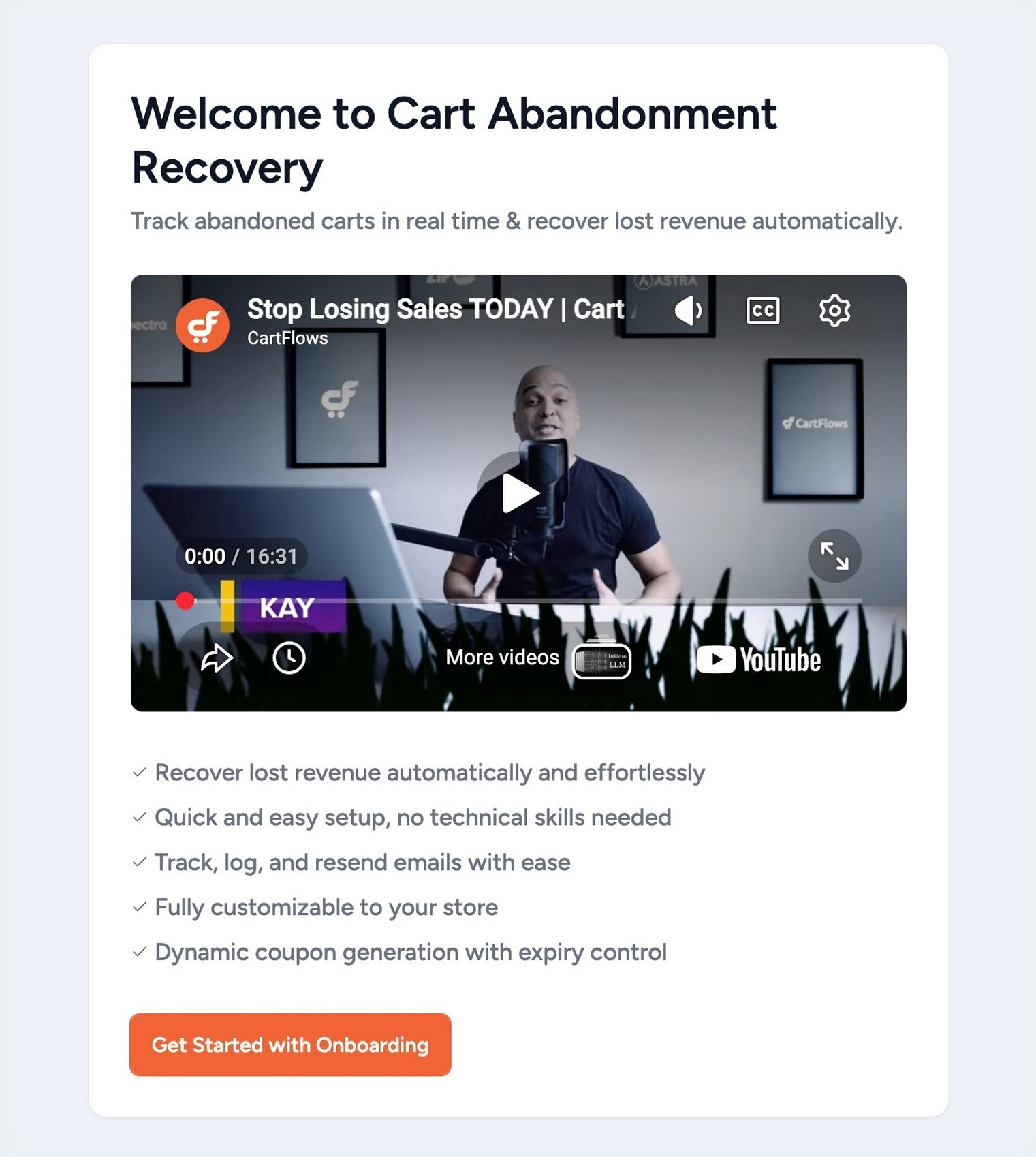
The guided onboarding (added in v2.0.5) walks you through activation. Three email templates are pre-configured and the plugin sends from your existing WordPress mail setup, with no third-party email service needed to get started.
The whole thing takes under five minutes.
If you’ve ever set up a WooCommerce plugin that demanded API keys, a separate account and a setup wizard before anything worked, this is the opposite of that.
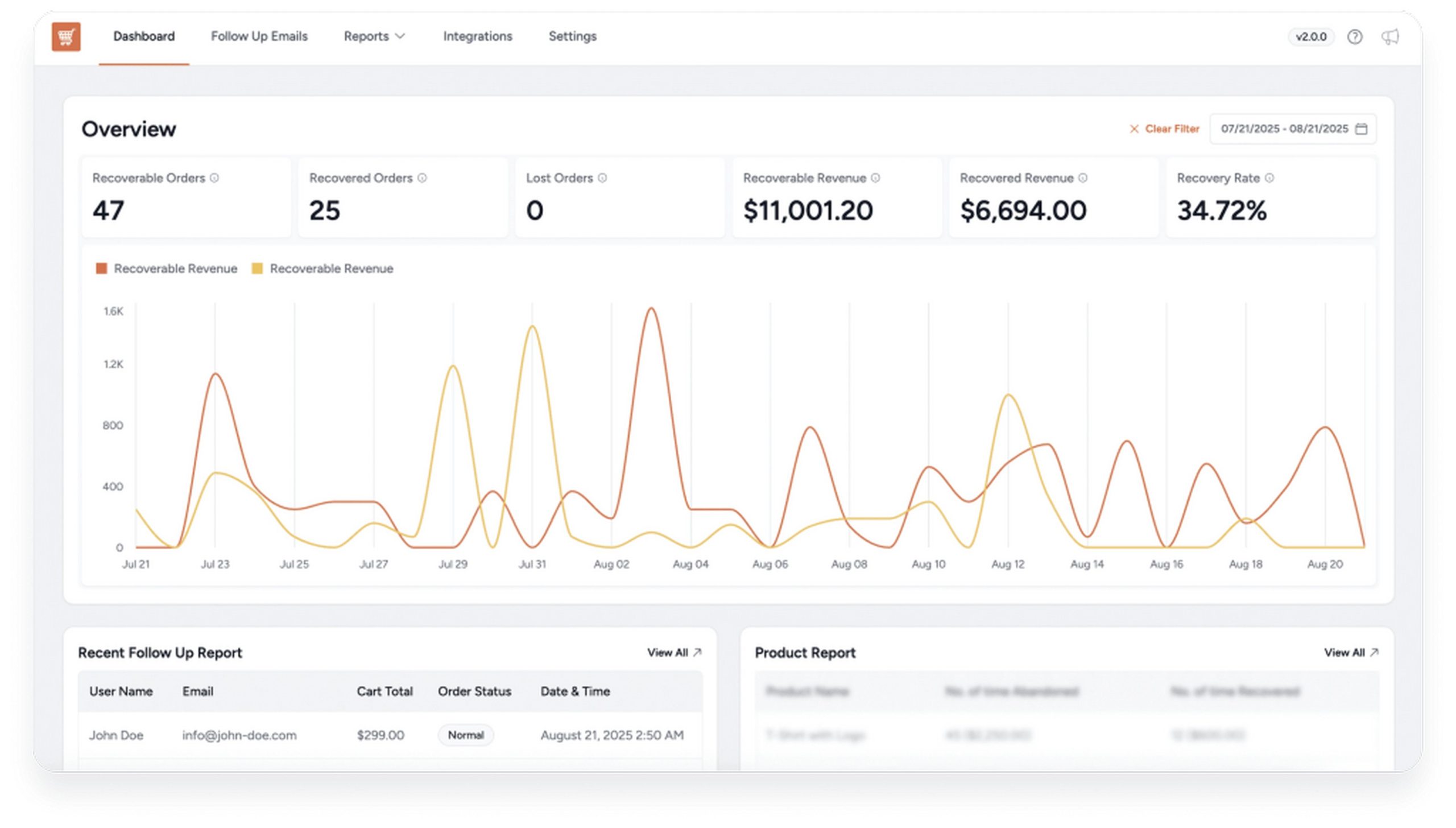
Revenue impact: 9/10
The reason cart recovery has such strong ROI is that you’re not doing cold outreach. Shoppers found your store, picked a product, added it to their cart and started entering their details.
They were close. The follow-up is just removing whatever got in the way.
The plugin’s own data cites recovering up to 45% of abandoned carts. Run the numbers for your store: 100 abandoned carts a month at a $60 average cart value, 8% recovered – that’s $480 back every month.
Pro costs just $8.25 a month. The math is simple.
Technical stability: 9/10
Cart Abandonment Recovery has one of the stronger update records in the BSF portfolio. Security hardened via PatchStack in v2.1.0 and v2.1.1, block checkout compatibility fixed in v2.0.7, rule engine conditions refined in v1.1.1. Multiple updates across both free and Pro in Q4 2025 and Q1 2026.
I didn’t see any compatibility issues across the checkout configurations I tested. If something does come up, priority support is included with Pro.
Who Is Cart Abandonment Recovery Pro For?
Cart Abandonment Recovery Pro works best for:
- WooCommerce stores that have no abandoned cart recovery system in place.
- Stores where even a 10% recovery rate meaningfully impacts monthly revenue.
- Store owners who want multi-channel recovery. Email alone works, but SMS and WhatsApp significantly increase reach and response rates, especially for mobile-first audiences.
- Stores running promotions. Coupon automation inside recovery emails converts those who just need a small nudge.
- Agencies managing multiple stores. The Lifetime plan covers 30 sites with no per-store subscription.
- Non-technical store owners. The entire sequence runs automatically once configured, with guided onboarding for first-time setup.
- Digital product and course sellers. Software, downloads and courses are just as recoverable as physical products. The 1-click restore link works for any WooCommerce product type.
It’s probably not the right fit for stores with very low order volume where manual follow-up is still practical, or businesses that need a full CRM or email marketing platform rather than a dedicated recovery tool.
For most other WooCommerce stores, it could make a real difference.
Cart Abandonment Recovery Features
Both the free and pro versions are built around the same core system, email capture, sequence delivery and cart restore.
Pro layers in the channels (SMS, WhatsApp), the intelligence (rule engine, coupon automation) and the reporting (per-email insights, product reports) that make the system worth optimizing once you’re seeing real recovery volume.
1. Automatic Email Capture at Checkout (Free)
WooCommerce doesn’t capture emails from incomplete checkouts by default, Cart Abandonment Recovery does.
It captures the email the moment a shopper types it into the checkout form, before they place an order, before they leave, before the session expires.
This is the foundation everything else runs on. No captured email means no follow-up. With it, every partial checkout becomes an opportunity.
Pro adds a validation layer to filter out disposable email domains and known spam addresses before they enter the recovery queue.
I think this is worth calling out because a cluttered list skews your recovery stats and wastes sequence sends on addresses that will never convert. (More on that in Feature 13.)
2. Automated Recovery Email Sequences (Free)
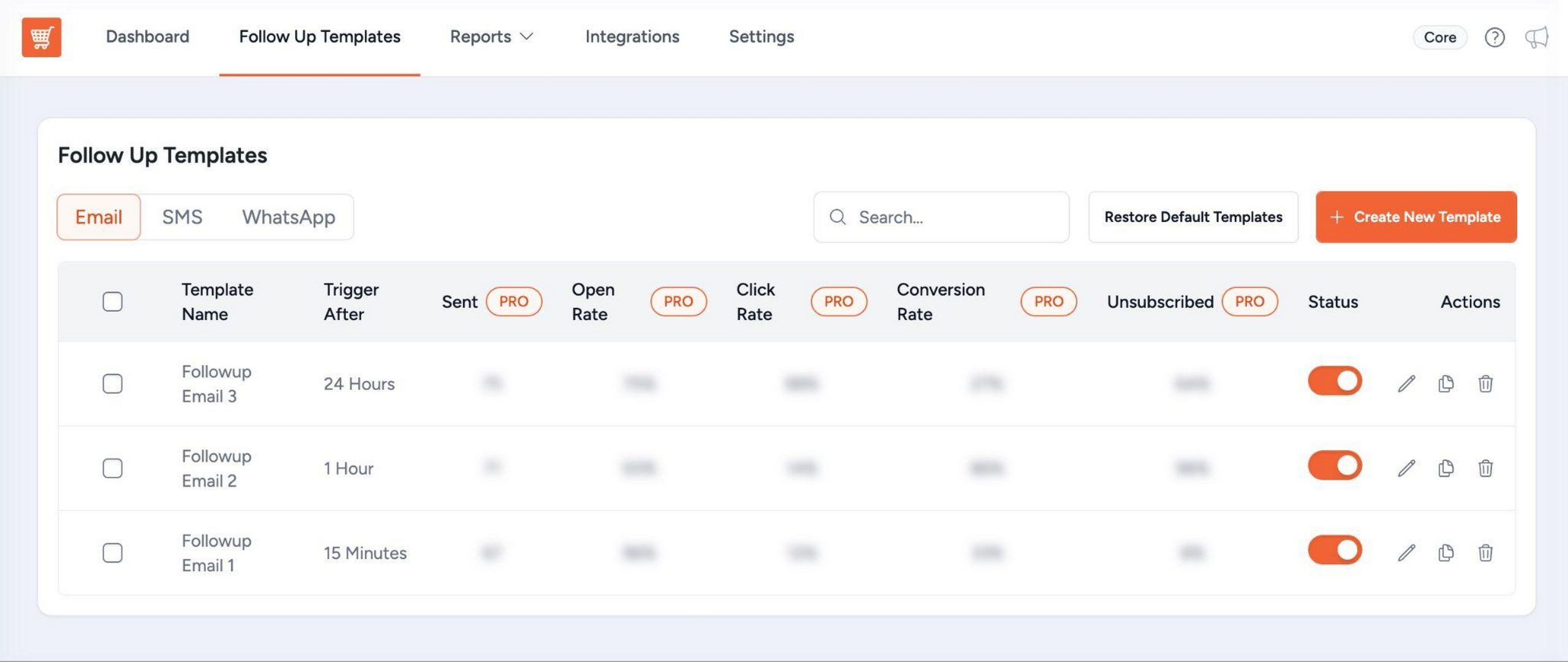
Once an email is captured, the plugin monitors whether the order completes. If it doesn’t, it fires a pre-set WooCommerce abandoned cart email sequence at timed intervals – 15 minutes, 1 hour, 24 hours, or whatever schedule you configure.
Three pre-built templates ship with the free version. Each contains a 1-click cart restore link.
Smart tracking stops the sequence the moment an order completes, so nobody gets a follow-up after they’ve already purchased. That automatic stop is more important than it sounds as a post-purchase recovery email is a trust-killer.
Out-of-stock warning emails are also included free. If products go out of stock before the shopper returns, the plugin notifies them. It’s a small edge case but a good one as it prevents disappointed customers clicking a restore link for items that are no longer available.
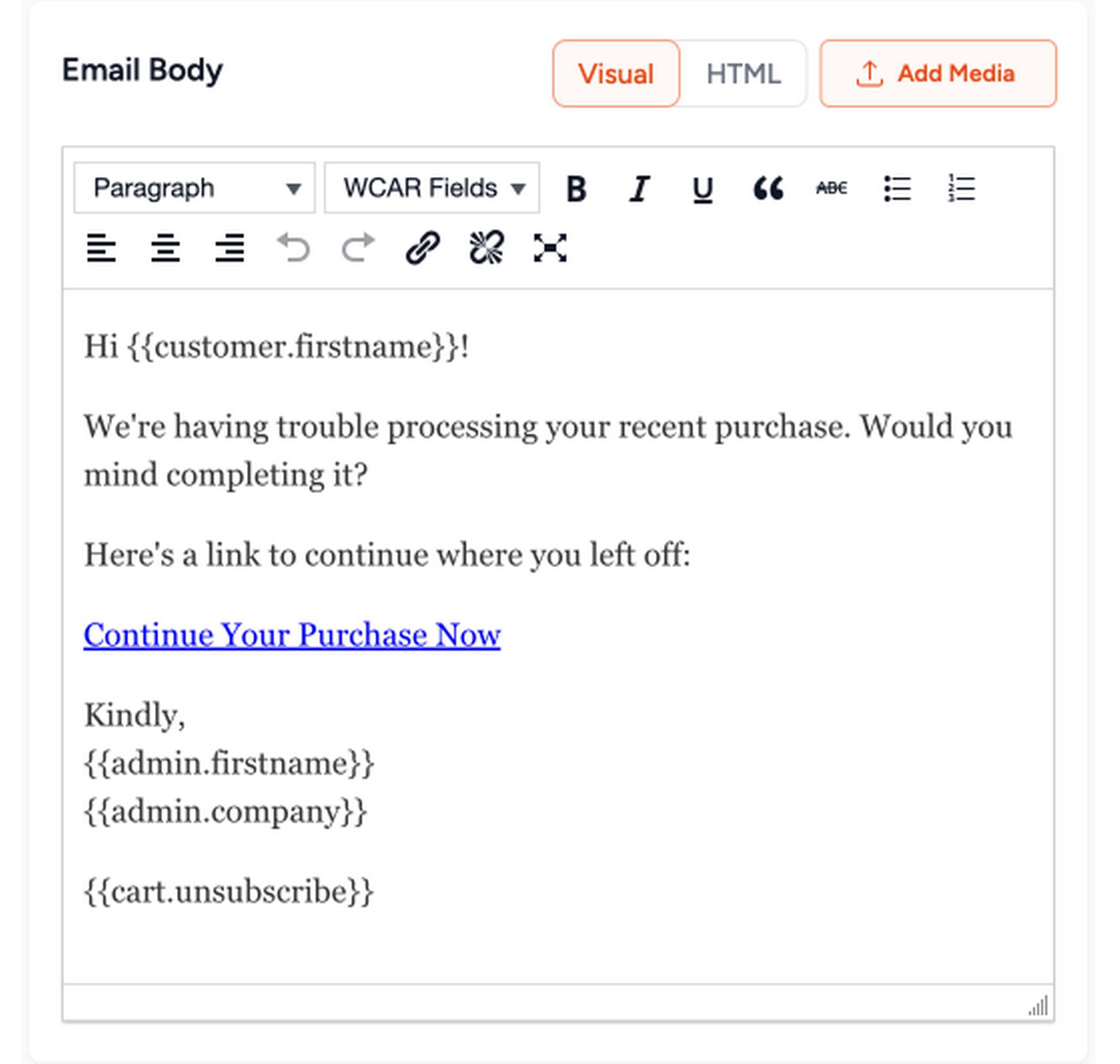
The TinyMCE email editor (improved in v2.1.0) gives full control over template copy, layout and personalization without touching code.
3. 1-Click Cart Restore Links (Free)
Every recovery email includes a unique link that rebuilds the shopper’s exact cart with the same products, quantities and checkout details pre-filled. One click and they are back at checkout, ready to complete the purchase. No re-adding items, no re-entering details.
This is the biggest friction reducer in the whole recovery system. Most people don’t abandon because they changed their mind. They got distracted. A restore link removes every barrier to their return.
4. Coupon Code Creation and Delivery (Free + Pro)
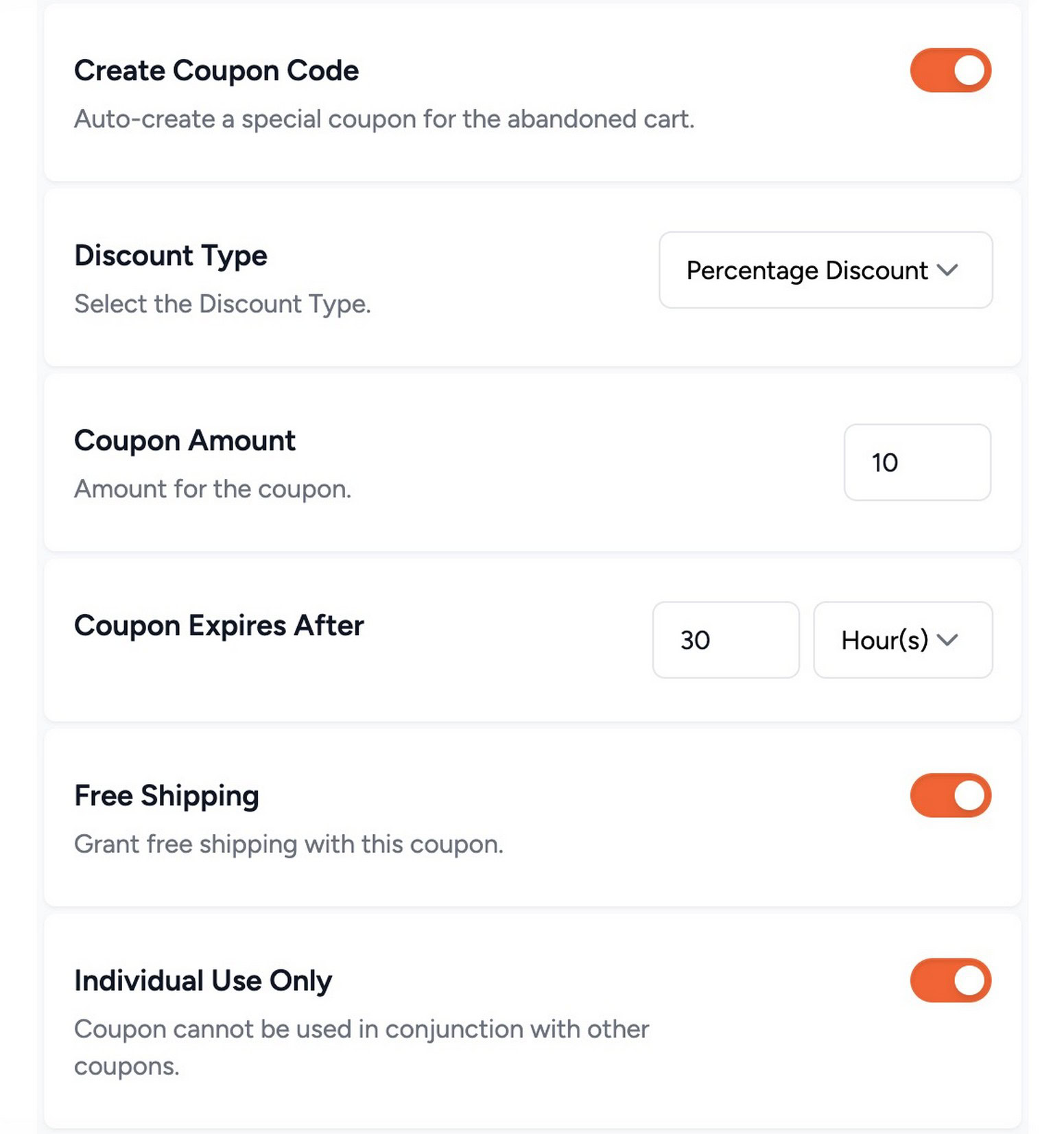
Recovery emails can include discount codes to incentivize completion.
The free version supports manually created coupons in emails. Pro adds full automation:
- Auto-generate unique, per-cart, time-limited coupon codes: One per abandoned cart, not a shared code everyone uses
- Coupon linked directly to checkout: The generated coupon embeds into the cart restore link so the discount applies automatically when the shopper clicks. No copy-pasting, no code entry required
- Cart subtotal rules: Only send a coupon when the cart exceeds a set value so you’re not discounting every $5 cart
- Send manually created custom coupons for campaigns where a fixed code makes more sense
Without Pro’s cart subtotal rule, a shared coupon goes out to every abandoned cart regardless of size.
A $200 cart and a $12 cart get the same discount, which either kills margin on your best potential sale or wastes a discount on an order that wasn’t worth the incentive.
That’s a problem I see a lot of stores miss until it shows up in their numbers.
Unique per-cart codes also outperform shared codes on conversion. They create genuine urgency and can’t be forwarded to friends or posted on coupon sites.
5. SMS Recovery Messages (Pro)
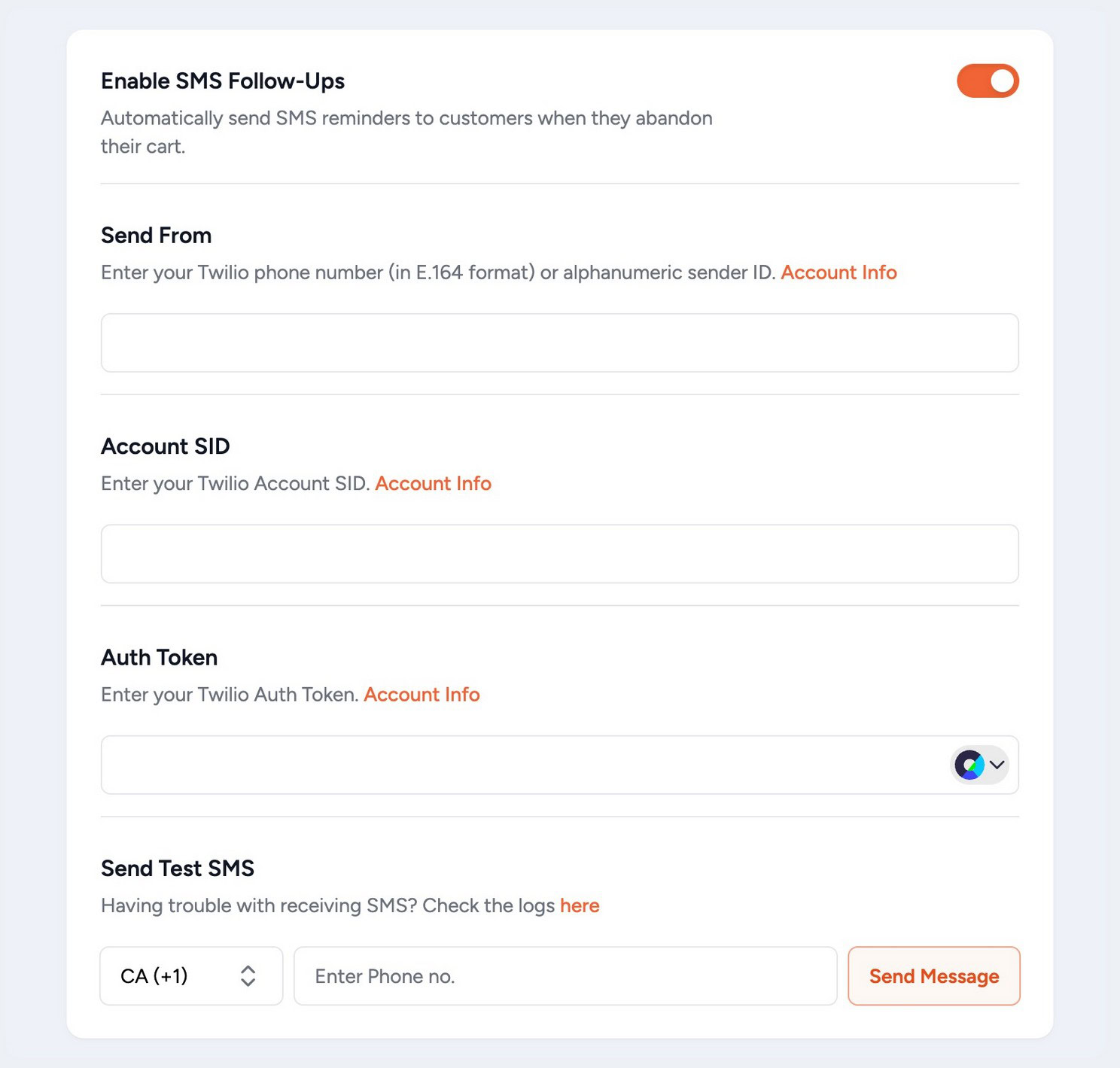
SMS recovery reaches shoppers faster than email. Pro adds SMS follow-up sequences via Twilio integration alongside your emails.
SMS has significantly higher open rates than email and is typically read within minutes. Adding SMS, for example, an email at 1 hour followed by an SMS at 3 hours, expands the recovery window and reaches shoppers who may have missed the email.
A dedicated country code field (added v1.2.0, improved v1.2.1) ensures accurate phone number formatting across international stores, improving deliverability.
Each SMS template also shows performance tracking metrics, sent count, delivery rate and campaign effectiveness. I like that it mirrors the same data discipline you’d apply to email sequences.
Note: SMS requires a separate Twilio account for sending.
6. WhatsApp Follow-Up Sequences (Pro)
WhatsApp recovery went live in v1.2.0. Pro now supports full WhatsApp follow-up sequences alongside email and SMS so you have three independent recovery channels from a single plugin.
Adding WhatsApp reaches shoppers who may have ignored the email and missed the SMS.
WhatsApp is the primary messaging platform for a large portion of mobile users worldwide. It’s particularly effective for stores with international traffic or audiences who are more active on messaging apps than email.
Each WhatsApp message includes a cart restore link. The sequence is configured from the same follow-up interface as email and SMS, with independent timing controls per channel.
7. Smart Rule Engine (Pro)
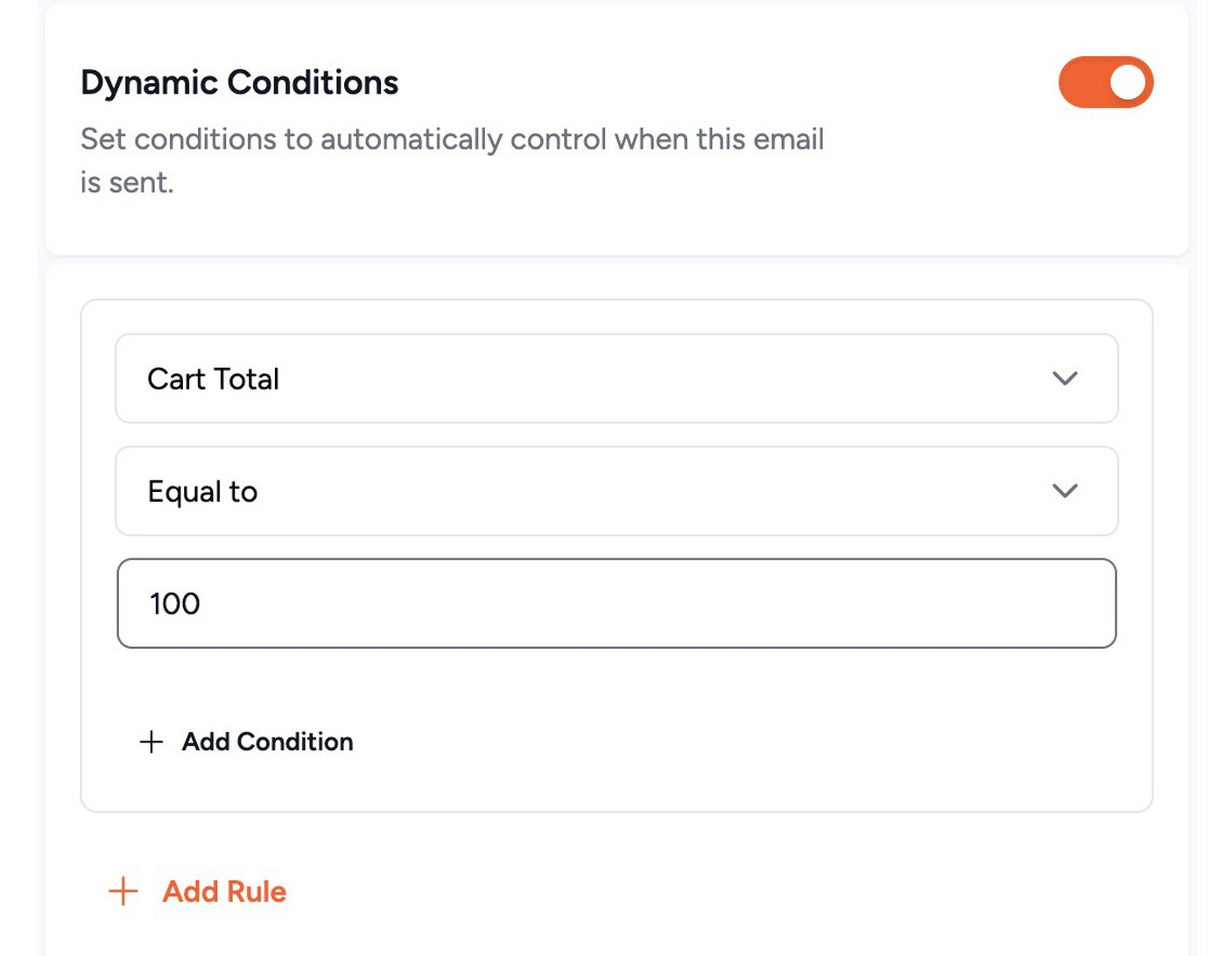
Not every abandoned cart should trigger the same recovery sequence. A $15 cart and a $400 cart should be treated differently.
The smart rule engine gives full control over the logic behind every sequence.
Without it, every abandoned cart gets the same treatment regardless of value, product type, or customer history. High-value carts that warranted a personalized discount get a generic email. Low-value carts that don’t justify a coupon get one anyway.
Rule conditions available:
- Exclude specific products from triggering recovery emails
- Send separate sequences for specific products
- Skip specific emails for specific order types
- Trigger coupon codes only when cart subtotal exceeds a set amount
- Disable tracking for specific user roles (admins, staff)
- Exclude sending based on order status
I think the rule engine is what makes Cart Abandonment Recovery Pro viable for stores running real volume, not just a set-it-and-forget-it tool for smaller operations.
The bluntness of a one-sequence-fits-all approach shows up fast when you’re processing hundreds of abandoned carts a month.
8. Email Reporting and Insights (Free + Pro)
Email Reports (Free): How many carts were abandoned and how many were recovered. Simple, useful and a good baseline for any store.
Email Insights (Pro): Per-email performance metrics, sent count, open rate, click rate, unsubscribe rate. This is where you identify exactly which email in your sequence converts and where shoppers drop off.
Without this, you’re guessing what’s actually doing the work.
Product Reports (Pro): Per-product abandoned and recovered stats, showing which products are abandoned most frequently. A date-range filter (added v1.1.0) makes it easier to isolate performance across specific campaigns or time periods.
Admin recovery reports: Periodic summary emails sent to the store admin. Weekly report logic was improved in v2.0.6 for better reliability.
9. Coupon Lifecycle Management (Pro)
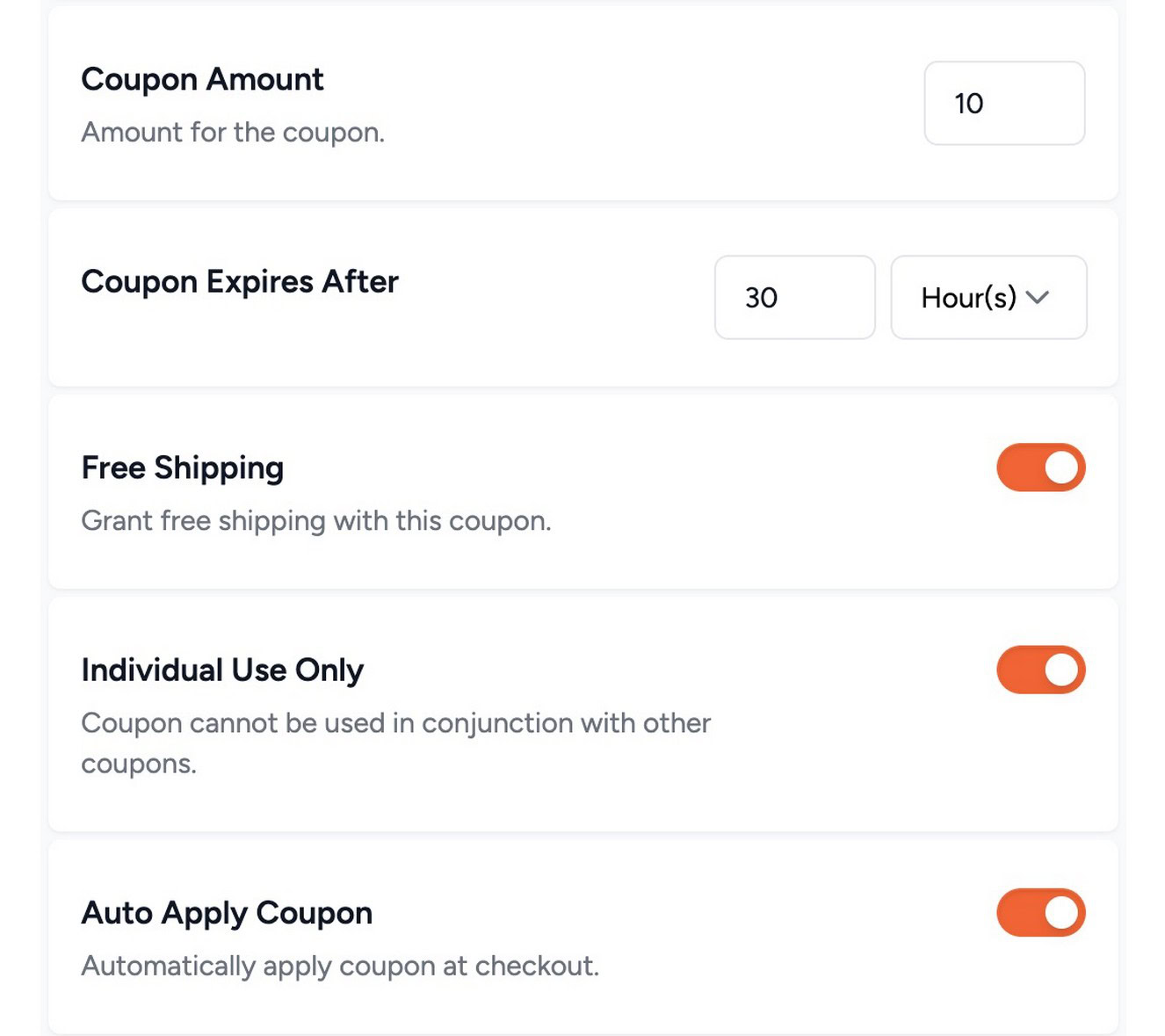
Once coupon codes start going out in recovery emails, they accumulate fast. Without lifecycle controls, your WooCommerce coupon list fills with hundreds of stale, unused codes.
This creates clutter, a harder admin experience and a potential vulnerability if old codes are discovered and used later.
Pro gives full control over what happens after delivery:
- Set expiry time on auto-generated coupons: The code expires in 24 or 48 hours, creating urgency and preventing use weeks after the recovery window closes
- Auto-delete unused coupons after expiry: Your coupon list stays clean automatically, no manual housekeeping required
- Remove any coupon from the admin at any time: Instant recall if something goes wrong
- Send manually created custom coupons: For campaigns where a fixed code makes more sense than a unique one
For stores running active recovery campaigns at any real volume, say, 50+ abandoned carts per month, this is the feature that keeps operations manageable.
Without it, the coupon list becomes a mess quickly.
10. OttoKit Integration (Pro)
Recovery doesn’t have to end when a cart is recovered.
Most stores treat that moment as the finish line. It’s actually a better starting point. You now have a confirmed buyer who responded to follow-up, which is exactly the kind of signal a CRM or email marketing tool should know about.
OttoKit connects Cart Abandonment Recovery to 1,000+ apps including Gmail, Slack, Mailchimp, ActiveCampaign, HubSpot and more.
Tag the customer in your CRM when they recover, add them to a post-purchase sequence, fire a Slack notification for high-value orders, or trigger a retargeting audience.
The recovered cart event becomes the start of a broader automation, not the end of one.
11. Webhooks (Pro)
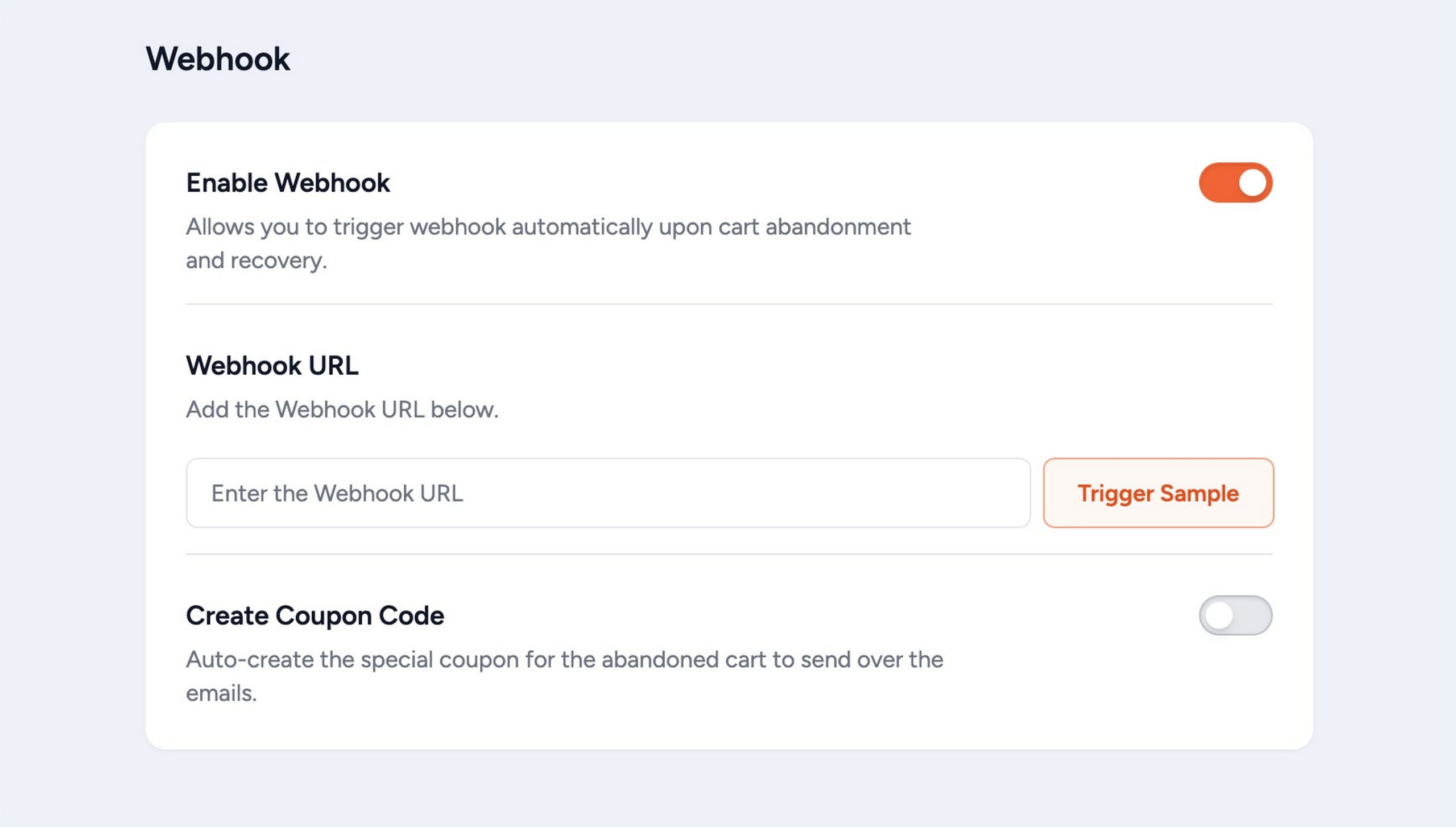
Webhooks are for stores that already have a technical stack and want Cart Abandonment Recovery to feed into it rather than around it.
When an abandonment event fires, a webhook payload goes out in real time to any tool that can receive it, custom CRMs, Mautic, Campaign Monitor, data warehouses or internal dashboards.
If OttoKit covers the no-code automation use case, webhooks cover everything else. I think it’s the right call to include both rather than forcing every store through a single integration path.
12. GDPR Consent Checkbox (Free)
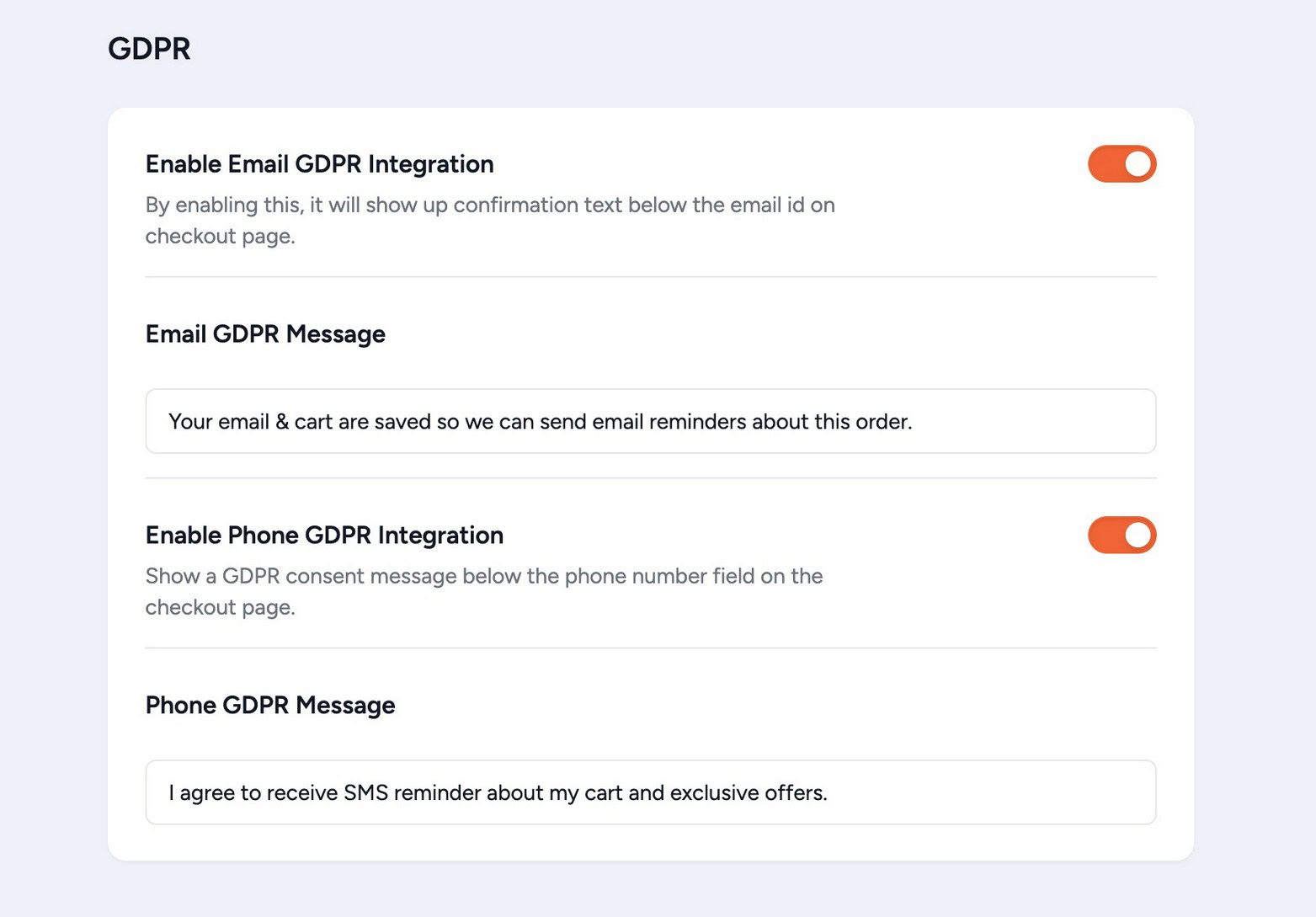
A GDPR consent checkbox can be enabled on the checkout page so customers explicitly consent before their email is captured. It’s configurable from plugin settings without any code.
This is a free feature and it’s a sensible one to have enabled from the start if your store has any EU traffic.
13. Domain and Email Validation (Pro)
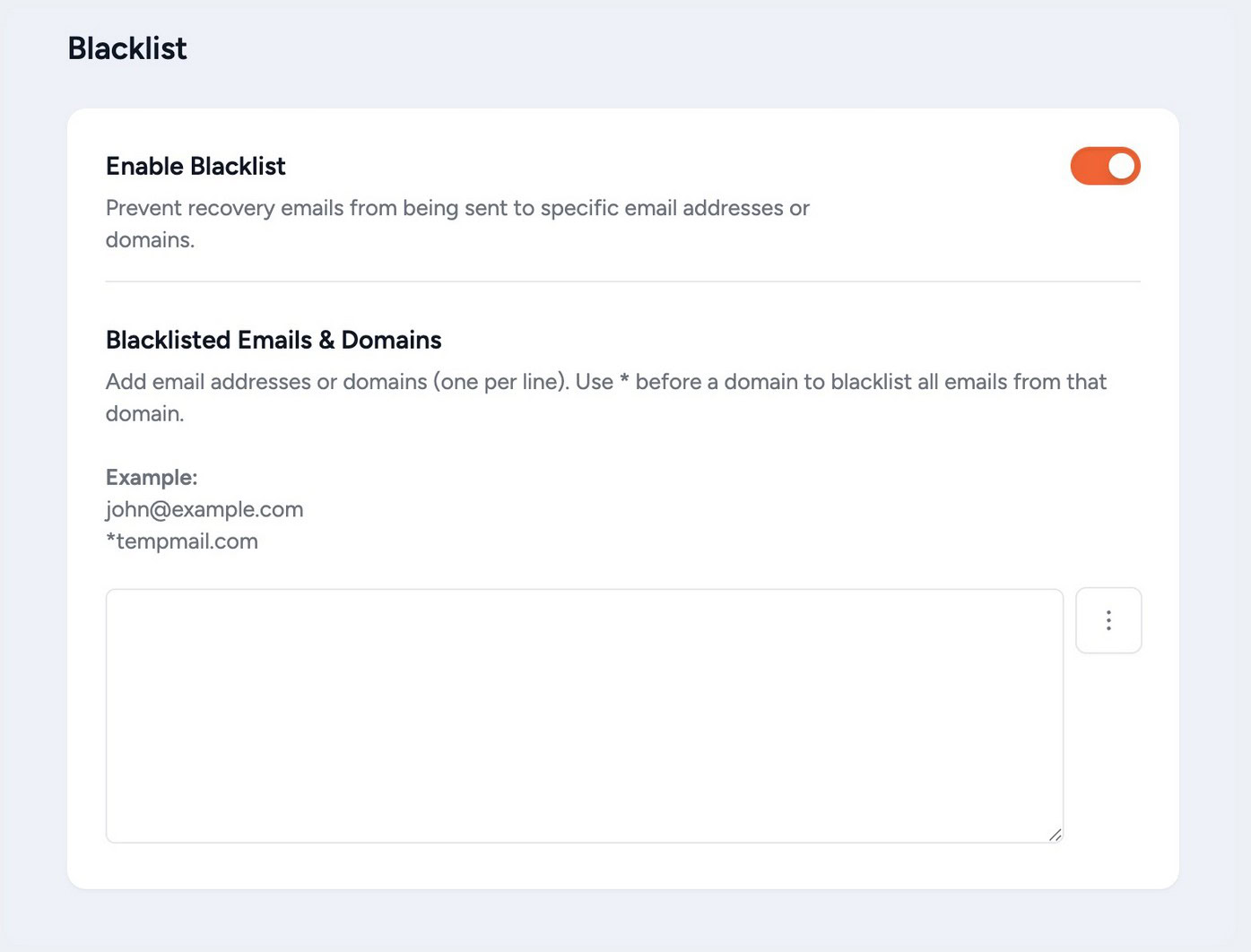
Added in v1.2.0. Pro includes controls to validate and blacklist specific email domains and individual addresses from the recovery system.
The practical value here is keeping your abandoned cart list clean. Exclude disposable email domains (mailinator.com, guerrillamail.com) that clog the queue with addresses that will never convert, block known spam patterns and prevent internal team emails from triggering sequences.
Recovery stats stay accurate. Sequence sends go to real shoppers.
14. Guided Onboarding and Plugin Rollback (Free)
Most recovery plugins leave new users on a blank settings page with no guidance on what to configure first. Cart Abandonment Recovery doesn’t.
Guided onboarding (added v2.0.5): A step-by-step onboarding flow launches on first activation and walks you through creating your first recovery sequence. You can have a live sequence running before the onboarding is done.
For a plugin where the first hour of setup directly affects revenue, that matters.
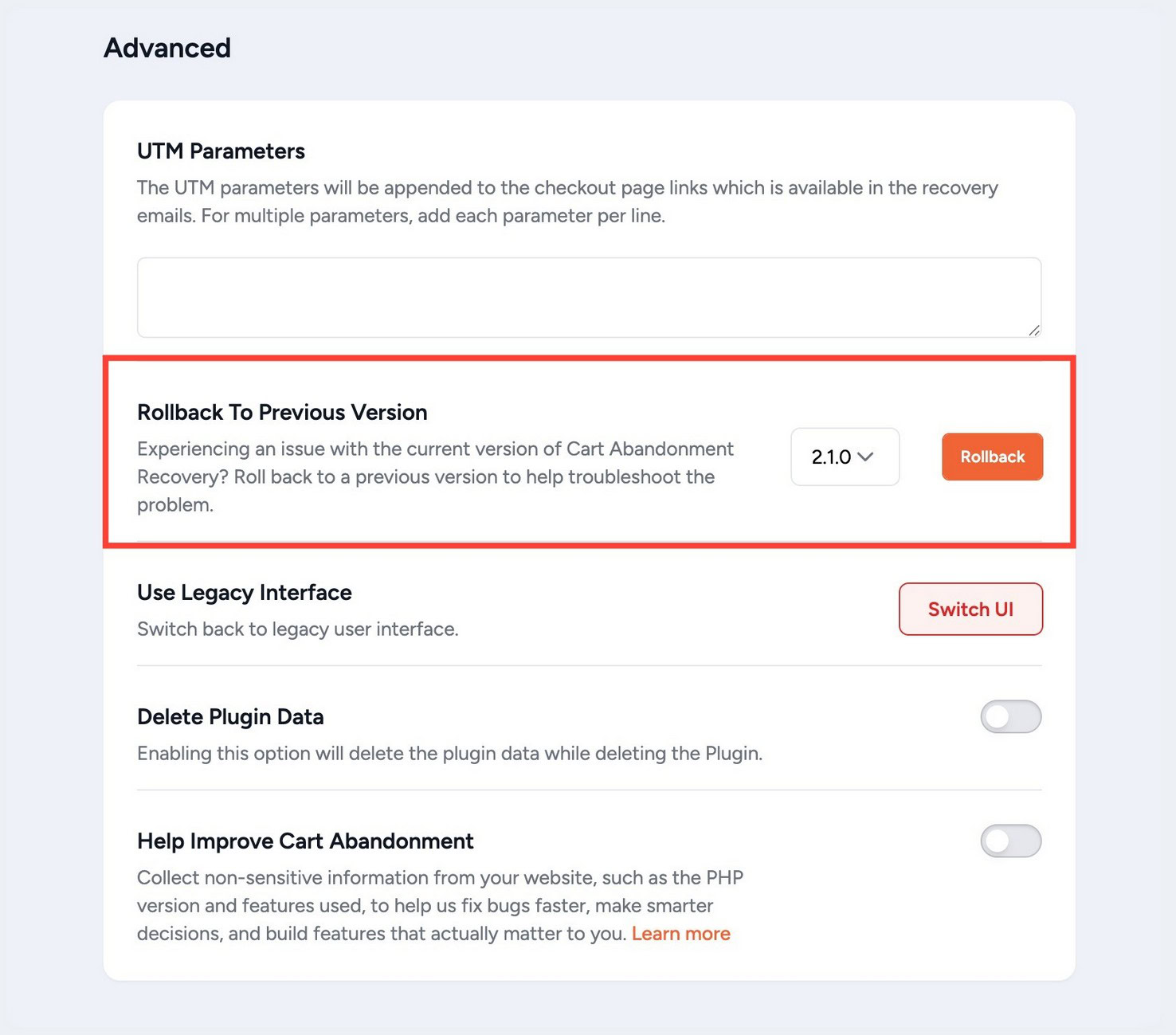
Plugin rollback (added v2.0.6): If an update causes unexpected issues, you can safely roll back to a previous version from the WordPress admin.
I think this is a smart addition for any store running automated sequences. The last thing you want is an update silently breaking a recovery email that was generating revenue every week.
How To Set Up Your First Recovery Sequence (Step-by-Step)
Here’s how to send your first abandoned cart recovery email in under five minutes using the free version.
Step 1: Install and activate
Search for “Cart Abandonment Recovery” in Plugins > Add New, install the plugin by Brainstorm Force and activate.
The guided onboarding launches automatically on first activation.
Step 2: Review the default email templates
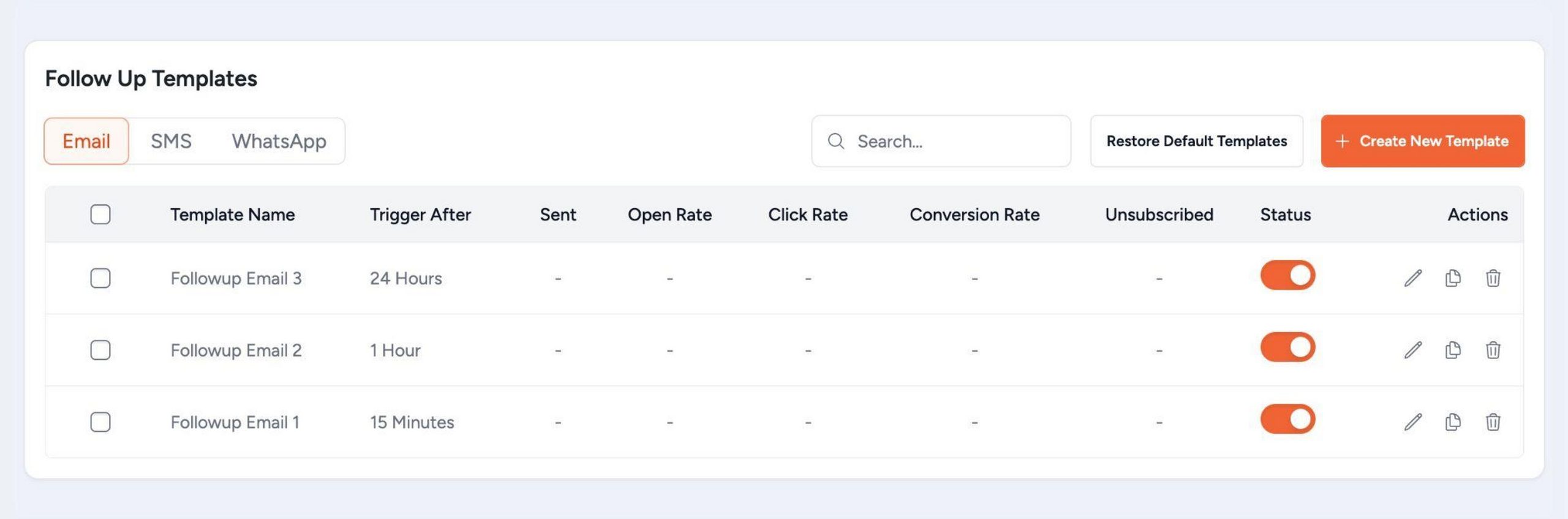
Go to Cart Abandonment > Follow Up Emails. Three templates are pre-configured, a 15-minute reminder, a 1-hour follow-up and a 24-hour final reminder.
Review and customize the copy to match your brand.
Step 3: Customize timing and copy
Click Edit on any template to adjust the send delay, subject line and email body. Add shortcodes for personalization – {{customer.firstname}}, {{product_names}}, {{cart.total}}, {{cart_restore_link}}.
Step 4: Enable a coupon code (optional)
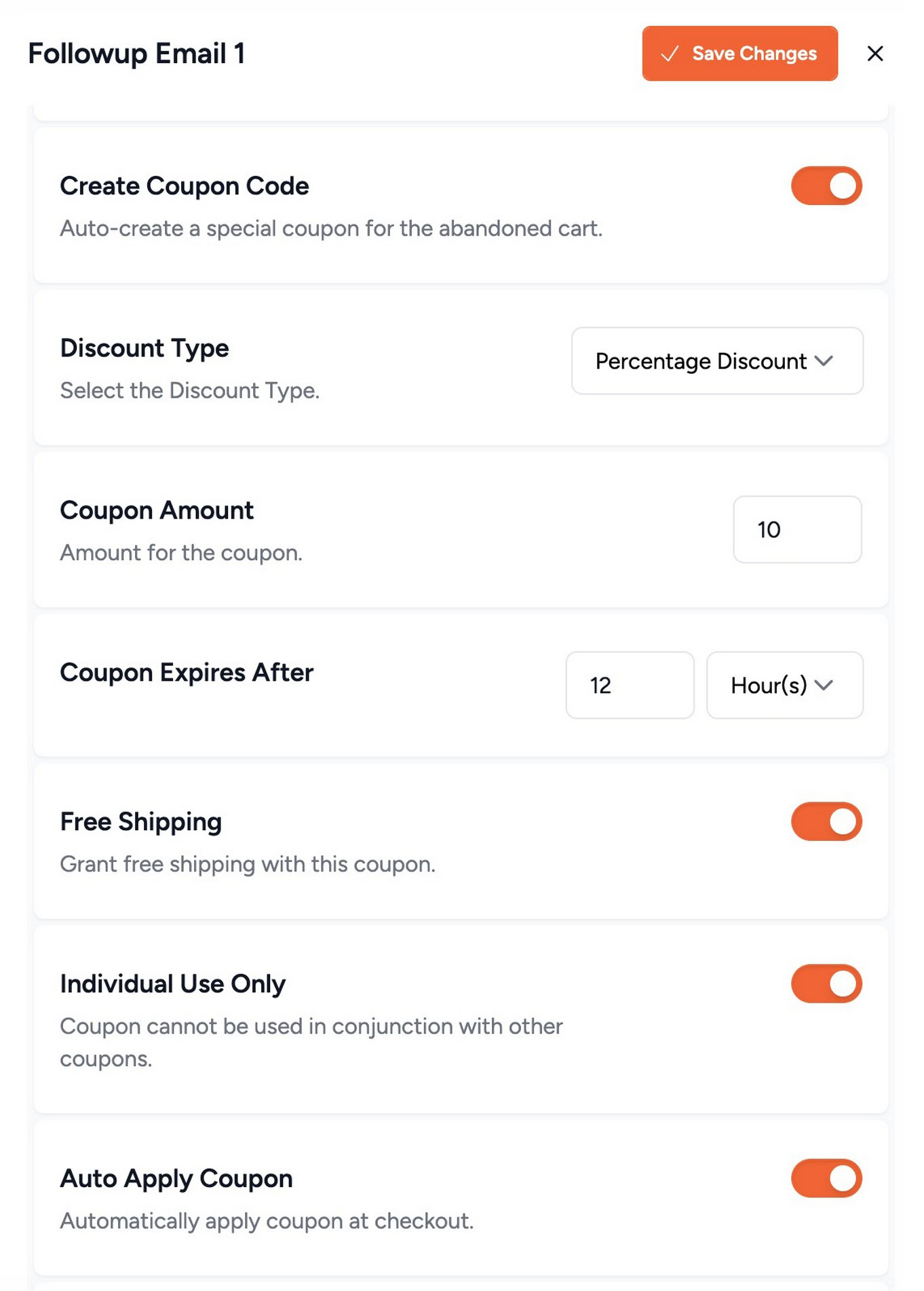
To include a discount in one of your emails, go to the coupon settings, enable auto-generate, set the discount amount and link it to the chosen email in the sequence.
Step 5: Check general settings
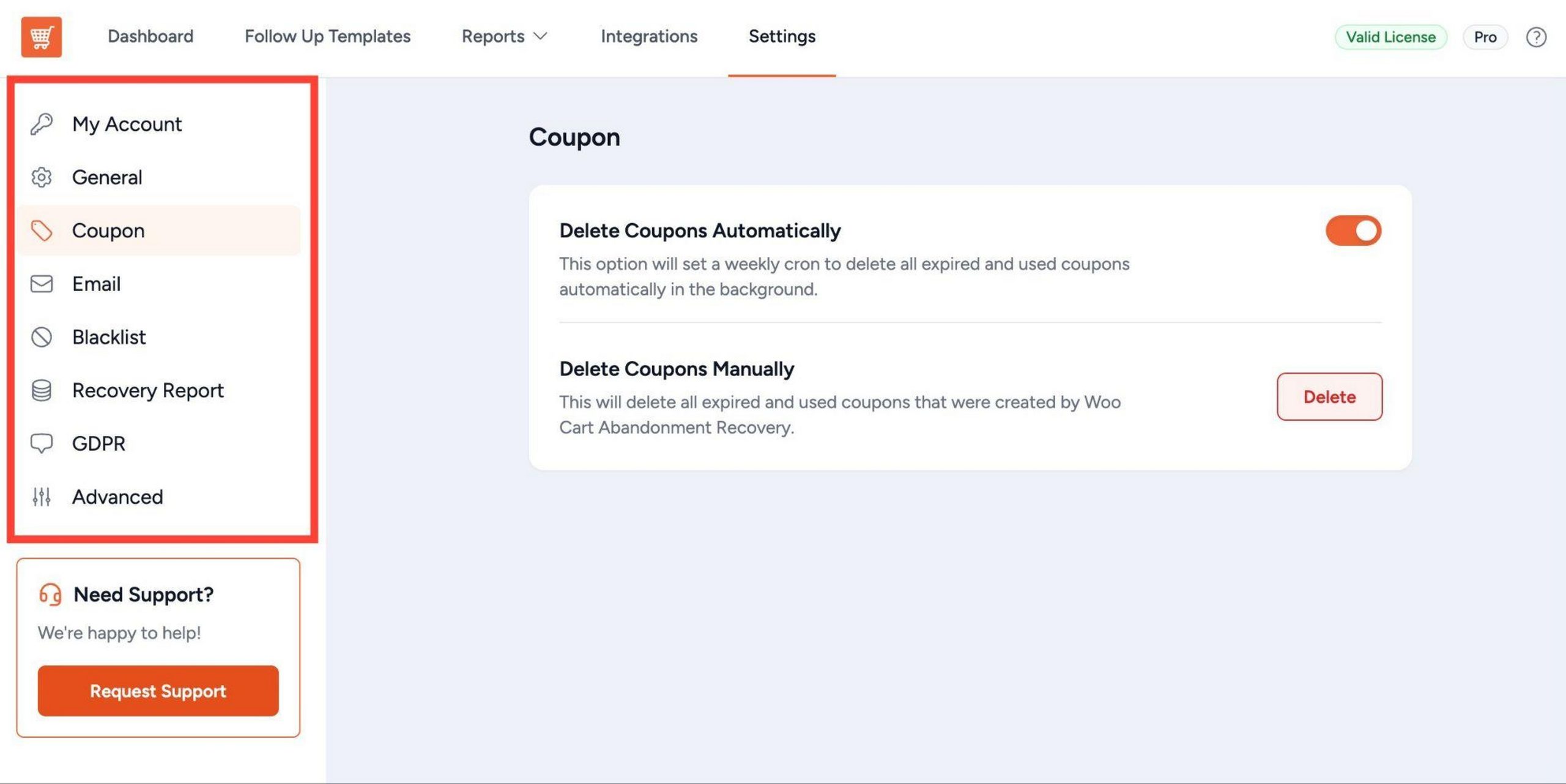
Go to Cart Abandonment > Settings. Confirm the lost cart cutoff time, enable the GDPR checkbox if required and exclude any user roles from tracking.
Your recovery sequence is now live. Every abandoned cart with a captured email triggers the sequence automatically.
Deliverability note: For stores processing higher email volume, a transactional email service like Postmark or SendGrid will improve deliverability over default WordPress mail.
It’s not required to get started, but worth setting up once you’re seeing consistent recovery volume.
Cart Abandonment Recovery Pro – Use Cases by Goal
The recovery sequence does most of the work once it’s configured. These use cases show where the Pro-specific features earn their keep.
Recover first-hour abandonments automatically
The highest-converting window is the first 60 minutes. Set your first email to send 15 minutes after abandonment and your second at 1 hour.
The 1-click restore link makes returning frictionless. Most stores see the majority of recoveries from here.
If your store has 100 abandoned carts per month at an average cart value of $60, an 8% recovery rate brings back $480 in otherwise lost revenue.
As Cart Abandonment Recovery Pro costs just $8.25 a month, it’s a no-brainer.
Convert fence-sitters with a time-limited coupon
Not every abandonment is about forgetting. Some shoppers leave because the price feels slightly too high.
Set your third recovery email (24 hours post-abandonment) to include an auto-generated coupon with a 48-hour expiry.
Pro’s rule engine lets you trigger the coupon for carts above a minimum value, so you’re not discounting every $10 cart.
Reach mobile-first customers via SMS and WhatsApp
If a meaningful portion of your traffic comes from mobile, SMS and WhatsApp recovery are worth enabling.
A recovery message 2-3 hours after abandonment reaches shoppers on the lock screen, in a messaging app, where they’re already active. Both channels are live in Pro.
Identify which products need attention
Pro’s product reports show which products are abandoned most frequently. If your $89 wireless headphones appear in 30 abandoned carts this month but only 2 are recovered, that’s a signal worth investigating before your next promotion.
A pricing issue, a missing product image, or a confusing variant setup could be behind it. Recovery data becomes diagnostic data and I think that’s an underrated use for the reporting.
Automate post-recovery follow-up via OttoKit
Once OttoKit is connected, a recovered cart becomes a trigger for a broader automation. Tag the customer in your CRM, add them to a post-purchase sequence, send a Slack alert for high-value orders, or pass the data to a loyalty program.
Cart Abandonment Recovery Free vs. Pro – What Do You Actually Need?
The free version is a genuinely complete tool, three email templates, cart restore links, basic reports and unlimited follow-up emails.
Here’s the full picture of what’s at each level.
| Feature | Free | Pro |
|---|---|---|
| Unlimited follow-up emails | ✅ | ✅ |
| Preset email templates (3) | ✅ | ✅ |
| 1-click cart restore links | ✅ | ✅ |
| Schedule emails | ✅ | ✅ |
| Dynamic shortcode support | ✅ | ✅ |
| GDPR consent checkbox | ✅ | ✅ |
| Out-of-stock warning emails | ✅ | ✅ |
| Basic email reports | ✅ | ✅ |
| Guided onboarding | ✅ | ✅ |
| Plugin rollback | ✅ | ✅ |
| Lost cart timing setting | ✅ | ✅ |
| Disable tracking for specific user roles | ✅ | ✅ |
| Exclude email for specific order status | ✅ | ✅ |
| Manually created coupons | ✅ | ✅ |
| Auto-generate coupons | ❌ | ✅ |
| Auto-delete coupons | ❌ | ✅ |
| Email insights (open rate, click rate, unsubscribes) | ❌ | ✅ |
| Product reports with date filter | ❌ | ✅ |
| Admin recovery reports | ❌ | ✅ |
| Smart rule engine | ❌ | ✅ |
| SMS recovery (Twilio) | ❌ | ✅ |
| SMS Template KPIs | ❌ | ✅ |
| WhatsApp follow-up sequences | ❌ | ✅ |
| Domain and email validation | ❌ | ✅ |
| OttoKit integration | ❌ | ✅ |
| Webhooks | ❌ | ✅ |
| Real-time admin notifications | ❌ | Coming soon |
| Sites | Unlimited | 3 Annual / 3 Lifetime |
| Support | Community | Priority |
| Regular updates | ✅ | ✅ |
Here is the full Cart Abandonment Recovery Free vs. Pro comparison.
Who should stick with the free version?
If you run a small store with modest traffic and need basic automated recovery emails without multi-channel follow-up or advanced reporting, the free version covers it.
It ships with three templates, supports custom coupons and runs automatically once set up. Start here, see what you recover and upgrade when the data shows you’re leaving money on the table.
Who should upgrade to Pro?
Pro is the right move when you want SMS and WhatsApp alongside email, need the rule engine to control which carts trigger which sequences, want per-email performance data to optimize your templates, or manage recovery across multiple stores.
The coupon automation alone, auto-generating and auto-deleting unique per-cart codes, saves significant manual work for stores running active campaigns.
Cart Abandonment Recovery Pro Pricing 2026
There are two paid plans, both backed by a 14-day money-back guarantee and regular product updates.
| Plan | Price | Sites | What’s Included |
|---|---|---|---|
| Annual | $99/year | 3 | All Pro features: unlimited emails, SMS, WhatsApp, smart rule engine, coupon automation, email insights, product reports, OttoKit integration, webhooks, priority support, 14-day guarantee |
| Lifetime | $279 one-time | 3 | Everything in Annual, lifetime updates, no renewal |
Annual ($99/year) – My take:
Start here if you run a single store and want to test whether Pro’s SMS, WhatsApp and rule engine improve your recovery rate over the free version.
For any store doing 50+ orders a month, recovering even 5-10% of abandoned carts will cover this cost within a couple months.
Lifetime ($279 one-time) – My take:
At $279 for 3 sites, this is the clear choice for agencies or anyone managing multiple WooCommerce stores. Three years of Annual is $387, five years is $645. Lifetime is $279 and covers three times as many sites, locked in at today’s price.
You can upgrade from Annual to Lifetime at any time by paying the difference.
Plus the 14-day money-back guarantee. No questions asked.
When To Pick Cart Abandonment Recovery Pro
Cart Abandonment Recovery Pro makes sense if you:
- Run a WooCommerce store with no automated cart recovery system in place
- Are losing sales to checkout abandonment with no way to follow up
- Want multi-channel recovery with email, SMS and WhatsApp
- Need the rule engine to control coupon timing and cart value thresholds
- Want per-email and per-product reporting to optimize sequences
- Already use CartFlows or Power Coupons
- Manage multiple WooCommerce stores (Annual covers 10, Lifetime covers 30)
Cart Abandonment Recovery Pro doesn’t make sense if you:
- Don’t use WooCommerce
- Have very low order volume where manual follow-up is still practical
- Need a full email marketing platform as your primary tool (OttoKit handles that instead)
- Want plug-and-play SMS with no third-party accounts required (Twilio account is needed)
- Prefer a plugin with a longer third-party review history before adopting
No long-term commitment required. Upgrade or cancel anytime.
Start Recovering Lost Sales – Try Cart Abandonment Recovery Pro Risk-Free for 14 Days
Cart Abandonment Recovery Alternatives
Klaviyo
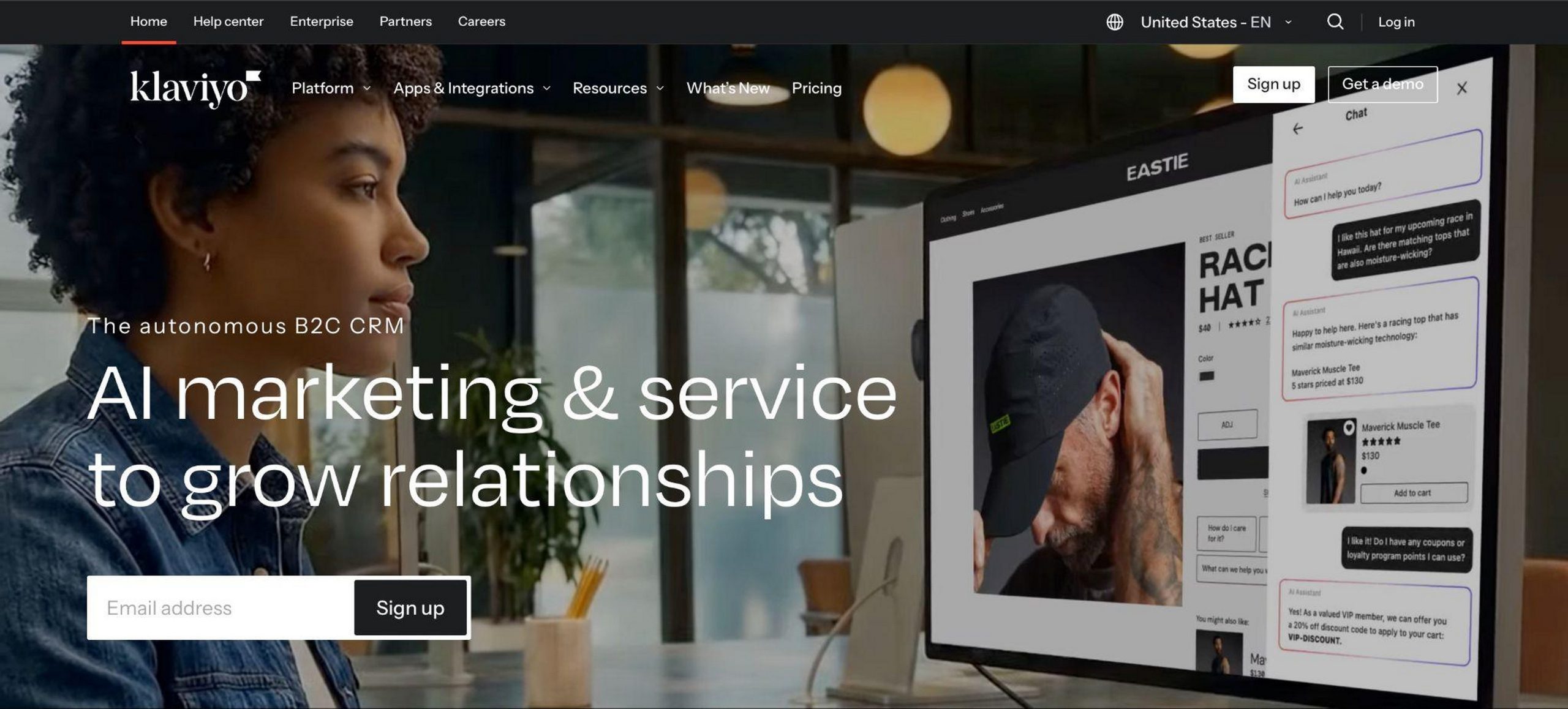
The most widely used email marketing and recovery platform for eCommerce. Captures abandoned carts, sends automated sequences, and integrates with essentially every eCommerce platform.
More powerful for complex segmentation than Cart Abandonment Recovery Pro, but significantly more expensive and with a steeper setup curve.
Where Klaviyo wins:
- Industry-leading segmentation and behavioral email triggers
- Deep analytics and A/B testing across all emails
- Large template library and extensive third-party integrations
- Works across multiple eCommerce platforms
Where Cart Abandonment Recovery Pro wins:
- Built specifically for WooCommerce, no integration overhead
- Significantly lower cost, especially for smaller stores
- No per-contact pricing, so cost doesn’t scale with list size
- SMS and WhatsApp recovery built in natively
- Simpler setup, live in minutes rather than hours
Pricing: Free plan up to 250 contacts, then $20+/month scaling with contact count.
WooCommerce Follow-Ups (WooCommerce.com)
The official WooCommerce extension for follow-up emails. Covers abandoned cart recovery alongside post-purchase follow-ups.
Where WooCommerce Follow-Ups wins:
- Official WooCommerce product with direct platform support
- Covers post-purchase follow-ups alongside abandonment recovery
- Trusted within the WooCommerce ecosystem
Where Cart Abandonment Recovery Pro wins:
- Lower cost per year
- SMS and WhatsApp recovery channels included
- More granular rule engine for coupon and sequence logic
- OttoKit integration for extending into broader automation workflows
- More active recent update cadence
Pricing: $99/year for a single site.
Retainful
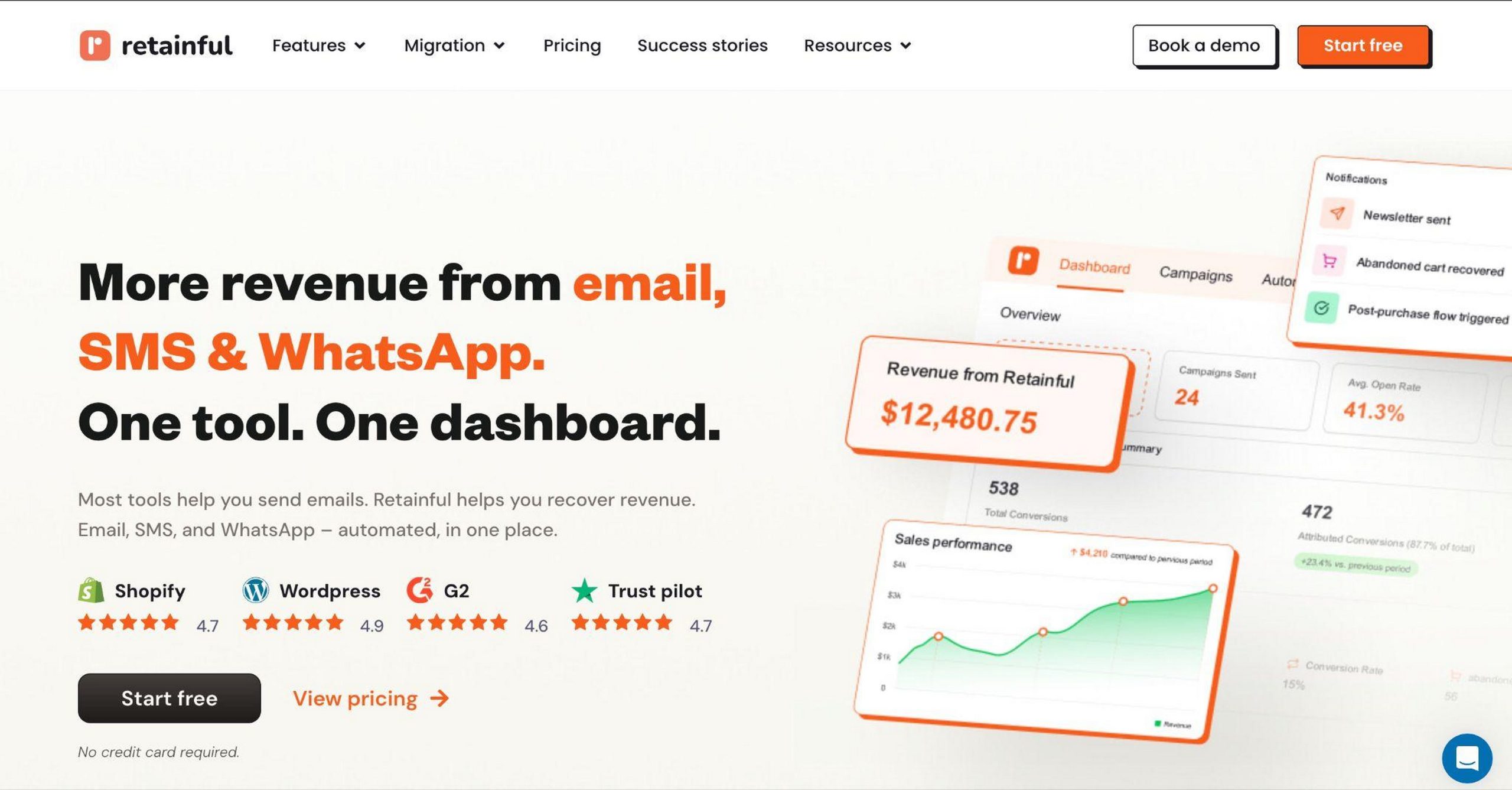
A dedicated WooCommerce cart abandonment and email marketing tool. Includes cart recovery, post-purchase emails, and referral campaigns.
Where Retainful wins:
- Includes referral program and post-purchase email marketing
- Visual workflow builder for multi-step sequences
- Built-in email marketing features beyond recovery
Where Cart Abandonment Recovery Pro wins:
- Lower entry price for pure cart recovery
- SMS and WhatsApp recovery built in
- OttoKit integration for connecting to external tools
- Better fit for stores wanting dedicated recovery without full email marketing overhead
Pricing: Free plan (limited), $19+/month for Pro features.
Native WooCommerce (No Plugin)
WooCommerce has no built-in cart abandonment recovery. If a shopper leaves without completing checkout, there is no follow-up, no email capture and no recovery of any kind.
Any store with meaningful traffic and no recovery plugin is leaving a predictable percentage of revenue on the table. The free version of Cart Abandonment Recovery solves this at zero cost.
Pricing: Free (included with WooCommerce), but recovers nothing.
My overall take on the alternatives:
- Cart Abandonment Recovery Pro is the right choice if you want a WooCommerce-native recovery tool that covers email, SMS, and WhatsApp without per-contact pricing.
- Klaviyo is the better choice if you need full email marketing capabilities and your store is growing into complex segmentation.
- Retainful is worth considering if you want post-purchase and referral features alongside recovery in one tool.
- WooCommerce Follow-Ups is a reasonable option if you want an official WooCommerce product and post-purchase emails matter as much as recovery.
Overall, I think Cart Abandonment Recovery Pro is worth a serious look if your store is doing real volume and you don’t have a recovery system in place.
Most stores that install it wonder why they waited.
Frequently Asked Questions
When does the plugin start capturing abandoned carts?
The moment a shopper types their email into the checkout form, not when they submit it. The email is captured keystroke by keystroke, so even a partial checkout is recoverable.
What happens if a customer completes their order before the recovery sequence ends?
The sequence stops automatically. Smart order tracking detects the completed purchase and cancels any unsent recovery emails.
Can I use Cart Abandonment Recovery with CartFlows?
Yes. Both are built by the same team and work together. CartFlows handles the checkout funnel experience. Cart Abandonment Recovery handles what happens when someone leaves without completing it, different stages of the same journey. See our CartFlows review.
How is Cart Abandonment Recovery different from Power Coupons?
Different problems. Power Coupons works during the active shopping session, auto-applying discounts to keep shoppers converting. Cart Abandonment Recovery works after they leave, sending follow-up emails, SMS, and WhatsApp messages to bring them back. See our Power Coupons Pro review.
Do I need a third-party email service to send recovery emails?
No. The plugin sends emails from WordPress using your existing email configuration. For better deliverability at high volumes, a transactional email service like Postmark or SendGrid is recommended but not required.
Does Cart Abandonment Recovery support SMS?
Yes, in Pro. SMS recovery messages are sent via Twilio integration. A separate Twilio account is required for SMS sending.
Does Cart Abandonment Recovery support WhatsApp?
Yes. WhatsApp follow-up sequences are live in Pro as of v1.2.0. They run alongside email and SMS from the same follow-up interface.
Can I include discount coupons in recovery emails?
Yes. The free version supports manually created coupons. Pro auto-generates unique, per-cart, time-limited coupons and auto-deletes them when unused or expired.
Is the plugin GDPR compliant?
Yes. A GDPR consent checkbox can be enabled on the checkout page so customers explicitly consent before their email is captured.
Can I connect the plugin to my CRM or marketing tools?
Pro supports webhooks for connecting to any tool that accepts webhook payloads. OttoKit integration extends this further, connecting to 1,000+ apps including Mailchimp, ActiveCampaign, HubSpot, and more.
How many sites can I use Cart Abandonment Recovery Pro on?
The Annual plan supports 10 sites. The Lifetime plan supports 30 sites.
Can I upgrade from Annual to Lifetime later?
Yes. Upgrade at any time by paying the difference. All settings and data remain intact.
What is the best timing for recovery emails?
The highest-converting window is within the first 1-3 hours of abandonment. A 15-minute email captures shoppers who were simply distracted. A 1-hour email reaches those who stepped away. A 24-hour email with a coupon catches the deliberate, price-sensitive shopper.
If you’re also looking to reduce abandonment before it happens, keeping shoppers engaged at the cart before they leave, check out our Modern Cart review.
Start Recovering Lost Sales – Try Cart Abandonment Recovery Pro Risk-Free for 14 Days