





Modern Cart Overview
If you could watch a customer browsing Amazon, you would probably see them add something to their cart and keep shopping before checking out with extra items they probably didn’t mean to buy.
Now watch that same customer in a typical WooCommerce store. They add an item and are immediately redirected to a checkout page, and typically have a choice between buying or leaving.
Most choose to leave.
The difference between the two experiences?
Amazon keeps customers in “discovery mode” that lets them continue shopping.
Most WooCommerce stores tend to skip discovery by pushing customers into “transaction mode” and sending them directly to checkout.
Modern Cart fixes this by bringing Amazon’s cart psychology to WooCommerce.
Here’s our unfiltered take on the plugin so you can decide if you should consider it.
Quick facts about Modern Cart
- Investment range: $70-$249/year
- Setup time: Under 30 minutes
- ROI timeline: 30-60 days for active stores
- Company: CartFlows (Brainstorm Force)
Modern Cart is designed to improve one of the most critical moments in WooCommerce stores: the cart experience.
As described by the CartFlows team, Modern Cart gives WooCommerce stores a modern, conversion-optimized cart experience that reduces friction and boosts average order value. Instead of relying on a basic cart page, it keeps shoppers engaged and moving toward checkout with fewer interruptions.
This positioning helps explain not just what Modern Cart does, but why upgrading the cart experience can have a direct impact on conversions.
After testing Modern Cart for several months across different store types, here’s our honest assessment:
Modern Cart Performance
Ease of implementation: 8/10
Install, activate, done. No configuration wizards or complex setup.
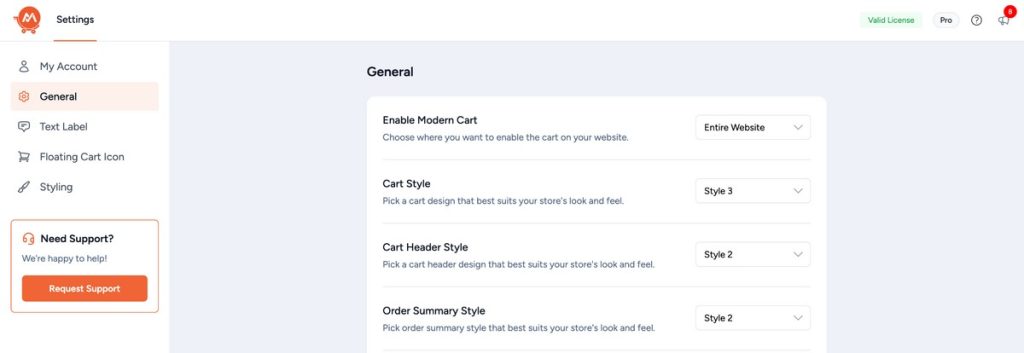
The plugin works immediately after activation without touching your existing WooCommerce settings.
Even non-technical store owners can have this running in minutes.
Revenue Impact: 8/10
Our testing shows 15-25% improvements in cart completion rates across different store types.
For stores processing 100+ orders a month, you should see ROI within the first billing cycle. That impact becomes more pronounced with higher traffic volumes.
Technical Stability: 8/10
The CartFlows team provides professional support with 24-hour response times.
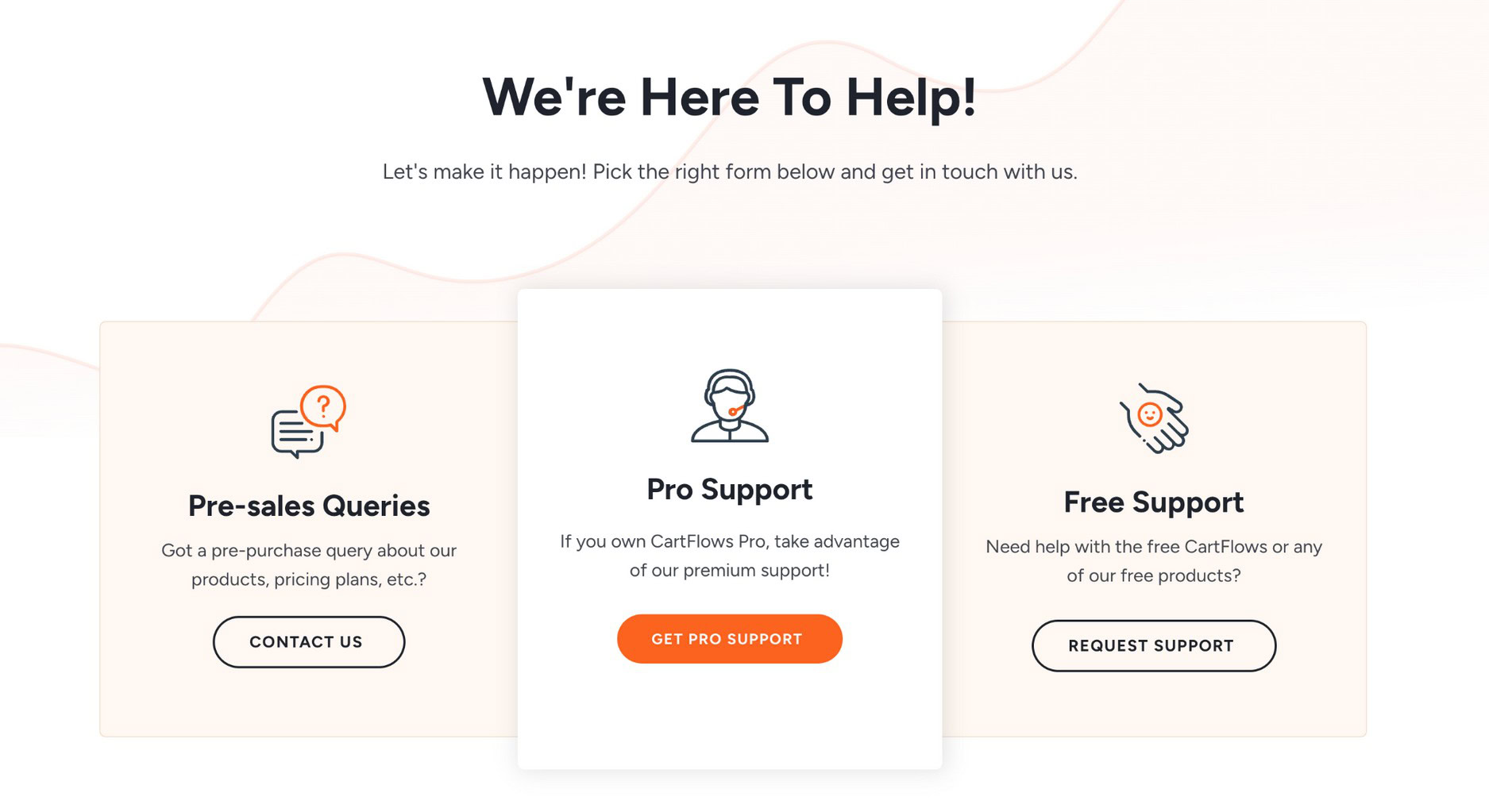
While the plugin is still new, it’s well-built and has no known compatibility issues. Support is still there if you need it though.
Modern Cart Pros
Let’s start with what Modern Cart does really well:
- Getting started is simple. Modern Cart installs like any standard WordPress plugin and works out of the box with WooCommerce. There’s no complex configuration or heavy setup required, which makes it easy to see the cart experience live almost immediately.
- It looks modern by default. The slide-out cart interface feels clean and intentional, instantly upgrading the default WooCommerce cart without changing your theme or checkout flow. It helps stores avoid the generic cart experience many WooCommerce sites still use.
- The mobile experience is strong. The cart behaves smoothly on smaller screens and feels natural to use, which is important given how much eCommerce traffic comes from mobile devices today.
- Performance impact is minimal. The cart loads only when a shopper interacts with it, so it doesn’t add unnecessary weight to regular page loads or browsing sessions.
- It includes the essentials without bloat. Features like product recommendations, a free shipping progress bar, and in-cart coupon handling focus on improving conversions rather than adding unnecessary extras.
- The product is actively maintained. Ongoing updates and a clear roadmap, including additional cart styles planned for the future, show that Modern Cart is being developed with long-term use in mind.
Modern Cart Cons
Now for the not-so-great parts:
- Customization depth has limits. While Modern Cart offers styling and label controls that work well for most stores, users looking for highly bespoke or layout-level customization may find the options more constrained than full custom-built solutions.
Modern Cart is new, so these pros may be addressed in future versions.
What Is Modern Cart?
Most WooCommerce store owners know cart abandonment is a problem. But over 70% of online shopping carts are abandoned before purchase.
Modern Cart is CartFlows’ solution to improve the WooCommerce cart experience and help reduce cart abandonment.
It works by keeping prospects in “shopping/discovery mode” until they’re ready to buy.
Instead of sending them straight to a separate cart page (like WooCommerce does by default), Modern Cart creates a slide-out cart that appears on any page.
This means customers aren’t rushed to the checkout page in case they change their mind.
Instead, they have the time and space to continue browsing and perhaps buy more than they originally planned.
Think of it as bringing the Amazon cart experience to your WooCommerce store.

Customers can add items, see recommendations, apply coupons, and even check out without leaving the page they’re browsing.
Modern Cart does one thing really well. It makes your cart experience feel modern and keeps customers engaged.
Who Is Modern Cart For?
Modern Cart works best for:
- Small to medium-sized stores looking to improve the cart experience without hiring developers. If you’re doing $100-$10K per month in sales and want professional cart functionality, this fits perfectly.
- Store owners who want results without complexity. If you’ve looked at other cart plugins and felt overwhelmed by the options and settings, Modern Cart’s simplicity will appeal.
- Mobile-focused businesses. Since the mobile experience is so well-executed, stores that see heavy mobile traffic will benefit most.
- Stores with average order values between $50-$200. The product recommendation and free shipping features work best in this range where customers might add additional items.
- Non-technical store owners. You don’t need to understand code or complex conversion optimization principles. Modern Cart does all that for you.
It’s probably not ideal for large enterprises needing extensive customization, or businesses that need comprehensive funnel-building capabilities.
For everyone else, it’s a solid bet.
Features That Make It Unique
You’ll find other products on the market promising cart optimization for WooCommerce, but Modern Cart does it differently.
1. Slide-Out Cart Interface
The core feature is the slide-out cart that appears from the side of the page.
Instead of sending customers straight to checkout, items are added to a sliding panel that doesn’t interrupt browsing.
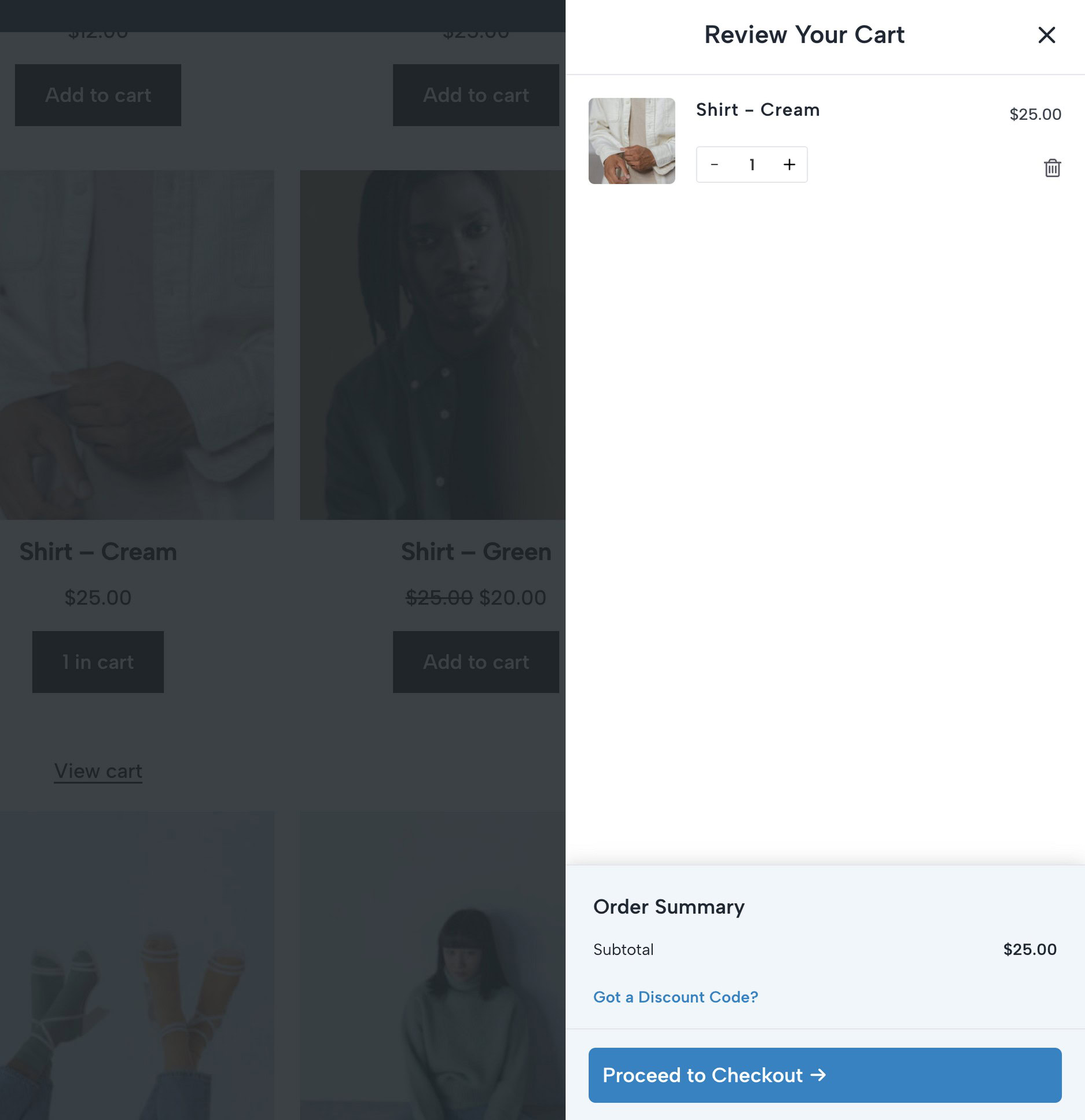
The interface is designed to keep customers shopping rather than forcing them into checkout right away.
They can continue browsing products while their cart remains easily accessible.
The animation is smooth, the design is clean, and it works consistently across different devices. Most importantly, it doesn’t feel jarring or disruptive.
2. Cart Style Options
Modern Cart is built around a smooth slide-out cart experience, but CartFlows has confirmed that additional cart styles are part of the product roadmap.
In addition to the existing slide-out cart, the team has introduced new styling options:
- Popup Cart: A centered cart overlay that brings focus to the cart and checkout action.
- Floating Cart: A persistent cart indicator that stays visible as shoppers browse the store.
These upcoming cart styles give store owners more flexibility in how they present the cart experience, depending on their store layout, audience behavior, and conversion goals.
3. Popup & Floating Cart Status
At the time of this review, Modern Cart’s primary cart experience is the slide-out cart.
Popup cart and floating cart options are part of the official product roadmap and are marked as upcoming features. These styles are not available by default yet, but are planned to give store owners additional flexibility in how the cart is presented.
If you need a polished slide-out cart experience today, Modern Cart delivers that out of the box, with more cart display options expected in future updates.
4. Cart Styling & Visual Customization
Modern Cart also provides built-in styling controls that let store owners visually align the cart with their brand.
From the settings, you can customize elements such as cart colors, fonts, width, and animation behavior. This makes it easy to match the cart design with your theme without relying on custom CSS or developer help.
For creators and agencies, these options are especially useful when showcasing before-and-after improvements or building branded shopping experiences for clients.
5. Cart Labels & Text Customization
Modern Cart also allows store owners to customize the text and labels used inside the cart interface.
This includes elements like the checkout button text, free shipping progress bar messaging, empty cart messages, and other cart labels. All changes can be made directly from the settings without writing any code.
This level of control is helpful for improving clarity, matching brand voice, or testing different messaging to guide customers toward checkout.
6. Product Recommendations
Modern Cart also offers a simple product recommendations feature.
Go to settings and select the option that’s most relevant from the “Increase AOV with Product Recommendations” dropdown.
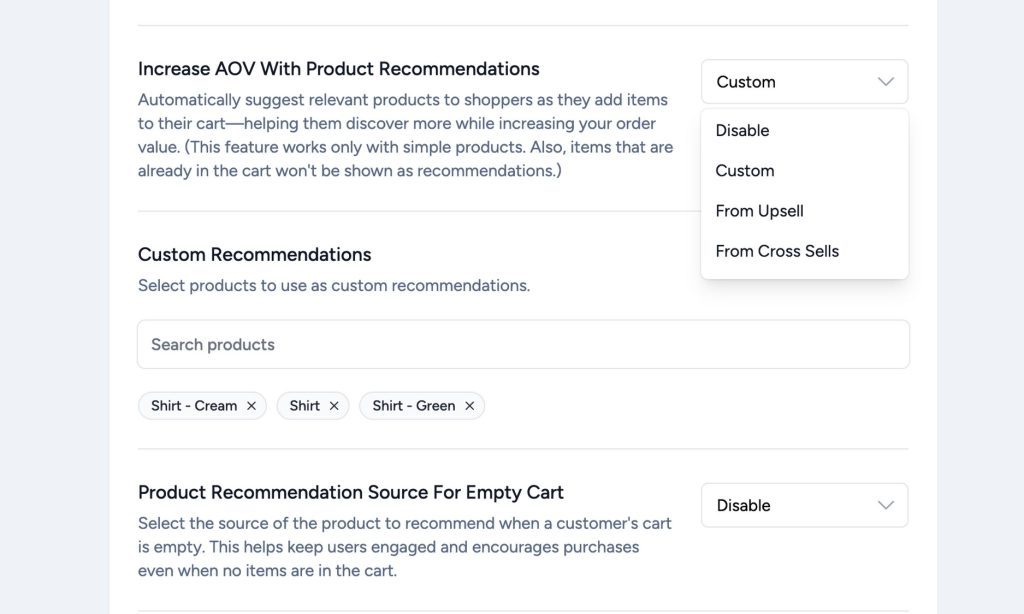
You can either display a custom set of products, upsells, or cross-sells you’ve already configured in WooCommerce.
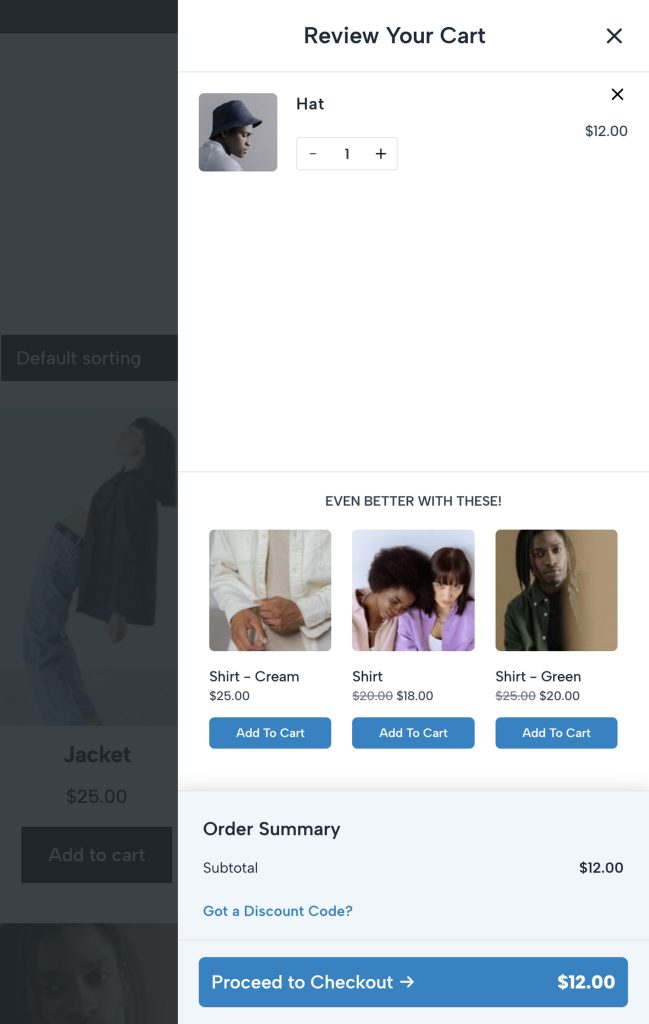
The feature is simple, but smart enough to exclude items already in the cart.
This prevents the awkward situation where customers see suggestions for products they’ve already added.
7. Free Shipping Progress Bar
The plugin includes a dynamic progress bar that shows customers how much more they need to spend to qualify for free shipping.
You can set free shipping thresholds from the WooCommerce shipping settings.
This feature taps into the psychology of “completing the set” and uses the most powerful word in eCommerce, ‘free’.
Both combine to drive additional purchases.
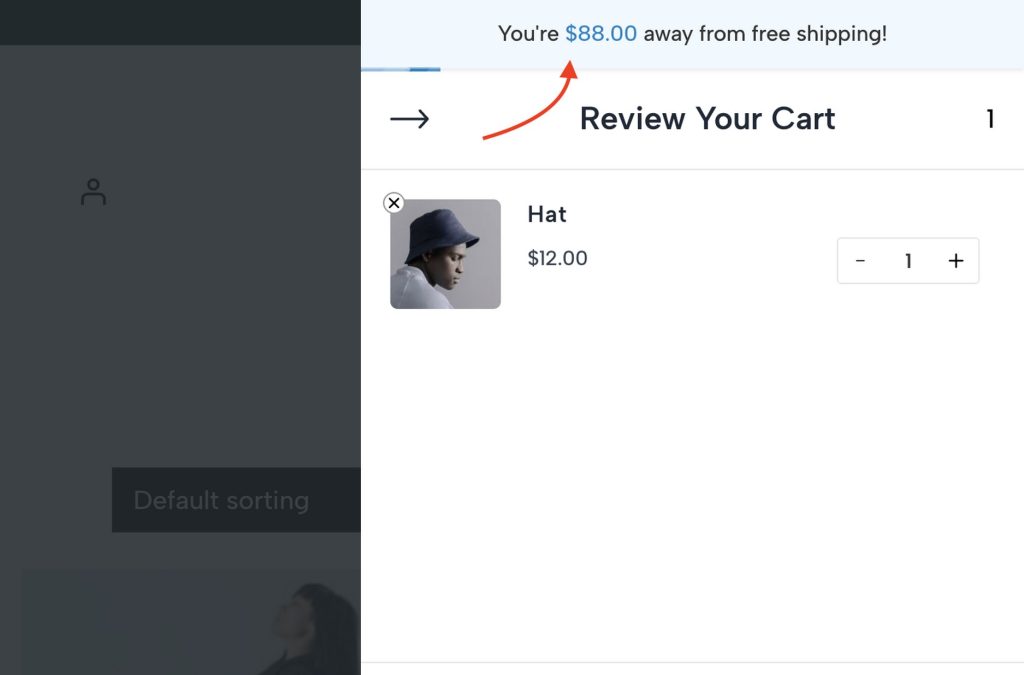
The progress bar updates in real-time as you add or remove items. The messaging is customizable so you can adjust it to match your brand voice.
This feature works particularly well for stores with free shipping thresholds as it provides a clear incentive for customers to buy more.
8. Seamless Coupon Handling
Applying discount codes is streamlined within the cart interface. Customers don’t need to navigate to a separate page or hunt for a coupon field as it’s prominently displayed and easy to use.
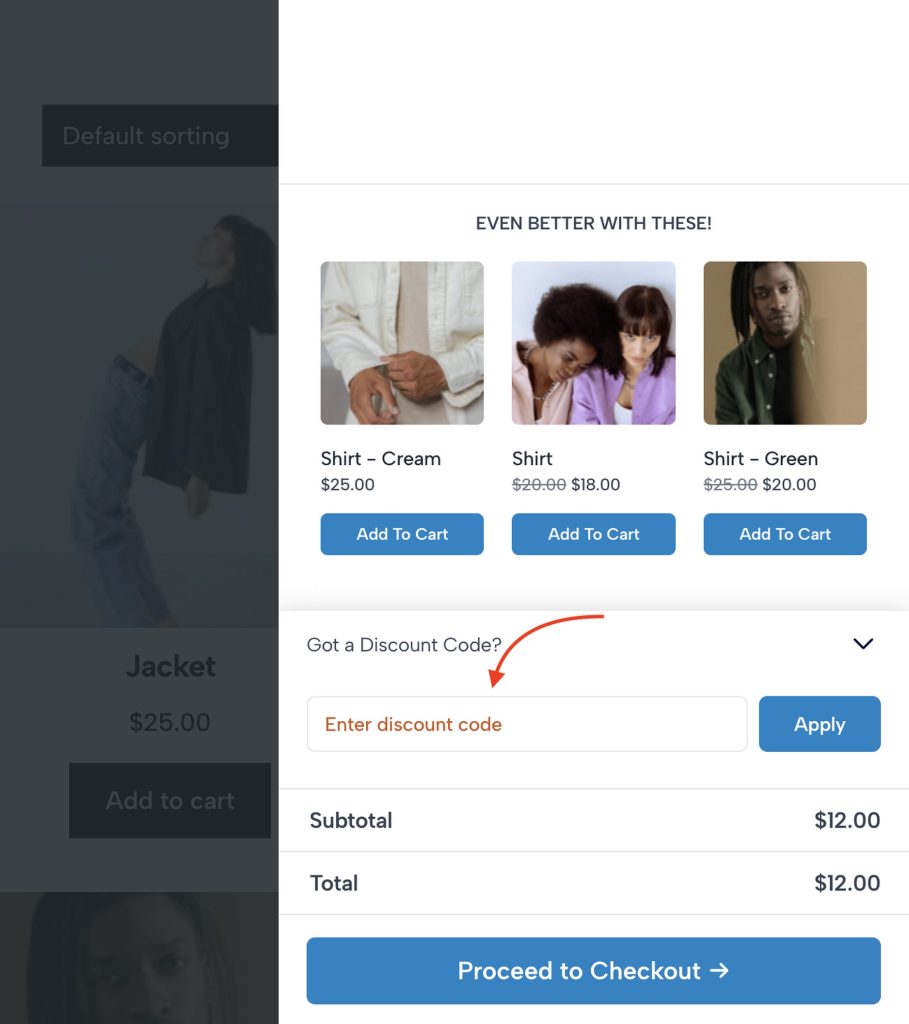
Coupon application happens via AJAX, so there are no page reloads or disruptions to the shopping experience.
Invalid coupons show clear error messages, and successful applications provide immediate feedback.
9. Mobile-First Design
The slide-out cart is also optimized for mobile devices with touch-friendly buttons and smooth animations.
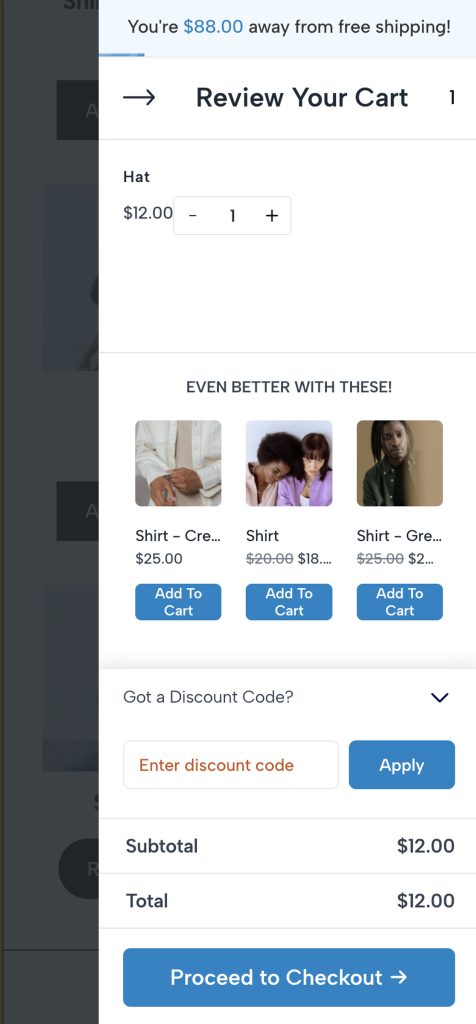
The cart interface adapts to different screen sizes without feeling cramped or difficult to navigate.
Buttons are properly sized for touch interaction and the sliding animation feels native to mobile browsing.
10. One-Click Setup
Getting started with Modern Cart is straightforward and beginner-friendly.
The plugin installs like any standard WordPress plugin and activates with a simple license step. Users also needs to install Modern Cart Starter, which helps enable the cart experience quickly using sensible defaults.
Once activated, Modern Cart works immediately with WooCommerce, allowing store owners and creators to start showcasing the slide-out cart experience without additional configuration.
For stores that want more control, customization options are available for cart styling, positioning, animations, and text labels.
Modern Cart Pricing
Modern Cart costs $79 per year, positioning it competitively between budget options and premium solutions.
The price includes:
- Plugin license for 10 sites
- 1 year of updates
- Customer support access
- 14-day money-back guarantee
The annual pricing model includes ongoing updates and support, which is important for staying compatible with WooCommerce updates.
The plugin also offers a lifetime option at $249, which includes all features and future updates.
Final Thoughts: Is Modern Cart Worth It?
We think Modern Cart succeeds in its mission to make WooCommerce cart experiences feel modern and professional, without overwhelming complexity.
Consider Modern Cart if:
- You want immediate improvement in the cart experience
- You prefer simple, effective solutions over complex systems
- Your store sees significant mobile traffic
- You’re comfortable with $79/year for cart optimization (that’s less than $7 a month)
- You want something that works out of the box
Look elsewhere if:
- You need extensive customization options
- You want comprehensive funnel building capabilities
- You have complex integration requirements
- You need advanced abandoned cart automation
For most small to medium WooCommerce stores, Modern Cart provides meaningful improvement without the headaches of more complex systems.
The pricing is fair, setup is simple, and the results are immediate. For those reasons alone, we thoroughly recommend it.
Modern Cart Coupon Discounts
Modern Cart is currently available at a default discounted price.
- Original price: $109/year
- Current price: $79/year
You can also get the lifetime version at a discounted price of $249 instead of $349.
Alternatives to Modern Cart
1. FunnelKit Cart
FunnelKit Cart offers more comprehensive funnel-building capabilities. It is better for stores wanting complete sales funnel control but requires more technical knowledge and setup time.
Modern Cart is simpler but less comprehensive.
Price: $99-399/year with significantly more complexity.
2. WooCommerce Fast Cart by Barn2
WooCommerce Fast Cart by Barn2 focuses on popup checkout rather than slide-out carts. It’s a solid alternative but lacks Modern Cart’s product recommendation features and costs more.
Price: $79/year
3. WPC Fly Cart
For stores wanting to test cart functionality before paying, the free version of WPC Fly Cart is worth trying. However, the premium features needed for serious conversion optimization require an upgrade to a paid plan.
Price: Free